

AMI BIOS BEEP CODES - No Graphics No POST
This is a long question for all technicians out there, and is deliberately detailed to save you having to ask for more spec. I need some qualified advice about a non-booting PC which sounds BIOS Beeps, but won't boot to POST (or at least I can't see if it does).
I've only awarded 45 points because I've given you such a full problem description :-) (Anyway, it's all I have).
My System:
==========
1. Intel Pentium 4 1.7 GHz mPGA-478 pin socket as boxed set fanned from motherboard connector as standard (ftp://download.intel.com/design/Pentium4/datashts/24988703.pdf)
2. Fully compatible Intel D845WN motherboard (with AGP 2x/4x slot) (ftp://download.intel.com/design/motherbd/wn/A6513601.pdf)
3. American Megatrends (Ami) BIOS as supplied
4. Enhance 300 watt ATX12V Pentium 4-compatible power supply
5. Onboard audio sound chip ADI 1885 enabled as standard
6. 512 MB fully compatible SimpleTech 168-pin 133 SDRAM as 2 matched modules (see near end of question)
7. GigaByte GA-GF 1280 rev 1.1 32MB nVidia GeForce2 AGP2x Graphics (http://ftp.gigabyte.com.tw/support/user_pdf/gv_gf1280%20_10_3.pdf)
8. Video out using standard cable to functional SVGA monitor
9. Maxtor DiamondMax Plus Ultra ATA 100 7200rpm 40GB HDD jumpered as Primary IDE Master/No Slave
10. Intel/Ambient PCI V90 56Kb fax modem
11. 2 motherboard-powered case fans
12. LiteOn 16x DVD player jumpered as Secondary IDE Master
13. Samsung 48 x 16 x 48 CD-RW jumpered as Secondary IDE Slave
14. Windows 98 SE
History:
========
System built from new retail components and booted to Win98 boot disk.
New drive hadn't been formatted and gave appropriate warnings.
Partitioned and formatted as FAT32 Primary active DOS partition and extended DOS partition split into 4 logical drives.
Booted to floppy and installed Windows98 successfully.
All hardware, usb ports, sound chip, and also drive data detected correctly. (No printer, scanner or additional peripherals added yet).
Booted to floppy and formatted system drive with the intention of adjusting the partition sizes to allow dual-boot to SuSe Linux, but didn't get around to doing this yet.
Booted to CMOS setup to ensure only 2 settings of personal preference were configured ie.
a) "After power failure - Stay Off"
b) "Boot sequence" = CD-Rom, Floppy, Hard Drive
No other CMOS settings altered. Left the system aside until after the festive season was over. Did nothing else to it until now.
Problem:
********
No POST sequence displayed on monitor, monitor isn't detecting graphics signal to activate it, and beep tones in the following pattern
One long beep <short pause> 2 short beeps <long pause> 2 short beeps
Action and results:
===================
1. Stripped back to basics: only CPU, HDD, Floppy and CD
3 long beeps
2. Added 1 memory module Bank 0
One long beep <short pause> 2 short beeps <long pause> 2 short beeps
3. Swapped other single memory module - same result
4. Removed memory module and added Graphics Card
3 long beeps
5. Replaced both memory modules leaving Graphics card in place
One long beep <short pause> 2 short beeps <long pause> 2 short beeps
Motherboard manual details the following Beep Codes and POST errors:
Beeps
--------
1 Refresh failure
2 Parity cannot be reset
3 First 64 KB memory failure
4 Timer not operational
5 Not used
6 8042 GateA20 cannot be toggled
7 Exception interrupt error
8 Display Memory Read/Write error
9 Not used
10 CMOS Shutdown register test error
11 Invalid BIOS (e.g. POST module not found, etc.)
One long tone followed by two short tones issued by BIOS during POST if video configuration fails (faulty video card or no card) or if an EXTERNAL ROM module does not properly checksum to zero.
NOTE:
Nothing said about 2 sets of short beeps separated by a space, and it's hard to tell if the initial long beep is the standard startup beep followed by error beeps, or if the beeps are the video card one detailed above.
Several POST routines issue a POST terminal error and shut down the system if they fail. Before shutting down the system, the terminal-error handler issues a beep code signifying the test point error, writes the error to I/O port 80h, attempts to initialize the video and writes the error in the upper left corner of the screen (using both monochrome and color adapters).
NOTE:
The system isn't shutting down and, in any event, I don't have a PCI POST card to use in bus connector 1 to read Port 80h output.
Standard AMI BIOS Codes:
-------------------------
1 Refresh Failure - Memory refresh circuitry of system board faulty.
2 Parity Error - A parity error was detected in the base 64KB memory block.
3 Base 64KB Memory Failure.
4 Timer Not Operational - Memory failure in the Base 64KB or error with Timer #1.
5 Processor Error.
6 8042 - Gate A20 Failure - BIOS not able to switch the CPU into Protected Mode using Gate A20 switch through keyboard controller (8042).
7 Processor Exception Interrupt Error.
8 Display Memory Read/Write Error - Video adapter missing or its memory is faulty.
9 ROM Checksum Error - ROM checksum value does not match the value encoded in BIOS.
10 CMOS Shutdown Register Read/Write Error - Shutdown register for CMOS RAM failed.
11 Cache Error/External Cache Bad - External cache is faulty.
Hardware activity and further action:
==========================
a) All fans operational
b) Boot sequence finds and activates lights for CD rom, Floppy and HDD in turn, then reads from floppy to HDD (can hear this activity)
c) Motherboard power light is lit.
1. Tested Graphics card in another AGP2x PC and it works perfectly.
2. Tested functional graphics card from that machine in this - non-functional as detailed above.
3. Have re-checked seating of all cables, CPU, memory, graphics card, and motherboard power sockets.
Suspected the plastic retention mechanism around the AGP slot (to support longer cards) may be obstructing pins of card from seating properly - wrong, it beds fully down into slot.
NOTE:
I haven't tried testing the memory modules in my other PC (Pentium II AL440LX board), as it's an older PC66 bus speed and I'm not sure if any damage will be caused to memory or motherboard if the architecture isn't compatible.
Is it likely to cause damage, or will it just not work? I've never mixed and matched memory much before.
The manual is very specific about that old Intel AL440LX boards acceptable memory architecture ie. "168 pin 3.3 volt PC66 (MHz) 4-clock unbuffered SDRAM as 64bit non-ECC or 72-bit ECC in 8, 16, 32, 64 & 128 MB modules" (commonly detailed as 4Mx64 architecture). Despite these "rigid specs" a few years ago I successfully replaced two 4Mx64 PC66 16MB 3.3 volt unbuffered non-ECC modules with three 16Mx64 PC100 128MB 3.3 volt unbuffered non-ECC modules. Which goes to show that it's probably because they were quoting the highest spec available at the time.
I am now tempted to test the PC100 memory modules from that older machine in my problematic Pentium 4 board which is detailed as being compatible ONLY with the following 133 MHz architectures in their respective capacities:
x64 Mbit technology in modules of 32 to 384MB
x128 Mbit technology in modules of up to 768MB and
x256 Mbit technology in modules of up to 1.5GB
x512 Mbit technology in modules of up to 3 GB
The ones I presently have installed in the problem PC are three matched 256MB modules recommended as compatible to my motherboard
http://www.simpletech.com/products/quals/qual_commercial.php search "D845WN"
ie. Part No. STI6432116UD2-75AVG
The Beep codes therefore appear to be isolated as:
==========================
1. Parity error in Base 64K memory block, or
2. Faulty video card or no card, or
3. External ROM module does not properly checksum to zero.
WHAT NOW
**********
Where does this leave me now? The Memory modules are matched to the motherboard and are the correct configuration for the non-parity spec, AND the video card DOES work in another machine but not in mine. Everything, therefore, points to faulty RAM modules.
Should I try the tested PC100 RAM in in the problem machine, or is there a risk of damage to motherboard or memory?
Should I try the possibly faulty PC133 memory from the problem machine in the PC66 machine?
Does anyone want to sell me a PCI Post Code card at a real knockdown price I could afford?
Thanks in anticipation.
I've only awarded 45 points because I've given you such a full problem description :-) (Anyway, it's all I have).
My System:
==========
1. Intel Pentium 4 1.7 GHz mPGA-478 pin socket as boxed set fanned from motherboard connector as standard (ftp://download.intel.com/design/Pentium4/datashts/24988703.pdf)
2. Fully compatible Intel D845WN motherboard (with AGP 2x/4x slot) (ftp://download.intel.com/design/motherbd/wn/A6513601.pdf)
3. American Megatrends (Ami) BIOS as supplied
4. Enhance 300 watt ATX12V Pentium 4-compatible power supply
5. Onboard audio sound chip ADI 1885 enabled as standard
6. 512 MB fully compatible SimpleTech 168-pin 133 SDRAM as 2 matched modules (see near end of question)
7. GigaByte GA-GF 1280 rev 1.1 32MB nVidia GeForce2 AGP2x Graphics (http://ftp.gigabyte.com.tw/support/user_pdf/gv_gf1280%20_10_3.pdf)
8. Video out using standard cable to functional SVGA monitor
9. Maxtor DiamondMax Plus Ultra ATA 100 7200rpm 40GB HDD jumpered as Primary IDE Master/No Slave
10. Intel/Ambient PCI V90 56Kb fax modem
11. 2 motherboard-powered case fans
12. LiteOn 16x DVD player jumpered as Secondary IDE Master
13. Samsung 48 x 16 x 48 CD-RW jumpered as Secondary IDE Slave
14. Windows 98 SE
History:
========
System built from new retail components and booted to Win98 boot disk.
New drive hadn't been formatted and gave appropriate warnings.
Partitioned and formatted as FAT32 Primary active DOS partition and extended DOS partition split into 4 logical drives.
Booted to floppy and installed Windows98 successfully.
All hardware, usb ports, sound chip, and also drive data detected correctly. (No printer, scanner or additional peripherals added yet).
Booted to floppy and formatted system drive with the intention of adjusting the partition sizes to allow dual-boot to SuSe Linux, but didn't get around to doing this yet.
Booted to CMOS setup to ensure only 2 settings of personal preference were configured ie.
a) "After power failure - Stay Off"
b) "Boot sequence" = CD-Rom, Floppy, Hard Drive
No other CMOS settings altered. Left the system aside until after the festive season was over. Did nothing else to it until now.
Problem:
********
No POST sequence displayed on monitor, monitor isn't detecting graphics signal to activate it, and beep tones in the following pattern
One long beep <short pause> 2 short beeps <long pause> 2 short beeps
Action and results:
===================
1. Stripped back to basics: only CPU, HDD, Floppy and CD
3 long beeps
2. Added 1 memory module Bank 0
One long beep <short pause> 2 short beeps <long pause> 2 short beeps
3. Swapped other single memory module - same result
4. Removed memory module and added Graphics Card
3 long beeps
5. Replaced both memory modules leaving Graphics card in place
One long beep <short pause> 2 short beeps <long pause> 2 short beeps
Motherboard manual details the following Beep Codes and POST errors:
Beeps
--------
1 Refresh failure
2 Parity cannot be reset
3 First 64 KB memory failure
4 Timer not operational
5 Not used
6 8042 GateA20 cannot be toggled
7 Exception interrupt error
8 Display Memory Read/Write error
9 Not used
10 CMOS Shutdown register test error
11 Invalid BIOS (e.g. POST module not found, etc.)
One long tone followed by two short tones issued by BIOS during POST if video configuration fails (faulty video card or no card) or if an EXTERNAL ROM module does not properly checksum to zero.
NOTE:
Nothing said about 2 sets of short beeps separated by a space, and it's hard to tell if the initial long beep is the standard startup beep followed by error beeps, or if the beeps are the video card one detailed above.
Several POST routines issue a POST terminal error and shut down the system if they fail. Before shutting down the system, the terminal-error handler issues a beep code signifying the test point error, writes the error to I/O port 80h, attempts to initialize the video and writes the error in the upper left corner of the screen (using both monochrome and color adapters).
NOTE:
The system isn't shutting down and, in any event, I don't have a PCI POST card to use in bus connector 1 to read Port 80h output.
Standard AMI BIOS Codes:
-------------------------
1 Refresh Failure - Memory refresh circuitry of system board faulty.
2 Parity Error - A parity error was detected in the base 64KB memory block.
3 Base 64KB Memory Failure.
4 Timer Not Operational - Memory failure in the Base 64KB or error with Timer #1.
5 Processor Error.
6 8042 - Gate A20 Failure - BIOS not able to switch the CPU into Protected Mode using Gate A20 switch through keyboard controller (8042).
7 Processor Exception Interrupt Error.
8 Display Memory Read/Write Error - Video adapter missing or its memory is faulty.
9 ROM Checksum Error - ROM checksum value does not match the value encoded in BIOS.
10 CMOS Shutdown Register Read/Write Error - Shutdown register for CMOS RAM failed.
11 Cache Error/External Cache Bad - External cache is faulty.
Hardware activity and further action:
==========================
a) All fans operational
b) Boot sequence finds and activates lights for CD rom, Floppy and HDD in turn, then reads from floppy to HDD (can hear this activity)
c) Motherboard power light is lit.
1. Tested Graphics card in another AGP2x PC and it works perfectly.
2. Tested functional graphics card from that machine in this - non-functional as detailed above.
3. Have re-checked seating of all cables, CPU, memory, graphics card, and motherboard power sockets.
Suspected the plastic retention mechanism around the AGP slot (to support longer cards) may be obstructing pins of card from seating properly - wrong, it beds fully down into slot.
NOTE:
I haven't tried testing the memory modules in my other PC (Pentium II AL440LX board), as it's an older PC66 bus speed and I'm not sure if any damage will be caused to memory or motherboard if the architecture isn't compatible.
Is it likely to cause damage, or will it just not work? I've never mixed and matched memory much before.
The manual is very specific about that old Intel AL440LX boards acceptable memory architecture ie. "168 pin 3.3 volt PC66 (MHz) 4-clock unbuffered SDRAM as 64bit non-ECC or 72-bit ECC in 8, 16, 32, 64 & 128 MB modules" (commonly detailed as 4Mx64 architecture). Despite these "rigid specs" a few years ago I successfully replaced two 4Mx64 PC66 16MB 3.3 volt unbuffered non-ECC modules with three 16Mx64 PC100 128MB 3.3 volt unbuffered non-ECC modules. Which goes to show that it's probably because they were quoting the highest spec available at the time.
I am now tempted to test the PC100 memory modules from that older machine in my problematic Pentium 4 board which is detailed as being compatible ONLY with the following 133 MHz architectures in their respective capacities:
x64 Mbit technology in modules of 32 to 384MB
x128 Mbit technology in modules of up to 768MB and
x256 Mbit technology in modules of up to 1.5GB
x512 Mbit technology in modules of up to 3 GB
The ones I presently have installed in the problem PC are three matched 256MB modules recommended as compatible to my motherboard
http://www.simpletech.com/products/quals/qual_commercial.php search "D845WN"
ie. Part No. STI6432116UD2-75AVG
The Beep codes therefore appear to be isolated as:
==========================
1. Parity error in Base 64K memory block, or
2. Faulty video card or no card, or
3. External ROM module does not properly checksum to zero.
WHAT NOW
**********
Where does this leave me now? The Memory modules are matched to the motherboard and are the correct configuration for the non-parity spec, AND the video card DOES work in another machine but not in mine. Everything, therefore, points to faulty RAM modules.
Should I try the tested PC100 RAM in in the problem machine, or is there a risk of damage to motherboard or memory?
Should I try the possibly faulty PC133 memory from the problem machine in the PC66 machine?
Does anyone want to sell me a PCI Post Code card at a real knockdown price I could afford?
Thanks in anticipation.
ASKER CERTIFIED SOLUTION


membership
This solution is only available to members.
To access this solution, you must be a member of Experts Exchange.
ASKER
Thanks Nathan
You get the points because...well, nobody else contributed even though I gave them all the symptoms etc, but more specifically because your last line just gave me a 2nd opinion "I would say it is most definitely a video problem".
Because you went to the trouble of providing links etc, you get the "A" as well.
For your info, I traced the problem after concentrating on video rather than RAM. Here's the problem for your future reference, and anybody else reading this, because it's evaded me for 2 weeks now and ISN'T apparent at all, it's just so easy to miss.
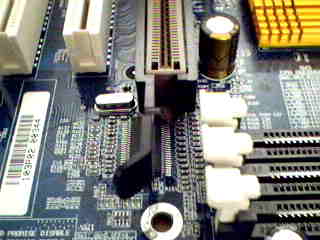
Intel have kindly provided a stupid AGP Card retention mechanism, presumably to stop cards creeping out the slot due to heat expansion. Basically a plastic sleeve which clips into place around the AGP slot with the little feet downwards and sized so that the upper surface is just flush with the top of the slot. As shown in the image below, the "arm" is flexible and has a small button on it
http://developer.intel.com/design/chipsets/agprm/pix/agprm3.gif
This locks the corresponding "L" shaped lug on 2x and 4x AGP cards into place at the front edge
http://images.anandtech.com/reviews/motherboards/gigabyte/7ZXR22/image003.jpg
This shot stupidly shows the mechanism mounted upside down !!
http://ascii24.com/news/columns/10100/article/1999/09/07/thumbnail/thumb320x240-images630029.jpg
The problem? The more I looked at the card the more I realised that the mechanism was pulling the card slightly downwards at the front edge and the card was higher at the back although it still screwed down perfectly well. Using a torch, I fistly noticed that the bottom square-tapered end of the mounting plate was actually touching part of the rail below the motherboard and the screw was not able to tighten the bent over part of the plate flush with the screw hole. This, combined with the fact that the retention mechanism was pulling it down too much at the front (we're only talking about 2mm most here), meant that the connectors of the card were being pulled TOO FAR DOWN into the AGP slot at the front and were forcing a contact with the board's lacquered surface rather than the pins.
It only affected the front few pins and, even though the rear pins were in contact, it was enough to cause a fault situation. Very hard to spot this with the naked eye. It's obviously the whole combination which stopped the other card from working as well.
Solution?
I glued tiny pieces of credit card to the bottom of each "foot" of the mechanism, and filed the top edge down so it was still flush with the top of the slot. I then filed away a fraction of the "L" shaped lug so that it held the card in place without pulling it down. I also filed off a couple of millimetres from the bottom of the mounting plate where it was bottoming out on the case rail.
Perfect now, no thanks to ¡ntel. Amazing how something as tiny and simple can take 2 weeks of trial and error and torrents of foul language
Thanks for showing an interest.
You get the points because...well, nobody else contributed even though I gave them all the symptoms etc, but more specifically because your last line just gave me a 2nd opinion "I would say it is most definitely a video problem".
Because you went to the trouble of providing links etc, you get the "A" as well.
For your info, I traced the problem after concentrating on video rather than RAM. Here's the problem for your future reference, and anybody else reading this, because it's evaded me for 2 weeks now and ISN'T apparent at all, it's just so easy to miss.
Intel have kindly provided a stupid AGP Card retention mechanism, presumably to stop cards creeping out the slot due to heat expansion. Basically a plastic sleeve which clips into place around the AGP slot with the little feet downwards and sized so that the upper surface is just flush with the top of the slot. As shown in the image below, the "arm" is flexible and has a small button on it
http://developer.intel.com/design/chipsets/agprm/pix/agprm3.gif

This locks the corresponding "L" shaped lug on 2x and 4x AGP cards into place at the front edge
http://images.anandtech.com/reviews/motherboards/gigabyte/7ZXR22/image003.jpg
This shot stupidly shows the mechanism mounted upside down !!
http://ascii24.com/news/columns/10100/article/1999/09/07/thumbnail/thumb320x240-images630029.jpg

The problem? The more I looked at the card the more I realised that the mechanism was pulling the card slightly downwards at the front edge and the card was higher at the back although it still screwed down perfectly well. Using a torch, I fistly noticed that the bottom square-tapered end of the mounting plate was actually touching part of the rail below the motherboard and the screw was not able to tighten the bent over part of the plate flush with the screw hole. This, combined with the fact that the retention mechanism was pulling it down too much at the front (we're only talking about 2mm most here), meant that the connectors of the card were being pulled TOO FAR DOWN into the AGP slot at the front and were forcing a contact with the board's lacquered surface rather than the pins.
It only affected the front few pins and, even though the rear pins were in contact, it was enough to cause a fault situation. Very hard to spot this with the naked eye. It's obviously the whole combination which stopped the other card from working as well.
Solution?
I glued tiny pieces of credit card to the bottom of each "foot" of the mechanism, and filed the top edge down so it was still flush with the top of the slot. I then filed away a fraction of the "L" shaped lug so that it held the card in place without pulling it down. I also filed off a couple of millimetres from the bottom of the mounting plate where it was bottoming out on the case rail.
Perfect now, no thanks to ¡ntel. Amazing how something as tiny and simple can take 2 weeks of trial and error and torrents of foul language
Thanks for showing an interest.
ASKER
I have tried a working and compatible AGP 2x card from another machine, but it issued the same beep codes and results.
I haven't replaced the CMOS battery since I put a fresh one in as I built it. I know it's holding the date and new settings after I installed Win98 for that brief time, because it held time/date and changed CMOS settings which I made. I have since changed the BIOS jumper to allow me to boot directly to the CMOS settings after the POST runs, but I'm not even sure if it's getting past POST as I can't see any screen activity or display.
I suppose there may be some intermittant motherboard problem here, but I've even checked the standoffs to make sure there is plenty clearance at the rear without anything shorting against the case, and I've ensured that all the screws securing the motherboard have insulated washers in case one of them was connecting to a track on the board.
The "Plasma Online" link is one I've checked before and have that page saved as a text file somewhere on backup CD's. I'll give it another study.
I've saved the .pdf file from PC Plus Mag's website and will have a read. They usually have some good stuff, but pity it's all in pdf's. I take it you're from UK too?
Meantime, anybody with any comment regarding my trying out the older RAM from my other machine in this one? Am I going to cause any damage, or is it worth a try? I don't want to fry the only RAM I have for my other machine I'm using now, and I don't want to risk damaging the motherboard of the problem machine if there isn't a fault with it's motherboard.