

Browse All Articles > Steps to solve SSRS SQL 2008 R2 User Access Control (UAC) Permission Error
Steps to solve SSRS SQL 2008 R2 User Access Control (UAC) Permission Error
With the introduction of SQL Server 2008 R2 and Vista (Windows 7 as well) came new enhanced security features. One of the features included was User Access Control (UAC) that will assist in prohibiting unauthorized entry into SQL Server Reporting Services. Although UAC can be disabled, working within the parameters of the new technology will strengthen the security within your company infrastructure.
There is a new process that you may run into involving SSRS for SQL Server 2008 R2 when used with Vista and/or Windows 7. There are new UAC security steps that are used during the validation process for Report Manager.
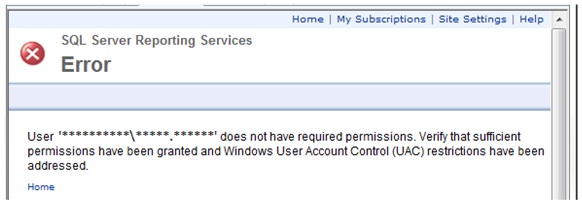
If you receive the following error when trying to make the connection to your Report Manager:
![UAC Error in Report Manager]()
Follow the steps below:
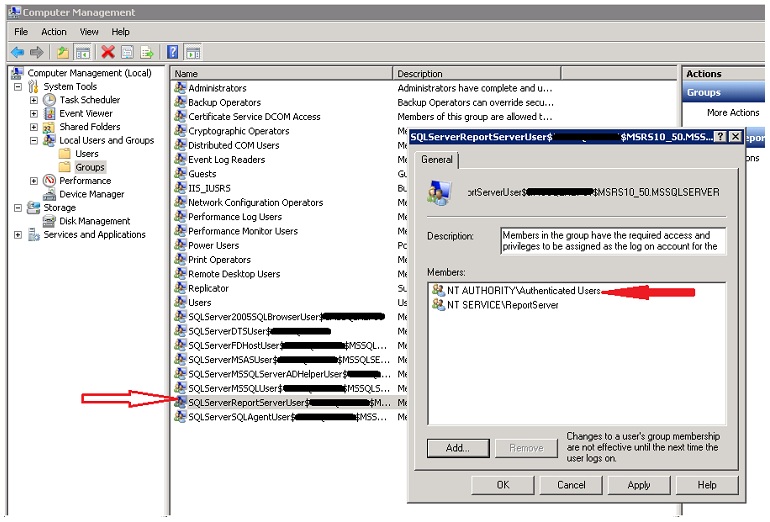
Go to the report server and navigate to the following; Start --> Administrative Tools --> Computer Management. Then Under Local Users and Groups you will see the screen below. Add the NT AUTHORITY\Authenticated Users to the SQLServerReportServerUser group
![Add Authenticated Users to SSRS Group]()
Once this is done, open IE browser from the server and go to http://localhost/Reports. This will bring up Report Manager in the Home folder and display a few option.
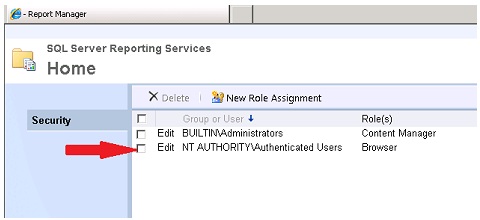
From the Report Manager screen, click on Folder Settings, then go add NT AUTHORITY\Authenticated Users to this group on the root folder (This can be substituted for any other group that contains all users that will be allowed access to the Report Manger)
![Add Authenticated Users to root folder in Report Manager]()
Once these steps are completed, you should be able to return to the Vista and/or Win7 PC and access the Report Manager. For further permission, add specific users to each folder as you normally would. As long as Authenticated Users is in the group on the server, then each user within AD should have access once granted within Report Mangager
With the introduction of SQL Server 2008 R2 and Vista (Windows 7 as well) came new enhanced security features. One of the features included was User Access Control (UAC) that will assist in prohibiting unauthorized entry into SQL Server Reporting Services. Although UAC can be disabled, working within the parameters of the new technology will strengthen the security within your company infrastructure.
There is a new process that you may run into involving SSRS for SQL Server 2008 R2 when used with Vista and/or Windows 7. There are new UAC security steps that are used during the validation process for Report Manager.
If you receive the following error when trying to make the connection to your Report Manager:
Follow the steps below:
Go to the report server and navigate to the following; Start --> Administrative Tools --> Computer Management. Then Under Local Users and Groups you will see the screen below. Add the NT AUTHORITY\Authenticated Users to the SQLServerReportServerUser group
Once this is done, open IE browser from the server and go to http://localhost/Reports. This will bring up Report Manager in the Home folder and display a few option.
From the Report Manager screen, click on Folder Settings, then go add NT AUTHORITY\Authenticated Users to this group on the root folder (This can be substituted for any other group that contains all users that will be allowed access to the Report Manger)
Once these steps are completed, you should be able to return to the Vista and/or Win7 PC and access the Report Manager. For further permission, add specific users to each folder as you normally would. As long as Authenticated Users is in the group on the server, then each user within AD should have access once granted within Report Mangager
Have a question about something in this article? You can receive help directly from the article author. Sign up for a free trial to get started.
Comments (2)
Commented:
Commented: