Dynamically Iterate over a list of tables or views and export to flat files.

Published:
Browse All Articles > Dynamically Iterate over a list of tables or views and export to flat files.
I recently came across an interesting Question In EE and was puzzled about how to achieve that using SSIS out of the box tasks, which was impossible as SSIS can;t use on the fly columns in the source or the destination.
SO definitely only could be done using a script task, but that wasn't really my favorite part, I'm the worst when it comes to that.
Anyway because I had some past experience as developing ASP pages using vb.net, so quickly came to my mind to build a DataGrid using a SQL query, then export the grid to a text file, which worked fine, The I came across the DataReader which is a neater and easier way.
So here I'm going to demonstrate how to Iterate over a list of views which has different structure to flat file using Script Task.
I'll be using the famous "AdventureWorksDW2008R2" DB for SQL 2008 and "AdventureWorks" for SQL 2005 which could be downloaded for free here, The demo is being done on a windows Vista 64BIT machine, with SQL and VS 2008 installed. but there shouldn't be any version different if you're using SQL 2005.
Alright enough talking....
For SQL server 2008 Users......
1-The first step is to identify what are the views that we be exporting.
![Views]()
2-Check the columns count for each of them, just to illustrate the different in structure.
3-I'll create 4 Variables, I love to always to the proper naming convention to tell the data type of the variable.
![Variables]()
A-Variable "ObjAllViews" will hold back the result set which has all the views' Names.
B-Variable "StrDelimiter" will hold the delimiter that you want to use between columns, I love to use the Vertical Line "|" because most of our data has commas in it, you can get it by pressing (SHIFT + \ )
C-Variable "StrViewName" will hold each individual view.
D-Variable "StrFilePath" will hold the desired path to save the files.
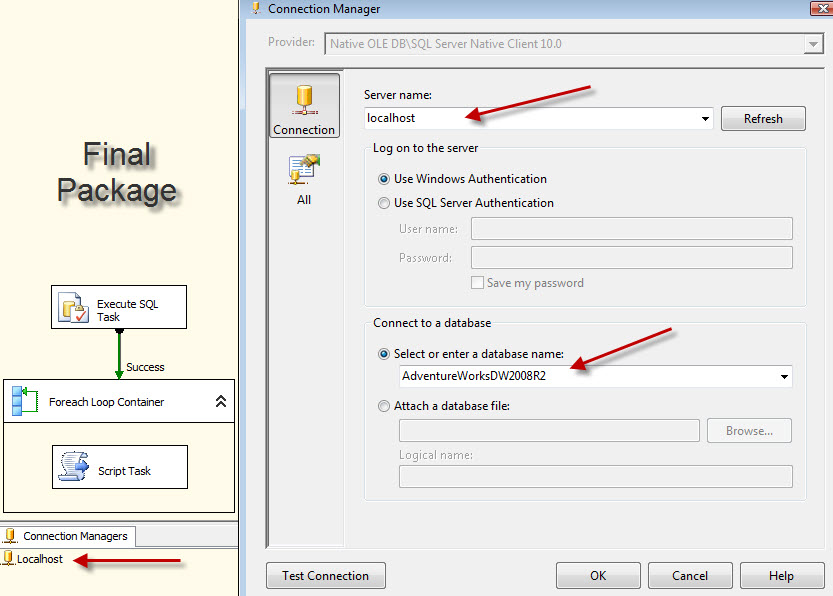
4-Create a connection to your server, in my case it's 'localhost' as I've my testing SQL server on the same machine, and I named the connection 'Localhost', take note of naming the connection because it's mentioned later in the script task.
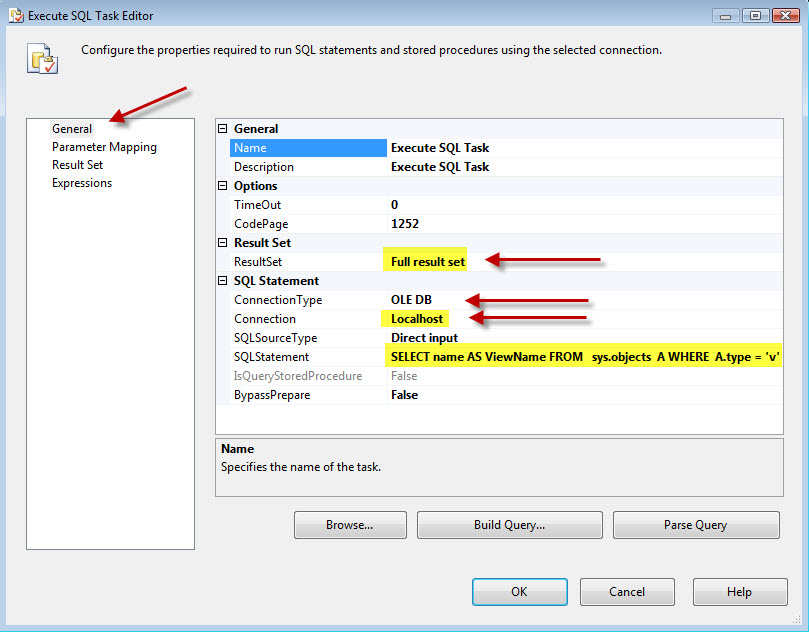
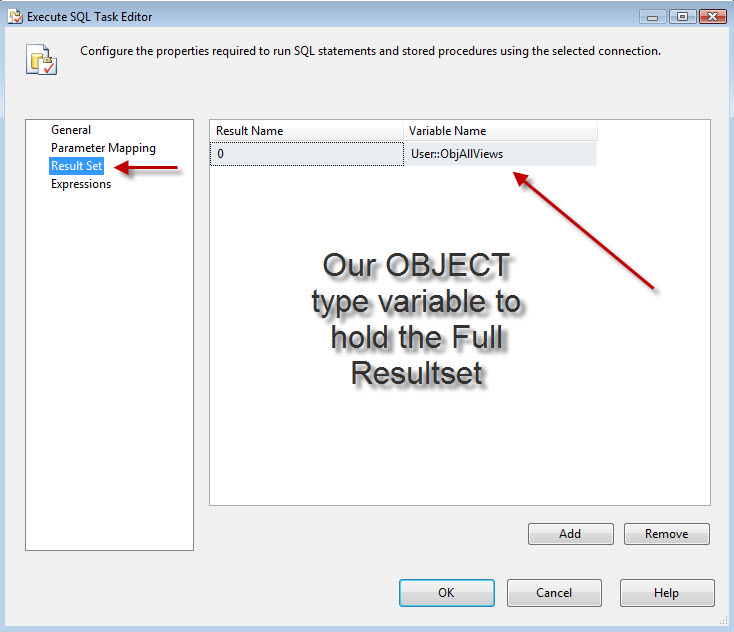
oh...so now you get the idea? we will use the "Execute SQL Task" to get us the list of the views that exists in that table into "ObjAllViews" variable, then we will use "Foreach Loop Container" to shred resultset from "ObjAllViews" variable to each individual view name into "StrViewName" variable .
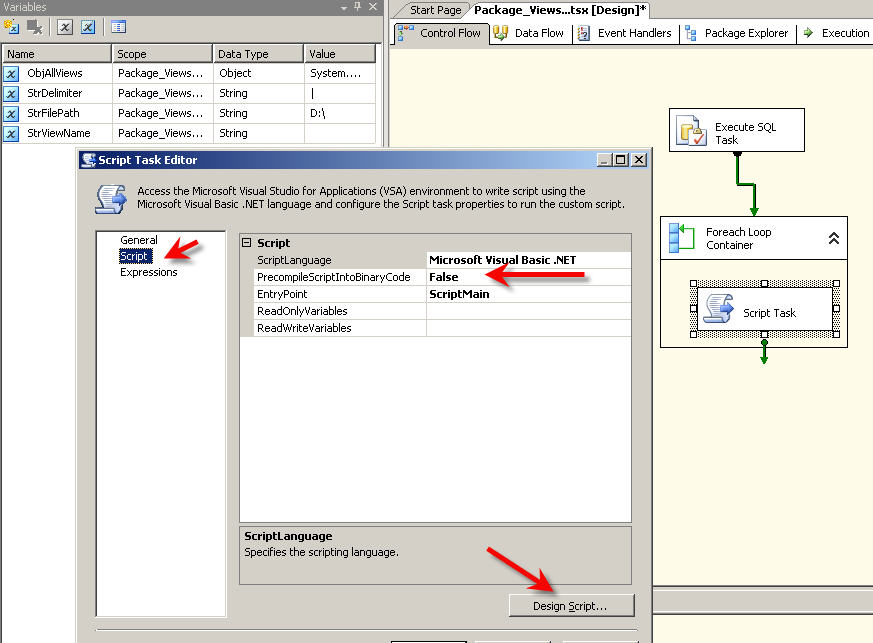
Then inside the "Foreach Loop Container" we will place a "Script Task" that will do the trick for us.
Now let's go over each tasks and how it's configured....
1-The control flow and the connection
![ControlFlow and connection]()
2-Execute SQL Task
![EST1]()
![EST2]()
3-Foreach Loop Container
![FEL1]()
![FEL2]()
4-Script Task , Thanks for SIVA for helping me with the counter code.
![ST]()
5- add This code
And The results .........
![Files]()
For SQL 2005 users...
We need to change the script task, also the SQL query too as follow:
1- change the SQL query to
2- and the script task as shown here
![scripttask2005]()
Solution assumptions:
1-You're using SQL 2008 or SQL 2005.
2-Server name is "Localhost" hosted locally, otherwise, please change that.
3-You have write access to your D:\ Drive.
4-For SQL 2008 you have installed "AdventureWorksDW2008R2" DB and "AdventureWorks" for SQL 2005.
That's it...I hope my article helps someone to be more dynamic and flexible in SSIS and over come some of the Data Flow limitations.
Also I'm open to discussions and comments if you have a better way to do it.
The final package for SQL 2008 can be FOUND HERE and for SQL 2005 FROM HERE
SO definitely only could be done using a script task, but that wasn't really my favorite part, I'm the worst when it comes to that.
Anyway because I had some past experience as developing ASP pages using vb.net, so quickly came to my mind to build a DataGrid using a SQL query, then export the grid to a text file, which worked fine, The I came across the DataReader which is a neater and easier way.
So here I'm going to demonstrate how to Iterate over a list of views which has different structure to flat file using Script Task.
I'll be using the famous "AdventureWorksDW2008R2" DB for SQL 2008 and "AdventureWorks" for SQL 2005 which could be downloaded for free here, The demo is being done on a windows Vista 64BIT machine, with SQL and VS 2008 installed. but there shouldn't be any version different if you're using SQL 2005.
Alright enough talking....
For SQL server 2008 Users......
1-The first step is to identify what are the views that we be exporting.
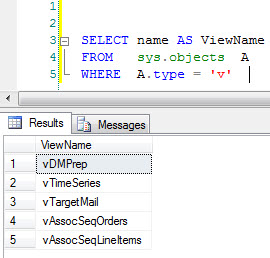
2-Check the columns count for each of them, just to illustrate the different in structure.
SELECT A.name AS ViewName
                      	 , count(B.TABLE_NAME) AS ColCount
                      FROM
                      	sys.objects AS A
                      	LEFT OUTER JOIN
                      		INFORMATION_SCHEMA.COLUMNS AS B
                      		ON A.name = B.TABLE_NAME
                      GROUP BY
                      	A.name
                        , A.type
                      HAVING
                      	(A.type = 'v')
                      ORDER BY
ColCount DESC3-I'll create 4 Variables, I love to always to the proper naming convention to tell the data type of the variable.
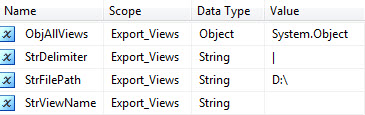
A-Variable "ObjAllViews" will hold back the result set which has all the views' Names.
B-Variable "StrDelimiter" will hold the delimiter that you want to use between columns, I love to use the Vertical Line "|" because most of our data has commas in it, you can get it by pressing (SHIFT + \ )
C-Variable "StrViewName" will hold each individual view.
D-Variable "StrFilePath" will hold the desired path to save the files.
4-Create a connection to your server, in my case it's 'localhost' as I've my testing SQL server on the same machine, and I named the connection 'Localhost', take note of naming the connection because it's mentioned later in the script task.
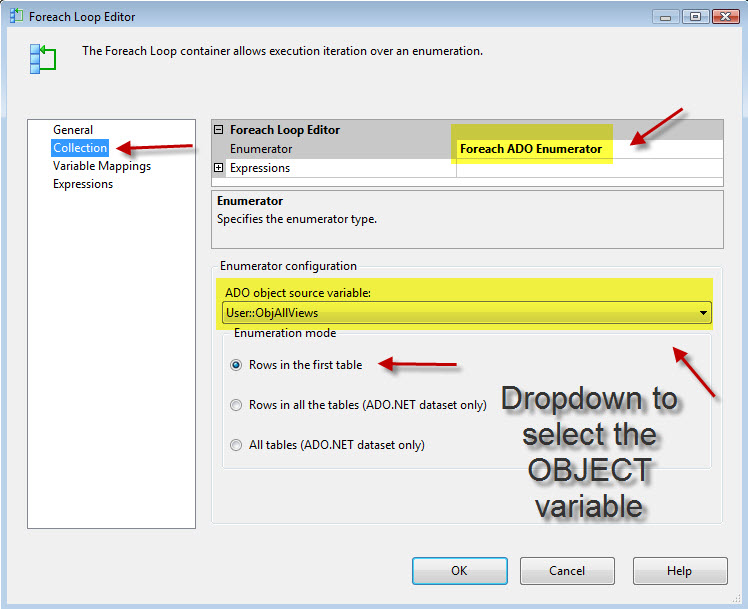
oh...so now you get the idea? we will use the "Execute SQL Task" to get us the list of the views that exists in that table into "ObjAllViews" variable, then we will use "Foreach Loop Container" to shred resultset from "ObjAllViews" variable to each individual view name into "StrViewName" variable .
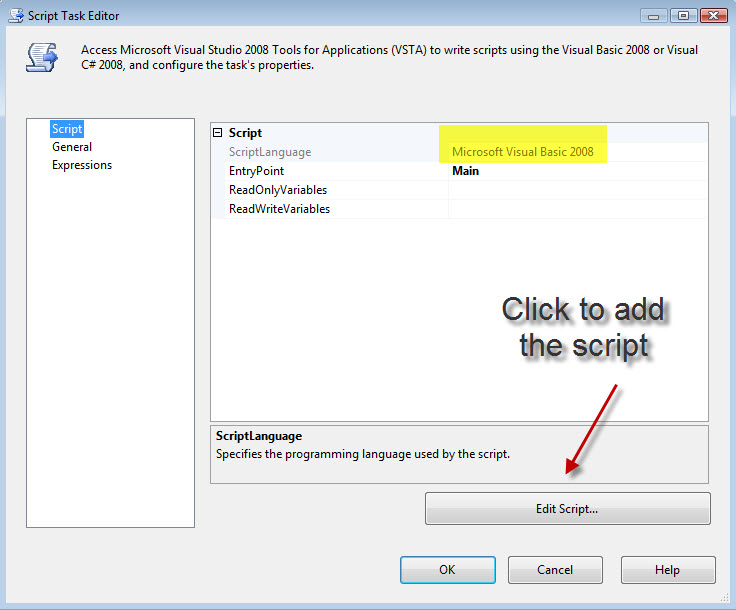
Then inside the "Foreach Loop Container" we will place a "Script Task" that will do the trick for us.
Now let's go over each tasks and how it's configured....
1-The control flow and the connection
2-Execute SQL Task
3-Foreach Loop Container

4-Script Task , Thanks for SIVA for helping me with the counter code.
5- add This code
Imports System
                      Imports System.Data
                      Imports System.Math
                      Imports Microsoft.SqlServer.Dts.Runtime
                      Imports System.Data.OleDb
                      Imports System.Data.SqlClient
                      Imports System.IO

                      <System.AddIn.AddIn("ScriptMain", Version:="1.0", Publisher:="", Description:="")> _
                      <System.CLSCompliantAttribute(False)> _
                      Partial Public Class ScriptMain
                          Inherits Microsoft.SqlServer.Dts.Tasks.ScriptTask.VSTARTScriptObjectModelBase
                          Enum ScriptResults
                              Success = Microsoft.SqlServer.Dts.Runtime.DTSExecResult.Success
                              Failure = Microsoft.SqlServer.Dts.Runtime.DTSExecResult.Failure
                          End Enum
                          Public Sub Main()

                              'Variable collection to hold the variables
                              Dim VarCol As Variables = Nothing

                              'Lock the 3 variables for read
                              Dts.VariableDispenser.LockForRead("User::StrViewName")
                              Dts.VariableDispenser.LockForRead("User::StrDelimiter")
                              Dts.VariableDispenser.LockForRead("User::StrFilePath")


                              'Fille the Variable collection
                              Dts.VariableDispenser.GetVariables(VarCol)

                              'Getting the variables' values, so we can use it later
                              Dim ViewName As String = VarCol("User::StrViewName").Value.ToString()
                              Dim delimiter As String = VarCol("User::StrDelimiter").Value.ToString()
                              Dim FilePath As String = VarCol("User::StrFilePath").Value.ToString()


                              'Construct the file name, example output: D:\vTargetMail.TXT
                              Dim FName As String = FilePath & ViewName & ".TXT"

                              'Build our Query
                              Dim Query As String = "SELECT * FROM " & ViewName


                              'Using StreamWriter
                              Dim writer As StreamWriter = Nothing

                              'Use our OLEDB COnnection
                              Dim connection As OleDbConnection = New OleDbConnection(Dts.Connections("Localhost").ConnectionString)
                              Dim command As OleDbCommand = Nothing
                              Dim reader As OleDbDataReader = Nothing

                              Try
                                  'Checking for the file, delete if exist(you can append or rename with [File.Move(FName, Today() & "_" & FName)]
                                  If File.Exists(FName) Then
                                      File.Delete(FName)
                                  End If
                                  'Open the OLEDB connection
                                  connection.Open()

                                  'Run the query
                                  command = New OleDbCommand(Query, connection)
                                  reader = command.ExecuteReader()

                                  If reader.HasRows Then

                                      'Stream Writer using the FNAME that we declared erlier
                                      writer = New System.IO.StreamWriter(FName)
                                      While reader.Read()

                                          'Counter to get the columns number
                                          Dim counter As Integer = 0
                                          Dim fieldCount As Integer = reader.FieldCount - 1

                                          While counter <= fieldCount
                                              If counter <> fieldCount Then

                                                  writer.Write(reader(counter).ToString() & delimiter)
                                              Else
                                                  writer.WriteLine(reader(counter).ToString())
                                              End If
                                              counter += 1
                                          End While
                                      End While
                                  End If
                              Catch ex As Exception
                                  Dts.Events.FireError(1, "", "Something Wrong happened!!!", "", 0)
                              Finally
                                  connection.Close()
                                  writer.Close()
                              End Try
                              Dts.TaskResult = ScriptResults.Success
                          End Sub
End ClassAnd The results .........
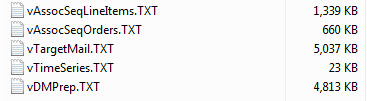
For SQL 2005 users...
We need to change the script task, also the SQL query too as follow:
1- change the SQL query to
SELECT  (sys.schemas.name + '.' + sys.objects.name) AS ViewName
                      FROM    sys.objects
                      INNER JOIN sys.schemas ON sys.objects.schema_id = sys.schemas.schema_id
Where type ='v'2- and the script task as shown here
Imports System
                      Imports System.Data
                      Imports System.Math
                      Imports Microsoft.SqlServer.Dts.Runtime
                      Imports System.Data.OleDb
                      Imports System.Data.SqlClient
                      Imports System.IO

                      Public Class ScriptMain

                          Public Sub Main()

                              'Variable collection to hold the variables
                              Dim VarCol As Variables = Nothing

                              'Lock the 3 variables for read
                              Dts.VariableDispenser.LockForRead("User::StrViewName")
                              Dts.VariableDispenser.LockForRead("User::StrDelimiter")
                              Dts.VariableDispenser.LockForRead("User::StrFilePath")

                              'Fille the Variable collection
                              Dts.VariableDispenser.GetVariables(VarCol)

                              'Getting the variables' values, so we can use it later
                              Dim ViewName As String = VarCol("User::StrViewName").Value.ToString()
                              Dim delimiter As String = VarCol("User::StrDelimiter").Value.ToString()
                              Dim FilePath As String = VarCol("User::StrFilePath").Value.ToString()

                              'Construct the file name, example output: D:\vTargetMail.TXT
                              Dim FName As String = FilePath & ViewName & ".TXT"

                              'Using StreamWriter
                              Dim writer As StreamWriter = Nothing

                              'Try
                              'Checking for the file, delete if exist(you can append or rename with [File.Move(FName, Today() & "_" & FName)]
                              If File.Exists(FName) Then
                                  File.Delete(FName)
                              End If

                              'Open the OLEDB connection
                              Dim connection As New OleDbConnection("Provider=SQLOLEDB;Data Source=Localhost;Initial Catalog=AdventureWorks;Integrated Security=SSPI;")
                              connection.Open()
                              Dim Query As String = "SELECT * FROM " & ViewName

                              Dim command As OleDbCommand = New OleDbCommand(Query, connection)

                              Dim reader As OleDbDataReader = command.ExecuteReader()

                              If reader.HasRows Then

                                  'Stream Writer using the FNAME that we declared erlier
                                  writer = New System.IO.StreamWriter(FName)
                                  While reader.Read()

                                      'Counter to get the columns number
                                      Dim counter As Integer = 0
                                      Dim fieldCount As Integer = reader.FieldCount - 1

                                      While counter <= fieldCount
                                          If counter <> fieldCount Then

                                              writer.Write(reader(counter).ToString() & delimiter)
                                          Else
                                              writer.WriteLine(reader(counter).ToString())
                                          End If
                                          counter += 1
                                      End While
                                  End While
                                  reader.Close()
                              End If

                              connection.Close()
                              writer.Close()
                              'Catch ex As Exception
                              '    Dts.Events.FireError(1, "Nasty", "Something Wrong happened!!!", "", 0)
                              '    Throw ex
                              'Finally

                              'End Try
                              Dts.TaskResult = Dts.Results.Success
                          End Sub
End ClassSolution assumptions:
1-You're using SQL 2008 or SQL 2005.
2-Server name is "Localhost" hosted locally, otherwise, please change that.
3-You have write access to your D:\ Drive.
4-For SQL 2008 you have installed "AdventureWorksDW2008R2" DB and "AdventureWorks" for SQL 2005.
That's it...I hope my article helps someone to be more dynamic and flexible in SSIS and over come some of the Data Flow limitations.
Also I'm open to discussions and comments if you have a better way to do it.
The final package for SQL 2008 can be FOUND HERE and for SQL 2005 FROM HERE

There's the plan, then there's what actually happens.
Have a question about something in this article? You can receive help directly from the article author. Sign up for a free trial to get started.
Comments (2)
Commented:
You can suppress the need of first execute sql task who fetch data from sysobjects with using the ADO.NET Schema RowSet Enumerator in Foreach loop, Just take a look at this type of enumerator, and then you will find out how to fetch sysobjects data with this enumerator simply.
Great job by the way, I voted for it. Hope to read more from you on SSIS :)
Reza Rad
Author
Commented:Yep, true, I could have used ADO.NET in the Foreach Loop.
Anyway there's always 100 ways to do anything :)
I was trying also to avoid BCP as it always gives me hard time, I don't know why !!
Thank you so much...for the encouraging words and the vote
Jason Yousef