How to customize a default user profile in Windows 7 before capturing Image for Operating System Deployment


Published:
Browse All Articles > How to customize a default user profile in Windows 7 before capturing Image for Operating System Deployment
Case Summary:
In this Article we introduce the new method to configure the default user profile using Automated profile copy with sysprep rather than the old ways such as the manual copy of a configured profile to default user profile
Old method is a traditional solution and it’s not recommended and not supported any more, it was to configure windows account with the required setting, and then copy user profile for this this account to default user profile.
It's important to know that we may have some problems with this procedure, it’s very old solution (From Windows NT), and this process will copy settings that should not copy to the default user profile.
Also Default user profile contains some run actions that occur when user log on for first time, if you overwrite the default user profile, those run actions will not run.
The New approach we show below is the supported and recommended method by Microsoft.
Solution:
The following steps describe how to customize default user profiles in Windows 7:
1- Log on to Windows 7 machine using local or administrator account (Don’t use domain admin account).
2- Configure Windows setting that you required (Desktop Settings, Favorite and start menu options).
3- Create “Unattend.xml” file that contains the Copy Profile parameter, by using Windows System Image Manager tool:
- The Windows System Image Manager tool is included as part of the Windows Automated Installation Kit (Windows AIK).
- Windows AIK is available and installed with Microsoft System Center Configuration Manager, if you don't have configuration Manager Server, you can installed it on specific machine and create an answer file.
* Open Windows System Image Manager.
* Click File menu than choose create a new answer file.
* Browse Windows source directory form Windows 7 DVD, the catalog file in \Sources folder.
* The new answer file appears in the Answer File pane.
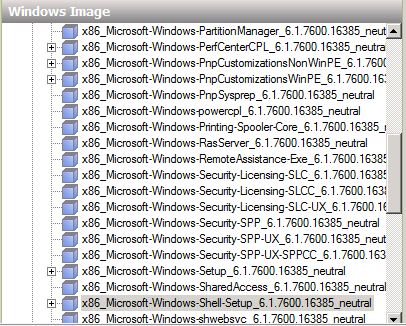
* Add the following component to an answer file in the specialize pass.
Microsoft-Windows-Shell-Setup
![Select Component]()
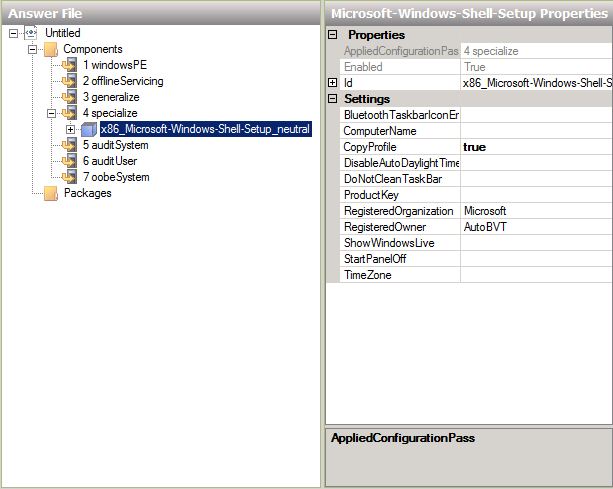
*In the settings set Copy profile to true.
![Set Copy Profile to True]()
* Save unattend.xml file
These settings will copy profile of the user who is currently logged to default user profile, during sysprep
To run Sysprep, please open command prompt and run it as administrator and run the following command:
sysprep.exe /oobe /reboot /generalize /unattend:c:\answerfile\unattend.xml
Note: Sysprep.exe is located in the %systemdrive%\Windows\System32\sysprep directory.
Thanks
Abduljalil Abolzahab
In this Article we introduce the new method to configure the default user profile using Automated profile copy with sysprep rather than the old ways such as the manual copy of a configured profile to default user profile
Old method is a traditional solution and it’s not recommended and not supported any more, it was to configure windows account with the required setting, and then copy user profile for this this account to default user profile.
It's important to know that we may have some problems with this procedure, it’s very old solution (From Windows NT), and this process will copy settings that should not copy to the default user profile.
Also Default user profile contains some run actions that occur when user log on for first time, if you overwrite the default user profile, those run actions will not run.
The New approach we show below is the supported and recommended method by Microsoft.
Solution:
The following steps describe how to customize default user profiles in Windows 7:
1- Log on to Windows 7 machine using local or administrator account (Don’t use domain admin account).
2- Configure Windows setting that you required (Desktop Settings, Favorite and start menu options).
3- Create “Unattend.xml” file that contains the Copy Profile parameter, by using Windows System Image Manager tool:
- The Windows System Image Manager tool is included as part of the Windows Automated Installation Kit (Windows AIK).
- Windows AIK is available and installed with Microsoft System Center Configuration Manager, if you don't have configuration Manager Server, you can installed it on specific machine and create an answer file.
* Open Windows System Image Manager.
* Click File menu than choose create a new answer file.
* Browse Windows source directory form Windows 7 DVD, the catalog file in \Sources folder.
* The new answer file appears in the Answer File pane.
* Add the following component to an answer file in the specialize pass.
Microsoft-Windows-Shell-Se
*In the settings set Copy profile to true.
* Save unattend.xml file
These settings will copy profile of the user who is currently logged to default user profile, during sysprep
To run Sysprep, please open command prompt and run it as administrator and run the following command:
sysprep.exe /oobe /reboot /generalize /unattend:c:\answerfile\un
Note: Sysprep.exe is located in the %systemdrive%\Windows\Syst
Thanks
Abduljalil Abolzahab
Have a question about something in this article? You can receive help directly from the article author. Sign up for a free trial to get started.
Comments (6)
Author
Commented:by the way, the above steps are recommended by Microsoft if you want to copy profile to default user profile.
Thanks for comment
Commented:
I attempted the first time to use the image.wmi from our only copy of Windows 7 Professional on DVD, but it was a 32 bit version and the new machines we are now getting are 64 bit. Would I be correct in thinking that using the 32 bit Windows 7 image.wmi file cause the problem the first time I tried to follow your scenario?
Secondly, I found a way to combine the SWF files that were in the recovery partition of my PC and created an image.wim file. So I used that for the second answer file on another laptop which also gave errors.
So, is there somewhere I can get a copy of the Windows 7 Professional 64bit image.wim file? Or will I really have to purchase a full OEM copy of Windows 7 Professional 64bit to get this to work?
Commented:
Author
Commented:Commented:
i have made other changes such as languange will this have any effect?
I am attaching the error:
I am runing Win7ProX64, one thing i have noticed that my win shell set up have version: 6.1.7601.17514
if i say ok my laptops keeps rebooting
many thanks in advance
View More