

Browse All Articles > Achieve Persistence Through Serialization
Summary:
Persistence is the capability of an application to store the state of objects and recover it when necessary. This article compares the two common types of serialization in aspects of data access, readability, and runtime cost. A ready-to-use code snippet using BinaryFormatter with simple encryption is provided.
Introduction:
I was amazed the first time I read the dotnet documentation about serialization. Prior to the dotnet era, it was a big headache to deal with configuration data. You would have to write large code pieces to stream the data out to a file and then parse the long strings again to find out the proper data to read back. When playing with serialization, I was hoping to create a complete cache of the application and restore it just like nowadays Windows system “Hibernation” feature. Although the reality is always far from the imagination, dotnet serialization is still very useful in caching “part” of an application – the data objects.
Dotnet framework provides two types of serialization: shallow serialization, and deep serialization, represented by
XmlSerializer in System.Xml.Serialization namespace and
BinaryFormatter in System.Runtime.Serializati
respectively. The differences between the two types are obvious: the former is designed to save and load objects in human-readable XML format, and the latter provides compact binary encoding either for storage or for network streaming. The dotnet framework also includes the abstract FORMATTERS class that can be used as a base class for custom formatters. We will focus on XmlSerializer and BinaryFormatter in this article.
XmlSerializer Basics
There are three projects in the attached package. The first one XMLSerializerSample shows some typical scenario that XmlSerializer could be applied. In file SampleClasses.cs, three sample classes are defined:
BuildinType contains properties with primary types;
DerivedClass uses build-in reference types, also demonstrates a class with base class;
CollectionTypes declares several different build-in Collection types.
The Main program routine simply serializes out the instance of each class to a file and reads it back sequentially, plus an array object to test the performance on bulk data. I tag the test case numbers in both the source code and the article. You can perform the tests yourself if you'd like. Simple guidelines are in the source code, which illustrate the basic elements of a Software Test Document (STD).
The output of the program is like:
test2.xml (Test Case 1):
                      <?xml version="1.0"?>
                      <DerivedClass xmlns:xsi="http://www.w3.org/2001/XMLSchema-instance" xmlns:xsd="http://www.w3.org/2001/XMLSchema">
                        <InstanceID>2</InstanceID>
                        <Number>300.900024</Number>
                        <Description>This is a test.</Description>
                        <TestState>DONE</TestState>
                        <TestTime>2010-12-08T02:23:50.265625+08:00</TestTime>
                        <StrFont>Times New Roman, 10pt</StrFont>
                      </DerivedClass>
XmlSerializer supports:
All the primary types (Test Case 2);
Derived class (Test Case 3);
Simple collection types such as array, list (Test Case 4);
Public data members – only (Test Case 5).
The limitations are:
Most build-in reference types are not serializable (Test Case 6);
Static data member won’t get serialized (Test Case 7);
Private fields can not be saved (Test Case 5);
There must be a default constructor. Normally the complier will generate one if none explicit constructor is present. But sometimes we could create a parameterized constructor but forget to add a default constructor. Then the serialization would be “accidentally” disabled. (Test Case 8);
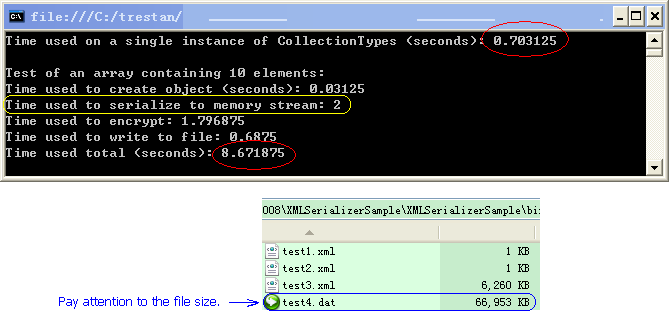
String manipulation is very expensive, and storage in text format is huge (Test Case 9):
![Execution time and output file size]() The workaround for making a build-in type serializable (Test Case 10):
The workaround for making a build-in type serializable (Test Case 10):
Font thisFont = new Font("Times New Roman", 10F); [XmlIgnore] public Font ThisFont //Accessors for general calling. { get { return thisFont; } set { thisFont = value; } } public string StrFont //Accessors for serialization. { get { return Utility.ObjectToString(thisFont); } set { thisFont = (Font)Utility.ObjectFromString(typeof(Font), value); } }
Overall, the biggest advantage of XmlSerializer is the human-readable format of the output. If you have a relatively simple object and need to modify the data directly, XmlSerializer is a good choice.
 The workaround for making a build-in type serializable (Test Case 10):
Font thisFont = new Font("Times New Roman", 10F); [XmlIgnore] public Font ThisFont //Accessors for general calling. { get { return thisFont; } set { thisFont = value; } } public string StrFont //Accessors for serialization. { get { return Utility.ObjectToString(thisFont); } set { thisFont = (Font)Utility.ObjectFromString(typeof(Font), value); } }
BinaryFormatter Basics
The second project in the attached package is similar to the first one, except some minor changes:
1. The use of XmlSerializer is substituted with BinaryFormatter;
2. The attribute “[Serializable]” is added ahead of each class;
3. A build-in graphic type “Brush” is added to the DerivedClass;
The same tests are performed on the classes described above. The advantages of BinaryFormatter are:
All the public and private fields in an object are capable to be serialized (Test Case 11);
No need to declare the default constructor any more. (Test Case 12) But it’s always a good practice to generate a default constructor along with the parameterized one;
Almost all build-in types are supported with a few exceptions such as graphic objects, with which the Serializable attribute is not defined. (Test Case 14)
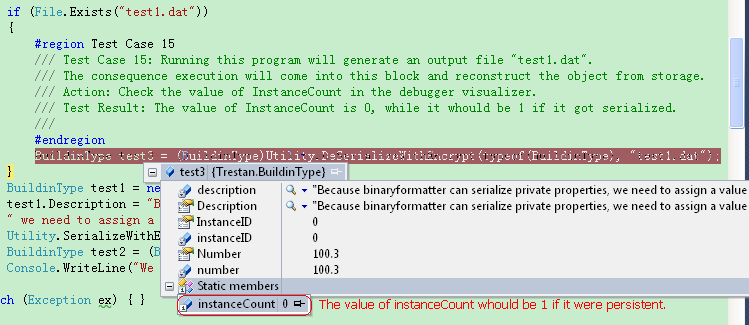
Static field is not serializable, because it’s non-object referenced (it’s not part of the object), as shown in the follow picture (Test Case 15).
![Static fields not serialized]() However, if you do want static members to be serializable, you can implement ISerializable interface to manually add the information and retrieve it back (Test Case 16):
However, if you do want static members to be serializable, you can implement ISerializable interface to manually add the information and retrieve it back (Test Case 16):
[Serializable] public class BuildinType: ISerializable { static int instanceCount = 0; public BuildinType(SerializationInfo info, StreamingContext context) { BuildinType.instanceCount = info.GetInt32("instanceCount"); } public void GetObjectData(SerializationInfo info, StreamingContext context) { info.AddValue("instanceCount", instanceCount, typeof(int)); } Now the value of instanceCount is persistent.
![Implement ISerializable to serialize static member]()
 However, if you do want static members to be serializable, you can implement ISerializable interface to manually add the information and retrieve it back (Test Case 16):
[Serializable] public class BuildinType: ISerializable { static int instanceCount = 0; public BuildinType(SerializationInfo info, StreamingContext context) { BuildinType.instanceCount = info.GetInt32("instanceCount"); } public void GetObjectData(SerializationInfo info, StreamingContext context) { info.AddValue("instanceCount", instanceCount, typeof(int)); } Now the value of instanceCount is persistent.

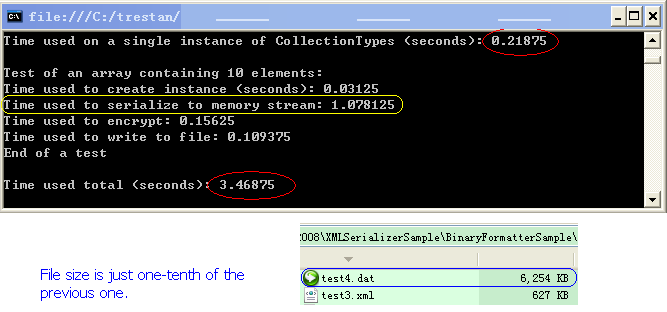
Binary operation is much faster than string operation (Test Case 16):
![Execution time and output file size]()
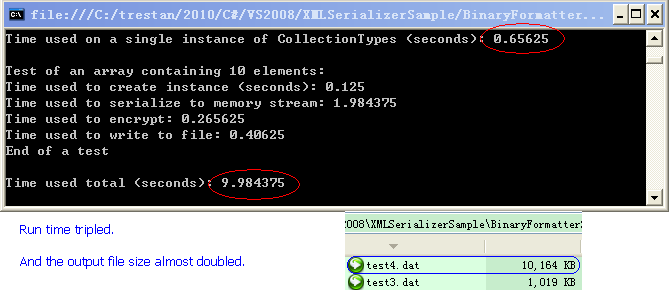
The Dictionary type is also supported, with a little more cost (Test Case 17).
![A little slower to serialize Dictionary type]()
Basically, you don’t need to worry too much about your data types, just put SerializableAttribute on your class. Then you can achieve persistency by saving the object wherever it needs to. For the types that can not be persisted properly, you can either put NonSerializedAttribute on the data member for the serializer to ignore it, or implement ISerializable interface to make it serializable.
Example of use
From the above experiments, we can see that it’s natural to favor BinaryFormatter over XmlSerializer. Even for configuration settings, it is recommend to modify the data through user interface, rather than directly touching the data in the output files. The third project in the attached package provides two more helper function to save and load data without encryption.
public static void TSerialize(object theObject, string sFileName)
                              {
                                  BinaryFormatter btFormatter = new BinaryFormatter();
                                  FileStream theFileStream = new FileStream(sFileName, FileMode.OpenOrCreate, FileAccess.Write, FileShare.ReadWrite);
                                  btFormatter.Serialize(theFileStream, theObject);
                                  theFileStream.Close();
                              }

                              public static object TDeSerialize(Type theType, string sFileName)
                              {
                                  if (sFileName == null || sFileName == "" || !File.Exists(sFileName))
                                  {
                                      return null;
                                  }
                                  FileStream theFileStream = new FileStream(sFileName, FileMode.Open, FileAccess.Read, FileShare.ReadWrite);
                                  BinaryFormatter btFormatter = new BinaryFormatter();
                                  object theObj = btFormatter.Deserialize(theFileStream);
                                  theFileStream.Close();
                                  return theObj;
                              }
public static void SerializeWithEncrypt(object theObject, string sFileName)
                              {
                                  MemoryStream theMS = new MemoryStream();
                                  BinaryFormatter btFormatter = new BinaryFormatter();
                                  btFormatter.Serialize(theMS, theObject);
                                  theMS.Seek(0, SeekOrigin.Begin);
                                  byte[] temp = theMS.ToArray();

                                  temp = Encrypt(temp);
                                  //Output to a file.
                                  FileStream theFileStream = new FileStream(sFileName, FileMode.OpenOrCreate, FileAccess.Write, FileShare.ReadWrite);
                                  BinaryWriter theBW = new BinaryWriter(theFileStream);

                                  theBW.Write(temp, 0, temp.Length);
                                  theBW.Close();
                                  theFileStream.Close();
                                  theMS.Dispose();
                              }

                              public static object DeSerializeWithDecrypt(string sFileName)
                              {
                                  if (sFileName == null || sFileName == "" || !File.Exists(sFileName))
                                  {
                                      return null;
                                  }

                                  byte[] temp = File.ReadAllBytes(sFileName);

                                  temp = Decrypt(temp);

                                  MemoryStream theMS = new MemoryStream(temp);
                                  BinaryFormatter btFormatter = new BinaryFormatter();
                                  object theObj = btFormatter.Deserialize(theMS);
                                  theMS.Dispose();
                                  return theObj;
                              }
[Serializable]
                          public sealed class Configuration
                          {
                              private static Configuration instance = null;

                              private Configuration()
                              {
                              }

                              public static Configuration Instance
                              {
                                  get
                                  {
                                      if (instance == null)
                                      {
                                          instance = (Configuration)Utility.TDeSerialize("test.dat");
                                      }
                                      if (instance == null)
                                      {
                                          instance = new Configuration();
                                      }
                                      return instance;
                                  }
                              }
                      …
                      …
Another attached application, TCPaint, uses exactly the same code to persist the size and location of the form as well as other configuration setting data such as MRU (most recent used files). The unlimited steps of undo and redo actions are also saved using this technique. A user can always rewind and modify their drawings as a set of individual objects rather than as a bitmap image.
In the end, using serialization properly can save you a lot time and headaches.
TSerializerSample.zip
TCPaint.zip
Have a question about something in this article? You can receive help directly from the article author. Sign up for a free trial to get started.
Comments (0)