A SQL Tidbit: Conditional Aggregates


Father, husband and general problem solver who loves coding SQL, C#, Salesforce Apex or whatever.
Published:
Browse All Articles > A SQL Tidbit: Conditional Aggregates
As they say in love and is true in SQL: you can sum some Data some of the time, but you can't always aggregate all Data all the time!
1. Introduction
By the end of this Article it is my intention to bring the meaning and value of the above quote to those who chose to read this whether as a beginning SQL programmer or an intermediate one inexperienced with this little tidbit of SQL syntax: conditional aggregation.Conditional aggregation is simply the use of aggregates under one or more conditions, thus, potentially altering your results of functions like SUM(), COUNT(), etcetera in a particular column while allowing you to analyze your record set as a whole.
In other words, consider the following data:
----------------+-------+------------
                      expert          |isMale |primaryZone
                      ----------------+-------+------------
                      acperkins       |   1   | MSSQL2K5
                      aneeshattingal  |   1   | MSSQL2K5
                      angeliii        |   1   | MSSQLSVR
                      Helen_Feddema   |   0   | MSACCESS
                      matthewspatrick |   1   | SQLSYNTX
                      mbizup          |   0   | MSACCESS
                      mwvisa1         |   1   | SQLSYNTX
                      ScottPletcher   |   1   | MSSQLSVR
                      sdstuber        |   1   | ORACLEDB
                      slightwv        |   1   | ORACLEDB
                      ----------------+-------+------------
««setup»»
To reproduce the above data, you can execute SQL similar to the below T-SQL example created for MS SQL Server.
(table structure -- create statement)
To reproduce the above data, you can execute SQL similar to the below T-SQL example created for MS SQL Server.
create table SQLExperts(
                         expert varchar(50) primary key,
                         isMale bit,
                         primaryZone char(8)
);(sample data -- insert statement)
insert into SQLExperts(expert, isMale, primaryZone)
                      select 'mbizup', 0, 'MSACCESS' union
                      select 'Helen_Feddema', 0, 'MSACCESS' union
                      select 'matthewspatrick', 1, 'SQLSYNTX' union
                      select 'mwvisa1', 1, 'SQLSYNTX' union
                      select 'angeliii', 1, 'MSSQLSVR' union
                      select 'ScottPletcher', 1, 'MSSQLSVR' union
                      select 'acperkins', 1, 'MSSQL2K5' union
                      select 'aneeshattingal', 1, 'MSSQL2K5' union
                      select 'sdstuber', 1, 'ORACLEDB' union
                      select 'slightwv', 1, 'ORACLEDB'
;To start, if we wanted to know how many Experts are on the list we would simply use:
select count(*) as cnt from SQLExperts;Now, what if we wanted to know how many female Experts are on the list?
Then we would add a WHERE conditional clause to the query:
select count(*) as cnt
                      from SQLExperts
where isMale = 0;2. Conditional Aggregates: Basics
Without conditional aggregates, to answer the previous question you would need a secondary query to get the total to do the percentage calculation.This code look familiar?
select (select count(*) from SQLExperts where isMale = 0) * 100.0 / count(*) as femaleExperts
from SQLExperts;With conditional aggregates (which I have seen a number of questions on lately), we can get the count of female Experts in the same query as the total like so:
select count(case isMale when 0 then expert end) * 100.0 / count(*) as femaleExperts
from SQLExperts;(MS Access IIF version -- MySQL IF syntax would be similar)
select sum(iif(isMale=0, 1, 0)) * 100.0 / count(*) as femaleExperts
from SQLExperts;(MS Access SWITCH version) added 2010-08-24
select count(switch(isMale = 0, 1)) * 100.0 / count(*) as femaleExperts
from SQLExperts;(Oracle DECODE version) added 2010-08-24
select sum(decode(isMale, 0, 1)) * 100.0 / count(*) as femaleExperts
from SQLExperts;Notice you can get a count of specific rows by using the SUM() function while using a conditional statement to add a 1 for matches and a 0 otherwise making the sum the same as the number of rows meeting your criteria.
««bonus tip»»
On some systems there is not a separate operator for Integer division (i.e., division operator acts differently based on data type of values involved); therefore, note that 100.0 is used purposefully to account for instances where this is not the case. For example, the above queries yield 20% as response. I used 100.0 so that result would be 20.0000, but could have made this 0.2000 by multiplying by 1.0. Note, however, what result you get in MS SQL if you simply omit this portion of the calculation or multiply by 1.
On some systems there is not a separate operator for Integer division (i.e., division operator acts differently based on data type of values involved); therefore, note that 100.0 is used purposefully to account for instances where this is not the case. For example, the above queries yield 20% as response. I used 100.0 so that result would be 20.0000, but could have made this 0.2000 by multiplying by 1.0. Note, however, what result you get in MS SQL if you simply omit this portion of the calculation or multiply by 1.
3. Conditional Aggregates: NULLIF
The basic principle on most conditional aggregates is that you include a specific column or literal when your criteria is met or you consider a value the same as null which is not considered in aggregate functions.Consequently, this is why I omitted the else condition on my case statement as values not matching the when condition will result in null anyway. In other words, these two bits of SQL are equivalent in results (i.e., 4):
select sum(case when primaryZone like 'MSSQL%' and isMale = 1 then 1 else 0 end) as cnt
from SQLExperts;select sum(case when primaryZone like 'MSSQL%' and isMale = 1 then 1 else null end) as cnt
from SQLExperts;select sum(case when primaryZone like 'MSSQL%' and isMale = 1 then 1 end) as cnt
from SQLExperts;Therefore, one neat trick you can use in simple cases is to take advantage of NULLIF function if available on your SQL platform to generate nulls for values you don't want to include.
For example, this counts the 8 male Experts or isMale values not equal to 0:
select count(nullif(isMale, 0)) as cnt
from SQLExperts;This counts the number of Experts whose primary zone is not 'MSACCESS', which also happens to be 8:
select count(nullif(primaryZone, 'MSACCESS')) as cnt
from SQLExperts;4. PIVOTing Without Fancy Keywords or TRANSFORMations
Another nice usage of conditional aggregates is pivoting data as seen in this example question regarding cross tab queries in SQL 2000.As seen in the linked question, we can pivot the data by the isMale column (male or female) like this:
select PrimaryZone
                           , count(case isMale when 0 then expert end) as Female
                           , count(case isMale when 1 then expert end) as Male
                      from SQLExperts
group by primaryZone;Which isn't as cool as this MS SQL 2005 T-SQL code maybe:
select primaryZone, [0] as Female, [1] as Male
                      from SQLExperts
pivot (count(expert) for isMale in ([0],[1])) pvt;But it gets the job done in most SQL platforms, with minimal tweaking based on support for CASE syntax shown or existence of IF/IIF or other helpful control flow functions, yielding results:
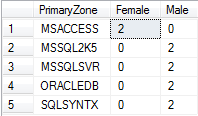
Hopefully it is self explanatory how this same data could have been pivoted by primary zone instead of gender. If not, like with anything else discussed here, please feel free to write me a comment below.
5. Conclusion
So as you can see or will find out, it is not always practical to aggregate all rows in your query based on your business need; however, you can definitely analyze a portion of the data using conditionals within your aggregates in those instances where it makes sense.This is a very novice concept, but, given the amount of questions regarding this or some complex queries that can be simplified to use this concept, I am hoping that this article was of value to you and thank you for reading.
Until the next adventure...
Best regards and happy coding,
Kevin C. Cross, Sr. (mwvisa1)
=-=-=-=-=-=-=-=-=-=-=-=-=-
If you found this article helpful, please click the Yes button after the question just below. This will give me (the author) a few points and might encourage me to write more articles.
If you didn't or otherwise feel the need to vote No, please first leave a comment to give me a chance to answer and perhaps to improve this article.
Thank you!
=-=-=-=-=-=-=-=-=-=-=-=-=-
Father, husband and general problem solver who loves coding SQL, C#, Salesforce Apex or whatever.
Have a question about something in this article? You can receive help directly from the article author. Sign up for a free trial to get started.
Comments (17)
Author
Commented:Using the Switch Function in Microsoft Access
Thought it might interest those here since we touched briefly on Switch.
Kevin
Author
Commented:Addendum: Conditional Aggregate PIVOTing In Action
In a recent question, MattDuPlessis, presented a good scenario for demonstrating cross tabulation using conditional aggregation in the question Group and Transpose data.The Request
[step=""]Table 1.1: Original Data
Open in new window
Table 1.2: Desired Results
Open in new window
[/step]The Conditional Aggregate Solution
Open in new window
I thought this was a good example to share as I focused in a lot on SUM() and COUNT() in the article as that is typically where we see conditionals during aggregation. MAX() and other aggregates make sense too at times, so just good to see others in action. In this scenario, we are pivoting data of probably the VarChar variety as it would need to be something along those lines to store both numeric and string data. Since you wouldn't typically SUM() string data, MAX() comes to mind but is especially appropriate since the expectation here is that there is only one instance of each key per ID; therefore, keep in mind this could easily also be shown with MIN().
Thanks again for reading!
Regards,
Kevin
Author
Commented:Addendum: Be Fearful of Nothing
In section #3 (NULLIF), we discussed how the following were equivalent in their results.
Open in new window
Open in new window
Open in new window
A point that came up recently, that is good also to note here, is that this is not always true. In most cases when doing conditional aggregates, the basis of the approach is that you expect at least one row to meet your criteria or are using COUNT() to tally the number of rows that do. COUNT() will return 0 if all row data counted is NULL; however, just be mindful that other aggregate functions, like SUM() or AVG(), may return NULL in the same scenario.
So to refine the above, those three statements have the same results as long as you have at least one row meeting the conditional in the aggregate. Otherwise, you will get 0 for the first and NULL for the other two.
Subsequently, this subtle difference is typically fine and often desired when dealing with pivoting data, at least in my experience, as it is often helpful for us to see where we had no sales or other activity (i.e., NULL sum) versus a net 0 month (i.e., sales but returns or credits that offset those sales). However, I saw a case recently where the conditional sum was used later in a math equation and NULL + 5 = NULL when using the standard arithmetic operators which is unlike the SUM() of two rows with data of 5 and NULL, respectively.
Hopefully that was clear and a useful addition to our tidbit on conditional aggregates.
Thanks again for reading and voting,
Kevin
Commented:
Great article!
A few suggestions:
1. In general, it is a good practice to avoid embedding VBA functions in your Access queries, and it usually can be done. They slow things down (Domain Aggregate functions are the most notorious for this).
I haven't actually benchmarked this query using iif (which I don't think would have nearly the same performance hit as a domain aggregate function):
Open in new window
But it can be written equivalently without embedded VBA as:
Open in new window
2. "NULLIF function if available on your SQL platform to generate nulls ..."
Do you want to include an alternative for other platforms as a sidenote?
Open in new window
3. Under the Pivot section, this is an option for systems (such as Access) that don't support CASE:
Open in new window
Author
Commented:View More