

Browse All Articles > Sorting Arrays and Collections in JavaScript
In this article, we'll look how to sort an Array in JavaScript, including the more advanced techniques of sorting a collection of records either ascending or descending on two or more fields.
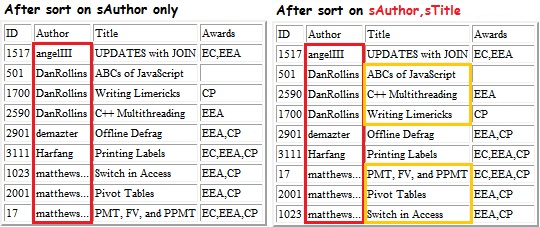
![Sorting on two fields of the record (Object)]()
Basic Sorting of Arrays
First, let's look at the basics. It's all about the sort() method of the Array object. The following example defines an array of person names, sorts them using the default handling, and displays the result:
"Sun Nov 1..." which will be sorted after
"Mon Nov 2..."
But that's just the default behavior. Array.sort() lets you customize the action by specifying a function that it will use as it sorts. In the next example, we provide a comparison function so that the sort will work for numeric values:
Sorting Descending vs. Ascending
Sorting in reverse order (Z..A or 9...0) is (or at least, should be) easy. In your comparison function, just reverse the logic used in normal (A..Z) sorting. But I have to admit that I get confused... was I supposed to subtract v1 from v2, or am I supposed to pretend that v1 is lower, to make it go higher in the list, or... all of these musings just make it hard to remember what to do. However... There is a very easy trick:
Sorting Dates
As mentioned earlier, if your array data consists of date values, the normal (default) handling of Array.sort() will fail disastrously. So, if you sort on a date field, you must supply a comparison function. Assuming that the array items are actual Date datatype values, you can use normal comparison logic -- JavaScript's < and > operators work perfectly for Date object values:
Sorting Collections (Records)
As we discussed in the last installment, it is a common programming task to work with an array of objects, in which each object is a record, containing several fields. The usual scenario is to display such data in a table, and allow the user to be able to sort it various ways. We'll look at how to sort by any single field, then reverse the order (sort descending) on a single field, and finally, we'll see how to sort on two fields -- a primary and a secondary.
Our data record will be a collection of information about articles at Experts Exchange. Here is the "defining" structure (the constructor function that we'll use as a structure definition):
Here is our sample dataset, defined in source code (it would typically be read from a web page or a database):
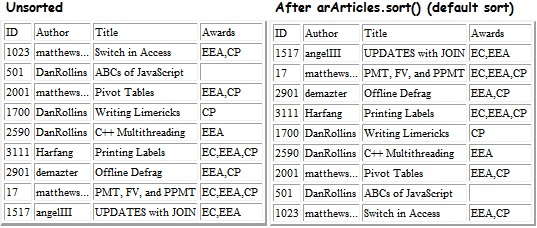
![The problem with "default" sorting of an object array]() Look closely -- the default sort seems to randomize the list! That's because without a comparison function, each array item is converted to the text "[Object object]" for comparison purposes, and that's not useful at all.
Look closely -- the default sort seems to randomize the list! That's because without a comparison function, each array item is converted to the text "[Object object]" for comparison purposes, and that's not useful at all.
Here's a simple version of a comparison function for our array of records:
![The problem with string sorting -- unwanted case sensitivity]() However, we'd probably prefer to see the sort that ignored character case so that, for instance, "angleIII" is at the top of the list. Here's a variation that does that:
However, we'd probably prefer to see the sort that ignored character case so that, for instance, "angleIII" is at the top of the list. Here's a variation that does that:
![After making the sort case-insenstive]() But that causes a problem if we want to sort of a numeric field -- the toLowerCase() function expects a string, not a number and using it on a numeric value will cause an error. Here's how to handle that: Add logic in the comparison function that checks the data type being compared...
But that causes a problem if we want to sort of a numeric field -- the toLowerCase() function expects a string, not a number and using it on a numeric value will cause an error. Here's how to handle that: Add logic in the comparison function that checks the data type being compared...
![Numeric sort, Ascending (perhaps not what's wanted)]() It's more likely that a person would want to see the articles sorted with the "best" at the top. The nAwardLvl field has been set up so that higher values mean higher accolades. So if we were to sort by descending values, then we'd get what we want. That means just inserting the swapping logic we covered earlier, like so:
It's more likely that a person would want to see the articles sorted with the "best" at the top. The nAwardLvl field has been set up so that higher values mean higher accolades. So if we were to sort by descending values, then we'd get what we want. That means just inserting the swapping logic we covered earlier, like so:
![After coding to provide Descending sort]() Note that "EEA,CP" is considered equal to "EEA-only" by our simplistic evaluator in the constructor (both cause nAwardLvl to be set to 2). I'll leave it as an exercise to the student to rewrite the constructor so that when sorted by nAwardLvl, "EEA,CP" will always be "higher" than "EEA-only."
Note that "EEA,CP" is considered equal to "EEA-only" by our simplistic evaluator in the constructor (both cause nAwardLvl to be set to 2). I'll leave it as an exercise to the student to rewrite the constructor so that when sorted by nAwardLvl, "EEA,CP" will always be "higher" than "EEA-only."
Sorting on Two Fields
When there are many records and when multiple records might have the same value, you'll want to provide a means for the user to do a secondary-field sort. For instance, the telephone book has lots of entries for people with the surname "Jones" in displaying that list, you most certainly want to do a secondary sort on the first name.
One way to handle that is to have your comparison function synthesize a combined value; for instance:
![Sorting on two fields of the record (Object)]()
TestSort.HTA.txt
=-=-=-=-=-=-=-=-=-=-=-=-=-=-=-=-=-=-=-=-=-=-=-=-=-=-=-=-=-=-=-=-=-=-=-=-=-=-=-=-=-=
If you liked this article and want to see more from this author, please click the Yes button near the:
Was this article helpful?
label that is just below and to the right of this text. Thanks!
=-=-=-=-=-=-=-=-=-=-=-=-=-=-=-=-=-=-=-=-=-=-=-=-=-=-=-=-=-=-=-=-=-=-=-=-=-=-=-=-=-=
Basic Sorting of Arrays
First, let's look at the basics. It's all about the sort() method of the Array object. The following example defines an array of person names, sorts them using the default handling, and displays the result:
var aNames= [ "Bob", "Jim", "Sam", "Al" ];
                      alert( aNames.toString() ); // (unsorted) shows: Bob,Jim,Sam,Al
                      aNames.sort();              // sort the array
alert( aNames.toString() ); // (sorted) shows: Al,Bob,Jim,Samvar aNumbers= [ 900, 17, 3, 1002 ];
alert( aNumbers.toString() ); // (unsorted) shows: 900,17,3,1002
aNumbers.sort(); // sort the array
alert( aNumbers.toString() ); // (sorted???) shows: 1002,17,3,900 "Sun Nov 1..." which will be sorted after
"Mon Nov 2..."
But that's just the default behavior. Array.sort() lets you customize the action by specifying a function that it will use as it sorts. In the next example, we provide a comparison function so that the sort will work for numeric values:
function CompareNumbers( v1, v2 ) {
                          if ( v1 < v2 ) return -1;  // v1 goes nearer to the top
                          if ( v1 > v2 ) return 1;   // v1 goes nearer to the bottom
                          return 0;                  // both are the same
                      }
                      ...
                      var aNumbers= [ 900, 17, 3, 1002 ];
                      alert( aNumbers.toString() );      // (unsorted) shows: 900,17,3,1002
                      aNumbers.sort( CompareNumbers );   // sort the array
                      alert( aNumbers.toString() );      // (sorted!!!) shows: 3,17,900,1002
Return a negative number (say, -1) if v1 is less than v2
Return a positive number (say, 1) if v1 is greater than v2
Return 0 if v1 and v2 are equal for sorting purposes
(Mnemonic: "I'm positive it's greater!")
You will often see a shortcut for numeric values -- if you subtract v2 from v1, the result is positive or negative or zero, exactly as desired for an ascending numeric sort. It's also possible to create an anonymous function right in the sort call itself. Here is an example of those two concepts combined:
Return a positive number (say, 1) if v1 is greater than v2
Return 0 if v1 and v2 are equal for sorting purposes
(Mnemonic: "I'm positive it's greater!")
aNumbers.sort(
                          function(v1,v2){
                              return v1-v2; // sort numbers ascending
                          }
); Sorting Descending vs. Ascending
Sorting in reverse order (Z..A or 9...0) is (or at least, should be) easy. In your comparison function, just reverse the logic used in normal (A..Z) sorting. But I have to admit that I get confused... was I supposed to subtract v1 from v2, or am I supposed to pretend that v1 is lower, to make it go higher in the list, or... all of these musings just make it hard to remember what to do. However... There is a very easy trick:
Use the normal (ascending) comparison logic, but swap the parameters!
function MyCompare( v1, v2 ) {
                          if ( gfSortDescending ) {
                              var t=v1; v1=v2; v2=t; // swap the parms
                          }
                          if ( v1 < v2 ) return -1;  // v1 goes nearer to the top
                          if ( v1 > v2 ) return 1;   // v1 goes nearer to the bottom
                          return 0;                  // both are the same
}Sorting Dates
As mentioned earlier, if your array data consists of date values, the normal (default) handling of Array.sort() will fail disastrously. So, if you sort on a date field, you must supply a comparison function. Assuming that the array items are actual Date datatype values, you can use normal comparison logic -- JavaScript's < and > operators work perfectly for Date object values:
function CompareDates( d1, d2 ) {
                          if ( d1 < d2 ) return -1; // d1 is in the past of d2
                          if ( d1 > d2 ) return 1;  // d1 is in the future of d2
                          return 0;
                      }
                      ...

                      var dt1= new Date('10/31/2010');
                      var dt2= new Date('11/01/2010');
                      var dt3= new Date('1/1/2011');

                      var aDates= [dt1, dt2, dt3 ];
                      aDates.sort( CompareDates );
alert( aDates.toString() ); // sorted correctly in ascending ordervar aDateStrings= ["2010-10-31", "2010-11-01", "2011-01-01" ];
aDateStrings.sort(); // OK to use the default (string) sort
alert( aDateStrings.toString() ); // sorted in ascending orderSorting Collections (Records)
As we discussed in the last installment, it is a common programming task to work with an array of objects, in which each object is a record, containing several fields. The usual scenario is to display such data in a table, and allow the user to be able to sort it various ways. We'll look at how to sort by any single field, then reverse the order (sort descending) on a single field, and finally, we'll see how to sort on two fields -- a primary and a secondary.
Our data record will be a collection of information about articles at Experts Exchange. Here is the "defining" structure (the constructor function that we'll use as a structure definition):
function ArticleRec(i,a,t,aw)
                      {
                          this.nID=       i;
                          this.sAuthor=   a;
                          this.sTitle=    t;
                          this.aAwards=   aw;    // EC, EEA, CP, or (empty)
                          this.nAwardLvl= 0;     // (none)
                          if (this.aAwards.indexOf("CP")  > -1) this.nAwardLvl = 1;
                          if (this.aAwards.indexOf("EEA") > -1) this.nAwardLvl = 2;
                          if (this.aAwards.indexOf("EC")  > -1) this.nAwardLvl = 3;
}Here is our sample dataset, defined in source code (it would typically be read from a web page or a database):
var arArticles= [
                        new ArticleRec(1023,"matthews...","Switch in Access", "EEA,CP" ),
                        new ArticleRec(501, "DanRollins", "ABCs of JavaScript","" ),
                        new ArticleRec(2001,"matthews...","Pivot Tables", "EEA,CP" ),
                        new ArticleRec(1700,"DanRollins", "Writing Limericks", "CP" ),
                        new ArticleRec(2590,"DanRollins", "C++ Multithreading","EEA" ),
                        new ArticleRec(3111,"Harfang", "Printing Labels", "EC,EEA,CP" ),
                        new ArticleRec(2901,"demazter", "Offline Defrag", "EEA,CP" ),
                        new ArticleRec(17, "matthews...","PMT, FV, and PPMT", "EC,EEA,CP" ),
                        new ArticleRec(1517,"angelIII", "UPDATES with JOIN", "EC,EEA" )
]; Look closely -- the default sort seems to randomize the list! That's because without a comparison function, each array item is converted to the text "[Object object]" for comparison purposes, and that's not useful at all.
Here's a simple version of a comparison function for our array of records:
var gsSortBy="";  // a field name -- global var for now

                      MyCompare= function(v1,v2) {
                          if ( v1[gsSortBy] < v2[gsSortBy] ) return -1;
                          if ( v1[gsSortBy] > v2[gsSortBy] ) return 1;
                          return 0;
                      }
                      ...
                      gsSortBy="sAuthor";  // set the sort key
arArticles.sort( MyCompare );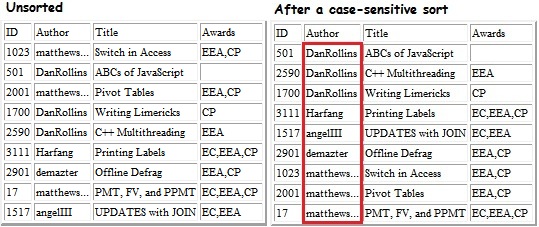 However, we'd probably prefer to see the sort that ignored character case so that, for instance, "angleIII" is at the top of the list. Here's a variation that does that:
var gsSortBy="";  // a field name -- global var for now

                      MyCompareNoCase= function(v1,v2) {
                          if ( v1[gsSortBy].toLowerCase() < v2[gsSortBy].toLowerCase() ) return -1;
                          if ( v1[gsSortBy].toLowerCase() > v2[gsSortBy].toLowerCase() ) return 1;
                          return 0;
                      }
                      ...
                      gsSortBy= "sAuthor";
arArticles.sort( MyCompareNoCase );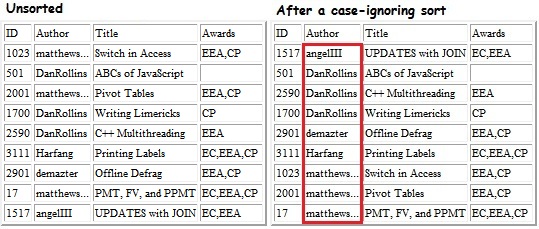 But that causes a problem if we want to sort of a numeric field -- the toLowerCase() function expects a string, not a number and using it on a numeric value will cause an error. Here's how to handle that: Add logic in the comparison function that checks the data type being compared...
var gsSortBy="";  // a field name -- global var for now

                      MyCompareNoCaseAndNumbers= function( v1,v2 ) {      // two objects
                          if ( typeof v1[gsSortBy]=="number" ) { // when sorting by a numeric field
                             if ( v1[gsSortBy] < v2[gsSortBy] ) return -1;
                             if ( v1[gsSortBy] > v2[gsSortBy] ) return 1;
                             return 0;
                          }
                          else {  // assume sort field is a String
                              if ( v1[gsSortBy].toLowerCase() < v2[gsSortBy].toLowerCase() ) return -1;
                              if ( v1[gsSortBy].toLowerCase() > v2[gsSortBy].toLowerCase() ) return 1;
                              return 0;
                          }
                      }
                      ...
                      gsSortBy= "nID";  // set the sort key
arArticles.sort( MyCompareNoCaseAndNumbers );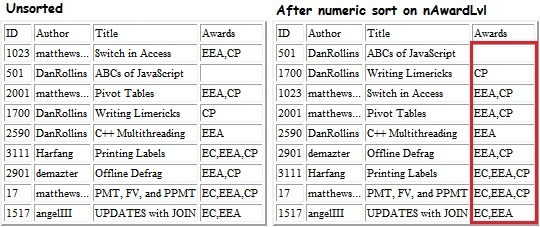 It's more likely that a person would want to see the articles sorted with the "best" at the top. The nAwardLvl field has been set up so that higher values mean higher accolades. So if we were to sort by descending values, then we'd get what we want. That means just inserting the swapping logic we covered earlier, like so:
MyCompareNoCaseAndNumbers= function(v1,v2) {
                          if (gfSortDescending) {
                              var t=v1; v1=v2; v2=t; // swap the parms
                          }
                          // do the comparison here
                          ...
                      }
                      ...
                      gsSortBy= "nAwardLvl";       // global var for now
                      gfSortDescending= true;        // global var for now
arArticles.sort( MyCompareNoCaseAndNumbers );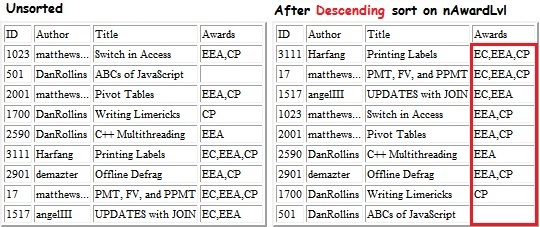 Note that "EEA,CP" is considered equal to "EEA-only" by our simplistic evaluator in the constructor (both cause nAwardLvl to be set to 2). I'll leave it as an exercise to the student to rewrite the constructor so that when sorted by nAwardLvl, "EEA,CP" will always be "higher" than "EEA-only."
Sorting on Two Fields
When there are many records and when multiple records might have the same value, you'll want to provide a means for the user to do a secondary-field sort. For instance, the telephone book has lots of entries for people with the surname "Jones" in displaying that list, you most certainly want to do a secondary sort on the first name.
One way to handle that is to have your comparison function synthesize a combined value; for instance:
var sKey1= v1.sNameLast + v1.sNameFirst;
                      var sKey2= v2.sNameLast + v2.sNameFirst;

                      if (sKey1 > sKey2 ) return 1;
                      if (sKey1 < sKey2 ) return -1;
return 0;// uses global variables gsSortyBy and gsSortBy2
MyCompareTwoKeys= function(v1,v2) {
if ( v1[gsSortBy] < v2[gsSortBy] ) return -1;
if ( v1[gsSortBy] > v2[gsSortBy] ) return 1;
// else, they are equal
if ( gsSortBy2 > "" ) { // a secondary sort field has been set
if ( v1[gsSortBy2] < v2[gsSortBy2] ) return -1;
if ( v1[gsSortBy2] > v2[gsSortBy2] ) return 1;
}
return 0;
}
Note:
To sort by three keys, just add another comparison sequence when the two secondary keys are equal.
At long last, here's the "final" code that includes:
To sort by three keys, just add another comparison sequence when the two secondary keys are equal.
String sort that ignores character case
Numeric sort that works as expected (e.g., 99 < 100)
Sort Ascending (AtoZ) or descending (ZtoA)
Ability to specify which field to use as the sort key
Ability to specify a secondary sort
Uses "local" object attributes of the Array object to avoid global variables
// Assign some default attributes to the array object
                      // This lets us keep the data together rather than use global variables
                      //
                      arArticles.sortBy=  "nAwardLvl";  // a field name in an ArticleRec object
                      arArticles.sortDir= "AtoZ";       // "AtoZ" or "ZtoA"
                      arArticles.sortBy2= "sAuthor";
                      arArticles.sortDir2="AtoZ";
                      //-------------------------------------- the sort function for this array
                      arArticles.Compare= function(v1,v2) {
                          if ( arArticles.sortDir == "ZtoA" ) {
                              var t=v1; v1=v2; v2=t; // swap the parms
                          }
                          var sFld= arArticles.sortBy;
                          if ( typeof v1[sFld]=="number" ) {
                             if ( v1[sFld] < v2[sFld] ) return -1;
                             if ( v1[sFld] > v2[sFld] ) return 1;
                          }
                          else { // string
                             if ( v1[sFld].toLowerCase() < v2[sFld].toLowerCase() ) return -1;
                             if ( v1[sFld].toLowerCase() > v2[sFld].toLowerCase() ) return 1;
                          }
                          //------------------------------- check for and handle secondary sort key
                          if ( arArticles.sortBy2 > "" ) {
                              if ( arArticles.sortDir=="AtoZ" && arArticles.sortDir2=="ZtoA" ) {
                                  var t=v1; v1=v2; v2=t; // swap the parms
                              }
                              sFld= arArticles.sortBy2;
                              if ( typeof v1[sFld]=="number" ) {
                                 if ( v1[sFld] < v2[sFld] ) return -1;
                                 if ( v1[sFld] > v2[sFld] ) return 1;
                              }
                              else { // string
                                  if ( v1[sFld].toLowerCase() < v2[sFld].toLowerCase() ) return -1;
                                  if ( v1[sFld].toLowerCase() > v2[sFld].toLowerCase() ) return 1;
                              }
                          }
                          return 0;
}TestSort.HTA.txt
=-=-=-=-=-=-=-=-=-=-=-=-=-
If you liked this article and want to see more from this author, please click the Yes button near the:
Was this article helpful?
label that is just below and to the right of this text. Thanks!
=-=-=-=-=-=-=-=-=-=-=-=-=-
Have a question about something in this article? You can receive help directly from the article author. Sign up for a free trial to get started.
Comments (0)