

Browse All Articles > Nmap: Performing a Service Scan
As discussed in my previous articles, the Nmap Security Scanner can be used to perform a port scan of remote systems. A port scan of a system can let the Nmap user know which services are available on a system as well as if these services are accessible through a firewall.
By default, Nmap will use commonly known port assignments to "assume" which service is running on an associated port. For example, if Nmap detects TCP port 80 is open on a system, Nmap reports that the port is open for HTTP - traditionally used to host a website. Of course, this does not mean necessarily that a web server is running on the system. Perhaps the administrator wanted to be tricky and hide an active SSH service on TCP port 80 which the default scan would not detect.
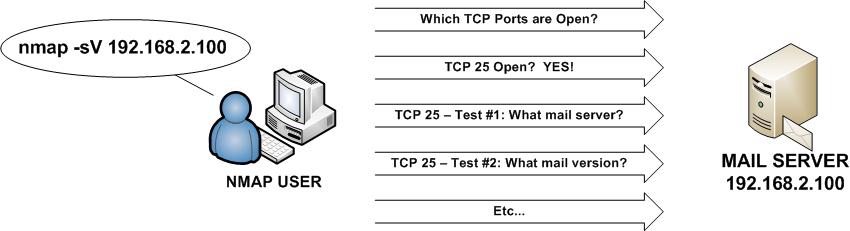
To determine what service is actually running on the port, Nmap has the ability to conduct a "Service Scan" (-sV) which conducts additional tests against an open port in an effort to determine more information about the service running on a specific port.
This article discusses features that are available in Nmap 5.0 and higher.
Conducting an Nmap Service Scan
When an Nmap scan is performed with the -sV option, the following will occur by default:
- With the Service Scan, Nmap will conduct additional tests on each open port to determine which service is truly running on the port.
- Your system will scan the 1,000 most commonly used TCP ports on your target(s). These ports were enumerated by Fyodor when he conducted an Nmap scan against every host on the Internet and compiled the end results. The scan type conducted is a standard SYN scan.
- Nmap will randomize the order in which the ports are scanned. If you wish for the ports to be scanned in sequential order, perhaps to test your IDS/IPS capabilities, use the -r option.
- If an IP address is specified as the scan target, Nmap will attempt to perform a reverse DNS lookup to identify the FQDN of the scanned host(s).
In the following example, Nmap is used to conduct a Service Scan of the system at 192.168.2.100.
![Nmap Service Scan (-sV)]()
As you can see, the above scan discovered that eight TCP ports were running on the system - noted by the "open" state. The remaining 992 scanned ports were reported as closed as no services were running on the system. By default, Nmap will "guess" which services are running on each of these ports based on the common usage of each port number.
In our example, Nmap performed a Service Scan to determine the eight services that appear to be running on the system. For example, Nmap determined that Microsoft Terminal Services was actively available on TCP port 3389 while an Exchange version (6.5.7638.1) was noted via the Routing Service on TCP port 691. A quick Google search indicates that the version of Exchange running on the system is 2003 SP2 with additional patches installed. Such information could be used by a security administrator for logging in to the system or provide a malicious attacker with information about the system with various attack avenues they might explore in their efforts to compromise the machine.
REMEMBER - Each system has 65,535 TCP and 65,535 UDP ports. The standard Nmap scan only scans the 1,000 most commonly used ports to help expedite scan times.
NOTE - If you do see a result state as "filtered", this means that access to the port by Nmap has been blocked. Typically, this result indicates that a firewall has prevented the Nmap scan from reaching the system on the filtered ports.
For other Nmap articles:
"Nmap: Performing a Basic Scan" (https://www.experts-exchange.com/articles/Security/Misc/Nmap-Performing-a-Basic-Scan.html)
"Nmap: Host Discovery Basics" (https://www.experts-exchange.com/articles/Security/Misc/Nmap-Host-Discovery-Basics.html)
By default, Nmap will use commonly known port assignments to "assume" which service is running on an associated port. For example, if Nmap detects TCP port 80 is open on a system, Nmap reports that the port is open for HTTP - traditionally used to host a website. Of course, this does not mean necessarily that a web server is running on the system. Perhaps the administrator wanted to be tricky and hide an active SSH service on TCP port 80 which the default scan would not detect.
To determine what service is actually running on the port, Nmap has the ability to conduct a "Service Scan" (-sV) which conducts additional tests against an open port in an effort to determine more information about the service running on a specific port.
This article discusses features that are available in Nmap 5.0 and higher.
Conducting an Nmap Service Scan
When an Nmap scan is performed with the -sV option, the following will occur by default:
- With the Service Scan, Nmap will conduct additional tests on each open port to determine which service is truly running on the port.
- Your system will scan the 1,000 most commonly used TCP ports on your target(s). These ports were enumerated by Fyodor when he conducted an Nmap scan against every host on the Internet and compiled the end results. The scan type conducted is a standard SYN scan.
- Nmap will randomize the order in which the ports are scanned. If you wish for the ports to be scanned in sequential order, perhaps to test your IDS/IPS capabilities, use the -r option.
- If an IP address is specified as the scan target, Nmap will attempt to perform a reverse DNS lookup to identify the FQDN of the scanned host(s).
In the following example, Nmap is used to conduct a Service Scan of the system at 192.168.2.100.
Starting Nmap 5.00 ( http://nmap.org ) at 2009-11-19 22:40 Eastern Standard Time

                      Interesting ports on mail.company.net (192.168.2.100):
                      Not shown: 992 closed ports
                      PORT      STATE SERVICE       VERSION
                      25/tcp    open  smtp
                      80/tcp    open  http                Microsoft IIS webserver 6.0
                      135/tcp   open  msrpc            Microsoft Windows RPC
                      139/tcp   open  netbios-ssn
                      445/tcp   open  microsoft-ds   Microsoft Windows 2003 microsoft-ds
                      593/tcp   open  ncacn_http     Microsoft Windows RPC over HTTP 1.0
                      691/tcp   open  resvc             Microsoft Exchange routing server 6.5.7638.1
                      3389/tcp  open  microsoft-rdp Microsoft Terminal Service

                      Service Info: OS: Windows

                      Service detection performed. Please report any incorrect results at http://nmap.
                      org/submit/ .
Nmap done: 1 IP address (1 host up) scanned in 47.02 secondsAs you can see, the above scan discovered that eight TCP ports were running on the system - noted by the "open" state. The remaining 992 scanned ports were reported as closed as no services were running on the system. By default, Nmap will "guess" which services are running on each of these ports based on the common usage of each port number.
In our example, Nmap performed a Service Scan to determine the eight services that appear to be running on the system. For example, Nmap determined that Microsoft Terminal Services was actively available on TCP port 3389 while an Exchange version (6.5.7638.1) was noted via the Routing Service on TCP port 691. A quick Google search indicates that the version of Exchange running on the system is 2003 SP2 with additional patches installed. Such information could be used by a security administrator for logging in to the system or provide a malicious attacker with information about the system with various attack avenues they might explore in their efforts to compromise the machine.
REMEMBER - Each system has 65,535 TCP and 65,535 UDP ports. The standard Nmap scan only scans the 1,000 most commonly used ports to help expedite scan times.
NOTE - If you do see a result state as "filtered", this means that access to the port by Nmap has been blocked. Typically, this result indicates that a firewall has prevented the Nmap scan from reaching the system on the filtered ports.
For other Nmap articles:
"Nmap: Performing a Basic Scan" (https://www.experts-exchange.com/articles/Security/Misc/Nmap-Performing-a-Basic-Scan.html)
"Nmap: Host Discovery Basics" (https://www.experts-exchange.com/articles/Security/Misc/Nmap-Host-Discovery-Basics.html)
Have a question about something in this article? You can receive help directly from the article author. Sign up for a free trial to get started.
Comments (1)
Commented:
Given it's written by the creator of NMAP, it outlines the real level of detail and strategies NMAP is capable of.