

Browse All Articles > Exchange DNS Configuration
I have seen a number of questions over the past few months regarding DNS configuration for an Exchange Server. Incorrectly configured DNS can cause your server to be rejected by receiving servers that are performing certain types of checks on the mail it receives.
One of the most common of these is the rDNS lookup which basically checks that the server sending the message actually exists.
I will try to cover the correct configuration here for hosting your own mail server and sending mail out via DNS rather than a smart host. This configuration is not as important if you send via a 3rd party relay.
MX Configuration
The MX record(s) for your domain provide systems sending you e-mail with the correct path for your mail server. If you're using a relay/SPAM service then your MX record will be configured to use their servers' host names. If you host your own server, the MX record will be configured with your server's IP address.
Step 1
Confirm the External IP address your server is using. This can be achieved by simply going to http://whatsmyip.org from your Exchange Server. At the very top of the screen this will provide you with your IP address.
Step 2
Create an A record in the DNS that controls your EXTERNAL domain name. This is the DNS for the part after the @ in your e-mail address. I always use mail.domainname.com but you don’t have to. It doesn’t matter what you use as long as it’s consistent.
Step 3
You now need to configure the MX record for your main domain -- the one after the @ sign for which you want to receive email. To do this, edit the DNS settings for that domain and set the MX record to use the A record you have configured in Step 2.
Do not use IP addresses or CNAME records for the MX entry as this can throw up errors on DNS lookups and is also against RFC standards. See RFC2181: http://tools.ietf.org/html/rfc2181#section-10.3 , section 10.3
Extract: "This domain name must have as its value one or more address records. Currently those will be A records, however in the future other record types giving addressing information may be acceptable. It can also have other RRs, but never a CNAME RR."
If you only have a single connection to the internet then only setup 1 MX record, and avoid giving it a value of 0 - use 5 or 10. This will be your PRIMARY MX.
If you have a second connection to the internet that has a different IP address that you use for backup purposes in case your main line goes down then add a secondary MX with an A record that is configured for this IP address with a higher value, of say 20.
If you only have a single server, avoid the temptation to setup multiple MX records either setting up two MX records pointing to the same IP address as this is a complete waste of time, or one pointing to your own server and one pointing to a backup MX server hosted for you as this will get targeted by spammers and you will be forwarding spam from your secondary MX to your Exchange server.
Step 4
Contact your ISP as you will need to configure a Reverse DNS, also referred to as a PTR (pointer) record. This is against your IP address so can only be done by the company that provide your internet connection. Whilst a generic rDNS record will work, any systems doing strict lookup will fail your server if it doesn’t match the A record configured in Step 2 so, therefore, it is best practice to configure your rDNS to use mail.domainname.com (A record configured in Step 2)
Step 5
Modify your send connector/SMTP Connector. Depending on which version of Exchange Server you are using this process will be different.
In Exchange 2007 & 2010 the Send Connector will need to be modified.
Open Exchange Management Console, navigate to Organisation Configuration > Hub Transport > Send Connector and right click on the send connector configured for internet usage and select properties.
![send_connector]()
On the first screen you will see a FQDN box. This should match the A record you created in Step 2. For consistency you may also want to do the same on the Internet Receive Connector which is located under Server Configuration > Hub Transport and by default it will be the one that starts with Default.
In Exchange 2003 you will need to modify the properties of the SMTP Virtual Server.
Open Exchange System Manager, navigate to Administrative Groups > First Administrative Group > Servers > Servername > Protocols > SMTP and right click on the Default SMTP Virtual Server select properties.
![smtp_virtual_s]()
Under the delivery tab click Advanced and enter the A record you created in Step 2 for the Fully Qualified Domain Name
Summary
In summary then your DNS configuration should look like this:
•A record mail.domainname.com configured for IP address of your server
•MX record for domainname.com configured to use A record mail.domainname.com
•rDNS configured to use mail.domainname.com
•Send Connector/Receive Connector in Exchange 2007 FQDN set to: mail.domainname.com
•SMTP Virtual Server in Exchange 2003 FQDN set to: mail.domainname.com
One of the most common of these is the rDNS lookup which basically checks that the server sending the message actually exists.
I will try to cover the correct configuration here for hosting your own mail server and sending mail out via DNS rather than a smart host. This configuration is not as important if you send via a 3rd party relay.
MX Configuration
The MX record(s) for your domain provide systems sending you e-mail with the correct path for your mail server. If you're using a relay/SPAM service then your MX record will be configured to use their servers' host names. If you host your own server, the MX record will be configured with your server's IP address.
Step 1
Confirm the External IP address your server is using. This can be achieved by simply going to http://whatsmyip.org from your Exchange Server. At the very top of the screen this will provide you with your IP address.
Step 2
Create an A record in the DNS that controls your EXTERNAL domain name. This is the DNS for the part after the @ in your e-mail address. I always use mail.domainname.com but you don’t have to. It doesn’t matter what you use as long as it’s consistent.
Step 3
You now need to configure the MX record for your main domain -- the one after the @ sign for which you want to receive email. To do this, edit the DNS settings for that domain and set the MX record to use the A record you have configured in Step 2.
Do not use IP addresses or CNAME records for the MX entry as this can throw up errors on DNS lookups and is also against RFC standards. See RFC2181: http://tools.ietf.org/html
Extract: "This domain name must have as its value one or more address records. Currently those will be A records, however in the future other record types giving addressing information may be acceptable. It can also have other RRs, but never a CNAME RR."
If you only have a single connection to the internet then only setup 1 MX record, and avoid giving it a value of 0 - use 5 or 10. This will be your PRIMARY MX.
If you have a second connection to the internet that has a different IP address that you use for backup purposes in case your main line goes down then add a secondary MX with an A record that is configured for this IP address with a higher value, of say 20.
If you only have a single server, avoid the temptation to setup multiple MX records either setting up two MX records pointing to the same IP address as this is a complete waste of time, or one pointing to your own server and one pointing to a backup MX server hosted for you as this will get targeted by spammers and you will be forwarding spam from your secondary MX to your Exchange server.
Step 4
Contact your ISP as you will need to configure a Reverse DNS, also referred to as a PTR (pointer) record. This is against your IP address so can only be done by the company that provide your internet connection. Whilst a generic rDNS record will work, any systems doing strict lookup will fail your server if it doesn’t match the A record configured in Step 2 so, therefore, it is best practice to configure your rDNS to use mail.domainname.com (A record configured in Step 2)
Step 5
Modify your send connector/SMTP Connector. Depending on which version of Exchange Server you are using this process will be different.
In Exchange 2007 & 2010 the Send Connector will need to be modified.
Open Exchange Management Console, navigate to Organisation Configuration > Hub Transport > Send Connector and right click on the send connector configured for internet usage and select properties.
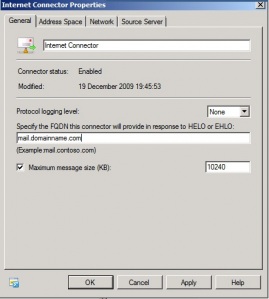
On the first screen you will see a FQDN box. This should match the A record you created in Step 2. For consistency you may also want to do the same on the Internet Receive Connector which is located under Server Configuration > Hub Transport and by default it will be the one that starts with Default.
In Exchange 2003 you will need to modify the properties of the SMTP Virtual Server.
Open Exchange System Manager, navigate to Administrative Groups > First Administrative Group > Servers > Servername > Protocols > SMTP and right click on the Default SMTP Virtual Server select properties.
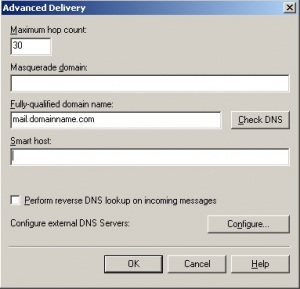
Under the delivery tab click Advanced and enter the A record you created in Step 2 for the Fully Qualified Domain Name
Summary
In summary then your DNS configuration should look like this:
•A record mail.domainname.com configured for IP address of your server
•MX record for domainname.com configured to use A record mail.domainname.com
•rDNS configured to use mail.domainname.com
•Send Connector/Receive Connector in Exchange 2007 FQDN set to: mail.domainname.com
•SMTP Virtual Server in Exchange 2003 FQDN set to: mail.domainname.com
Have a question about something in this article? You can receive help directly from the article author. Sign up for a free trial to get started.
Comments (18)
Commented:
I also have a question, I have 2 different domains (abc.com and xyz.net), in 2 different forests , both are running Exchange 2007. I want to setup users in domain abc.com to have an email address xyz.net was well as abc.com email address. Do I just setup a PTR for xyz.net to point to the ip address of abc.com?
If so, does that cause any email routing issues externally? If that is not the best way to do it, any other suggestions how?
Commented:
at the moment i have three DNS "zones"
1. Forward look up zone
2. Reverse lookup zone
3. Conditional Fowarders.
Am i supposed to have an external Zone? if so where do i create this? how am i supposed to do this?
Basically what is happening when a user logs on the there computer and runs outlook 2007 it starts the email config wizard and searches for the email settings and comes back with my local domain name longridgerv.local but it should come back with longridge.org.au when i manualy enter this and users name and password and click connect it instantly pops up with welcome back to remote.longridge.org.au and asks for a user name and password when i enter it there it just keeps poping up til it finally says cannot connect. What am i missing?
One other thing i had one user out of 50 connect straight away no problems but now it just keeps asking for password
Commented:
I still have a question. Do I still have to change my FQDN on my internal mail server when using a UTM which sends and receives the mail on the outside, say smart host? I configured that with the name of the MX and A record where my domain is hosted? My PRT, A an MX records are pointing to my internal mail server on my local domain and the MX and A record (unable to add a PRT) with my domain hosting partner are pointing to my static ip, which will be forwarded to the UTM.
Commented:
I am a beginner in exchange, for my study purpose i installed one domain controller and another one server with exchange server on Vmware workstation.
Now my requirement is send mail to outside world. And I have not configured any relays etc. I got a free domain and hosted it freely. For that on where I should configure my DNS records, either on server or on hosted server.
Commented:
I am a beginner in exchange, for my study purpose i installed one domain controller and another one server with exchange server on Vmware workstation.
Now my requirement is to send mail to outside world. And I have not configured any relays etc. I got a free domain and hosted it freely. For that on where I should configure my DNS records, either on server or on hosted server. Is it must to create SMTP relay.
Kindly guide me how to proceed further.
View More