Backup Exchange 2010 Information Store using Windows Backup

AID: 2452
  • Status: Published

21688 points

  • Bydemazter
  • TypeTips/Tricks
  • Posted on2010-02-12 at 11:43:38
Awards
  • Community Pick
  • Experts Exchange Approved
There seems to be quite a lot of confusion around the ability to backup Exchange 2010 using the built in Windows Backup feature.  This stems from the omission of this feature prior to Exchange 2007 service Pack 2

Exchange 2010 includes a plug-in for Windows Server Backup that allows you to perform a backup of the Exchange data using the Volume Shadow Copy Service.

Preparation Tasks

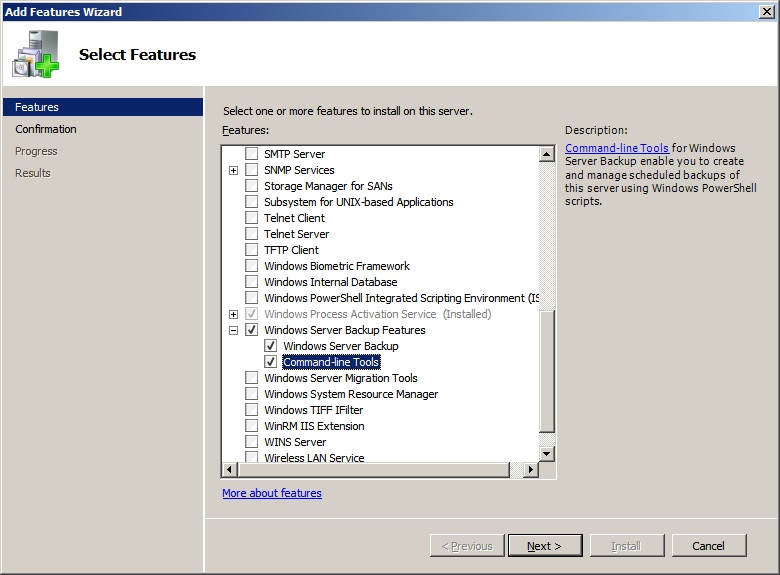
With Windows 2008 R2 and Windows 2008 the Windows Backup feature is not installed by default so we first need to add this feature.  To do this launch Server Manager, under Features select Add Feature.   Locate the Windows Server Backup Features and put a check box in both options.
 
Windows-Backup-Tools.jpg
  • 96 KB
  • Windows-Backup-Tools.jpg
Windows-Backup-Tools.jpg


Now that the features are installed the plugin needs to be enabled.  In the services snapin (start > Run > Services.msc) locate the “Microsoft Exchange Server Extension for Windows Server Backup” set the service to automatic and start it.

Backup the store

From Start > All Programs > Accessories  > System Tools select Windows Server Backup

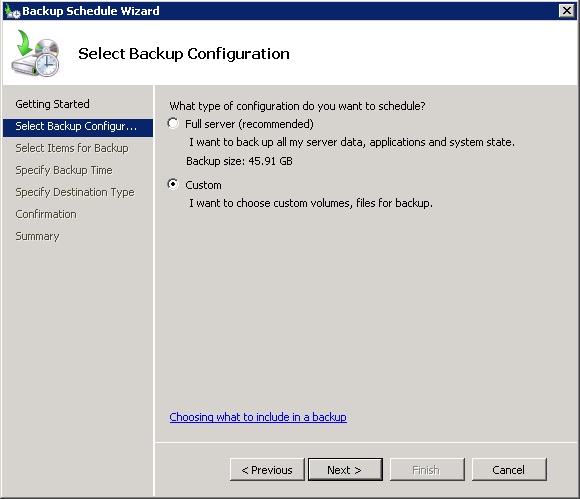
In the task pane select Backup Schedule.  When the wizard opens click Next on the first screen and then select either Full Backup if you want to perform a full system backup or Custom if you just want to select the items to be backed up.  So if you just want to backup the information store then select Custom.  Click Next.
 
Backup-Wizard-01.jpg
  • 54 KB
  • Backup-Wizard-01.jpg
Backup-Wizard-01.jpg


On the following screen click Add Items and browse to the folder your information store files are stored in.  By default with Exchange 2010 this is C:\Program Files\Microsoft\Exchange Server\V14\Mailbox there will then be a folder for each store called Mailbox Database (Database reference number)

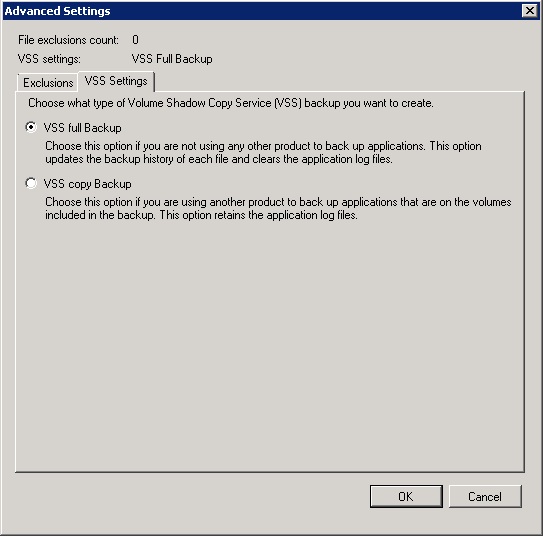
Once you have selected the Mailbox Databases and have returned to the wizard screen click the Advanced Settings button and under VSS Settings select VSS Full Backup
 
Backup-Wizard-02.jpg
  • 53 KB
  • Backup-Wizard-02.jpg
Backup-Wizard-02.jpg


Configure your schedule and set the destination on the following two screens and select Finish.  This will backup your Exchange databases and flush the logs.
    Asked On
    2010-02-12 at 11:43:38ID2452
    Tags

    Exchange 2010

    ,

    backup

    Topic

    Exchange Email Server

    Views
    49185

    Comments

    Expert Comment

    by: Arabsoft-ACS on 2010-03-06 at 23:32:36ID: 10547

    Here is my path (folder) which i selected:
    F:\Program Files\Microsoft\Exchange Server\V14\Mailbox\Mailbox Database 1388205925

    I just selected logs, didnt select database which is on below path:

    E:\Program Files\Microsoft\Exchange Server\V14\Mailbox\Mailbox Database 1388205925

    Do i have to select both under the backup selection and perform backup ?

    Expert Comment

    by: nesan1984 on 2010-04-01 at 07:12:36ID: 12534


    Separate folder cannot be selected for backup when using Windows Server Backup. You can select only the volumes [drives]. And i think, you need to select both the drives for doing a successful full backup.

    Author Comment

    by: demazter on 2010-04-01 at 08:01:18ID: 12536

    >>Separate folder cannot be selected for backup when using Windows Server Backup. You can select only the volumes [drives].

    Have you followed the instructions exactly in the article?

    You can select individual files/folders if you follow the instructions in my article.
    When I write an article I test each individual step in my lab before I submitt it to EE for publishing.

    I have attached screen shots of my server with an individual folder selection and an individual file selection using Windows Backup

     
    folder-selection.jpg
    • 69 KB
    • folder-selection
    folder-selection

     
    individual-file-selection.jpg
    • 74 KB
    • individual-file-selection
    individual-file-selection

      Author Comment

      by: demazter on 2010-04-01 at 08:15:49ID: 12537

      nesan1984 > I think I have worked out what you are doing.

      When you go through the backup wizard (either one time or scheduled) you MUST select Custom on the Backup Configuration Screen.  If you select "Full Server (recommended" then you do not get the choice to make individual file selections

      Expert Comment

      by: snowdog_2112 on 2010-04-13 at 19:54:53ID: 13105

      Hate to disagree, but as of today (4/13/10), even choosing a Custom Backup, the only options are to *exclude* entire volumes from the backup.

      Further, it doesn't let you exclude the C: volume.

      Even further still, Windows Backup is in Administrative Tools, not Accessories-->System Tools.

      Is this new/different?  Or is MS reverting to Exch07 with no means to back up the data?

      Author Comment

      by: demazter on 2010-04-13 at 21:33:22ID: 13107

      Snowdog_2112,

      Please can you clarify what isn't working for you?

      It IS possible to just backup the information store as I have demonstrated above.  Which part isn't working for you!

      Thanks
      demazter

      Author Comment

      by: demazter on 2010-04-13 at 22:29:00ID: 13109

      >>Even further still, Windows Backup is in Administrative Tools, not Accessories-->System Tools
      On SBS you are correct the Windows Backup is in Administrative Tools but since Exchange 2010 is not part of SBS I didn't clarify this point.

      On both Windows 2008 Server and Windows 2008 R2 Server you will find the backup tool in Start > All Programs > Accessories  > System Tools as well as Start > Administrative Tools.

      But since it is possible to HIDE the Administrative Tools from the Start Menu I included the default location of the utility that would be valid for ALL readers  of my article.

      Thanks
      demazter

      Expert Comment

      by: tonytaz on 2010-05-01 at 05:56:20ID: 14013

      Thanks demazter,

      I followed you steps, add this works perfectly for me

      Thanks

      Tonytaz

      Expert Comment

      by: haydent on 2010-05-10 at 08:18:34ID: 14202

      We have a three node DAG, and 6 mail stores. The mail stores, and the logs for each mail store reside in their own lun/folder.

      It appears that Windows Server Backup will not truncate the logs if the database and the log files are in different folders.

      For testing, I have moved the log files back to the same folder where the db resides, and the backup will truncate the logs.

      We use Networker but they are not ready for 2010 yet. So for now, were stuck with Win backup.

      Any ideas how to get around this issue?

      Author Comment

      by: demazter on 2010-05-10 at 08:20:07ID: 14203

      Are you also backing up the log files?

      Are you using the method in my article?

      Expert Comment

      by: haydent on 2010-05-10 at 09:07:30ID: 14205

      I tried two methods;

      1. Backup up just the edb file

      2. Backup the entire db and log volumes

      Expert Comment

      by: haydent on 2010-05-10 at 09:20:52ID: 14207

      Are your configurations like mine? DB and logs in different folders.

      Expert Comment

      by: EE-Jon on 2010-05-10 at 13:22:14ID: 14229

      I am having the same problem as hayden.  If my logs are on seperate volumes, the do not get truncated.  I am doing a full VSS backup of exchange.

      Author Comment

      by: demazter on 2010-05-10 at 14:16:54ID: 14240

      I will test this and report back with my findings.  Watch this space.

      Expert Comment

      by: haydent on 2010-05-11 at 06:29:16ID: 14271

      Instead of selecting the edb, or the entire volume, I select just the top level Exchange folder on all volumes (db’s and logs.)

      The job completes, and the logs truncate!

      What I have been noticing is, when looking at the db properties in emc, the last backup time shows four hours into the future. All times, and time zones are correct.

      On a side note, EMC announce this week the release of Networker support for 2010.

      Expert Comment

      by: haydent on 2010-05-11 at 06:42:51ID: 14273

      Another issue.

      Since I have 7 mail stores and 7 sets of logs, and Win BU can only handle one scheduled job, all data from all db and logs get dumped into the same destination.

      I see 7 vhd's which I assume are the dbs, but where are the logs?

      Expert Comment

      by: haydent on 2010-05-13 at 06:06:19ID: 14364

      Im back...

      Looks like my solution only worked once. The logs are not truncating.

      Expert Comment

      by: JammyPak on 2010-05-19 at 19:36:52ID: 14902

      some items I would be curious to know if you've examined:
       - what if your volume is over 2TB which is the limit for Windows Server Backup (right now we're seemingly able to work by just selecting the folders we want)
      - what if I want to backup weekly or 2-3 x / week? nightly is not feasible as I can't write all of the data to tape quickly enough. I tried using wbadmin cmd line but not successful yet
      - I am having terrible performance in the time it takes to run consistency check and do the backup to remote share, any performance tips (seems I can't setup multiple bkup jobs for different things using the gui).

      thanks!

      Expert Comment

      by: royceeb on 2010-05-28 at 20:46:56ID: 15158

      I too would like to know how you got the granular selection option. The choices I get for Scheduled Backup are very limited. No folder selection, only the ability to not back up the log drive. I am running Win2k8 SP2, no DAG.

      Expert Comment

      by: affinity-systems on 2010-07-28 at 02:40:58ID: 17542

      We have multiple servers in our company.
      One of our servers is running Server 2008 R2 Enterprise.  The Server Backup software DOES ALLOW for individual selections when backing up.  
      One of our other servers is Server 2008 R1 Standard with Exchange 2010.  This server DOES NOT have the option of individual file selection when using Server backup.  It also DOES NOT place the server backup under Start > All Programs > Accessories  > System Tools as mentioned above.

      Expert Comment

      by: SqueezeOJ on 2010-08-10 at 04:24:38ID: 17977

      Do I need to stop all Exchange Services before running the backup?  

      (Server 2008, Exchange 2010 Rollup 3)

      Author Comment

      by: demazter on 2010-08-10 at 04:25:18ID: 17978

      no, you shouldn't need to.

      Expert Comment

      by: Treadstone21 on 2010-08-22 at 20:08:37ID: 18636

      So basically, in order to completely use the method suggested by "demazter" (have the granular option).
      You need to have Windows Server 2008 Enterprise installed, and not Windows Server 2008 Standard?

      Expert Comment

      by: rayfordporter on 2010-09-02 at 07:16:43ID: 19018

      I agree with Treadstone21. I also have checked for upodates but to no avail. It appears that only Windwos 2008 R2 has this feature. Has anyone been able to find and update that may fix this?

      Expert Comment

      by: JesperHC on 2010-11-05 at 06:53:53ID: 21108

      I can do the backup (win2008R2 and Exchange2010), but it doesn't seem to register as exchange backup, because when I try to do a recover the application option is greyed out.
      When I do the backup it looks like it's acknowledging exchange as an application (...doing the consistency check for application Exchange...).
      I also have logs and store on different drives.. could this be the problem?

      Expert Comment

      by: JesperHC on 2010-11-08 at 02:31:32ID: 21176

      Got it working. Only if I select the whole drive (ie drive E and F forexample - logs and database) does it work when recovering as application.

      Expert Comment

      by: Trihimbulus on 2011-02-12 at 19:39:27ID: 23785

      Dematzer - I am attempting to backup my Exchange 2010 DB and Logs (really need to flush the logs!) and am getting the following error - "There was a failure in updating the backup to remove deleted items. The version does not support this version of the file format." Any idea what's going on?

      Expert Comment

      by: Trihimbulus on 2011-02-12 at 19:43:10ID: 23786

      Trying to do a full backup to flush logs

      Expert Comment

      by: STNoida on 2011-03-28 at 04:51:42ID: 25163

      Hi,

      I have a problem while backing up exchange 2010sp1 installed on windows server 2008R2, Ent .

      1- i have installed CAS/HUB servers on microsoft VM.
      2-i hvae total 4 server playing exchange service (Mx-01 & Mx-02 as HUB/CAs and mx-03 &mx-04 as mailbox)
      3-i have 10 Database groups, 5mounted on mx-03 and 5 on mx-04.
      4-i am using symentech Netbackup to backup exchange , and backup application is taking backup of databases succesfully but log are not purging.
      and getting following errors--

      22/03/2011 2:24:46 PM - Error bpbrm(pid=11472 ERR - Error encountered while attempting to get additional files for Microsoft Information Store:\East_Database\Logs_1300782888\
      22/03/2011 2:24:46 PM - Error bpbrm(pid=11472) from client mbhi-mx-srv-04: ERR - Exchange granular restore from this image may not work.
      22/03/2011 4:30:45 PM - Error bpbrm(pid=11472) from client mbhi-mx-srv-04: ERR - Error encountered while attempting to get additional files for Microsoft Information Store:\West_Database\Logs_1300782888\
      22/03/2011 4:30:45 PM - Error bpbrm(pid=11472) from client mbhi-mx-srv-04: ERR - Exchange granular restore from this image may not work.
      22/03/2011 8:16:50 PM - Error bpbrm(pid=11472) from client mbhi-mx-srv-04: ERR - Error encountered while attempting to get additional files for Microsoft Information Store:\South_Database\Logs_1300782888\
      22/03/2011 8:16:50 PM - Error bpbrm(pid=11472) from client mbhi-mx-srv-04: ERR - Exchange granular restore from this image may not work.
      22/03/2011 9:13:31 PM - Error bpbrm(pid=11472) from client mbhi-mx-srv-04: ERR - Error encountered while attempting to get additional files for Microsoft Information Store:\North_Database\Logs_1300782888\
      22/03/2011 9:13:31 PM - Error bpbrm(pid=11472) from client mbhi-mx-srv-04: ERR - Exchange granular restore from this image may not work.

      5-While taking backup from Windows image backup from active node of DAg for that database it stuck on " running consistency check" and after a long time backup fails with VSS error.

      Kindly suggest...

      Author Comment

      by: demazter on 2011-03-28 at 05:15:17ID: 25164

      STNoida,

      This question is completely unrelated to the article, I would suggest you open a question in the Exchange and NetBackup zones,

      Thanks
      demazter

      Expert Comment

      by: StellerSystems on 2011-03-29 at 11:06:56ID: 25235

      I used this article to backup my exchange and flush the logs after my hard drive was full with logs. The steps worked perfectly for me. Thank you so much.

      Then I accidentally killed the vm the exchange server was on and then reinstalled windows and exchange using the recovery flag for exchange. that allowed me to recover all my exchange settings without having to delete all the exchange folders in AD.

      I then used the companion article to this one:

      http://www.experts-exchange.com/Software/Server_Software/Email_Servers/Exchange/A_2975-Mailbox-Recovery-Exchange-2010.html
       
       to restore the exchange data and it worked better than planned. I only needed about half the steps because AD had already don't much of the work. I just restored the files and mounted the databases and it was running. before any of  that command line stuff. You might want to mention that. Seriously, thank you for helping me get my data back.

      Then after all that i wanted to use this article to do other backups on other windows 2008 machines. I found that indeed as others have said, not all versions of windows 2008 server seem to allow the granularity this article needs. My Exchange server is on windows 2008 server R2 enterprise. That worked fine, but in standard windows 2008 server it did not. I was able to follow the directions properly to set the exchange backups fine both the first time and again now after reinstalling and restoring. so lets assume I didn't miss anything on the other server, save for the fact that i couldn't start the service “Microsoft Exchange Server Extension for Windows Server Backup” because exchange isn't installed on that server.

      so is there something magical about “Microsoft Exchange Server Extension for Windows Server Backup” that allows this to happen or is it just the windows server version? if I want to backup up files with granularity on a machine without exchange, is there some other service i should install/start?

      I know this is only half related to this topic but I do think it adds at least a bit of clarity to the dispute over granularity.


      Add your Comment

      Please Sign up or Log in to comment on this article.

      Join Experts Exchange Today

      Gain Access to all our Tech Resources

      Get personalized answers

      Ask unlimited questions

      Access Proven Solutions

      Search 3.2 million solutions

      Read In-Depth How-To Guides

      1000+ articles, demos, & tips

      Watch Step by Step Tutorials

      Learn direct from top tech pros

      And Much More!

      Your complete tech resource

      See Plans and Pricing

      30-day free trial. Register in 60 seconds.

      Loading Advertisement...

      Top Exchange Experts

      1. demazter

        724,144

        Sage

        1,580 points yesterday

        Profile
        Rank: Genius
      2. alanhardisty

        714,931

        Sage

        4,220 points yesterday

        Profile
        Rank: Genius
      3. jjmck

        275,745

        Guru

        1,030 points yesterday

        Profile
        Rank: Genius
      4. Rajkumar-MCITP

        268,093

        Guru

        0 points yesterday

        Profile
        Rank: Guru
      5. apache09

        245,757

        Guru

        1,500 points yesterday

        Profile
        Rank: Genius
      6. akicute555

        178,820

        Guru

        0 points yesterday

        Profile
        Rank: Wizard
      7. amitkulshrestha

        171,436

        Guru

        0 points yesterday

        Profile
        Rank: Genius
      8. acbrown2010

        159,135

        Guru

        1,000 points yesterday

        Profile
        Rank: Genius
      9. Akhater

        153,366

        Guru

        0 points yesterday

        Profile
        Rank: Genius
      10. Neilsr

        137,804

        Master

        0 points yesterday

        Profile
        Rank: Genius
      11. jordannet

        127,611

        Master

        10 points yesterday

        Profile
        Rank: Wizard
      12. GreatVargas

        101,542

        Master

        2,800 points yesterday

        Profile
        Rank: Wizard
      13. HendrikWiese

        95,084

        Master

        2,050 points yesterday

        Profile
        Rank: Sage
      14. limjianan

        94,700

        Master

        0 points yesterday

        Profile
        Rank: Genius
      15. endital1097

        93,710

        Master

        10 points yesterday

        Profile
        Rank: Genius
      16. Anuroopsundd

        92,000

        Master

        0 points yesterday

        Profile
        Rank: Sage
      17. davorin

        91,351

        Master

        0 points yesterday

        Profile
        Rank: Sage
      18. Radweld

        88,729

        Master

        0 points yesterday

        Profile
        Rank: Guru
      19. chakko

        88,498

        Master

        0 points yesterday

        Profile
        Rank: Genius
      20. R--R

        86,699

        Master

        0 points yesterday

        Profile
        Rank: Wizard
      21. e_aravind

        85,998

        Master

        0 points yesterday

        Profile
        Rank: Genius
      22. Exchange_Geek

        85,704

        Master

        0 points yesterday

        Profile
        Rank: Sage
      23. lucid8

        81,809

        Master

        0 points yesterday

        Profile
        Rank: Sage
      24. KalluSureshKumar

        76,534

        Master

        0 points yesterday

        Profile
        Rank: Master
      25. tigermatt

        73,020

        Master

        0 points yesterday

        Profile
        Rank: Genius

      Hall Of Fame