Creating a bootable CD/USB


Veteran in computer systems, malware removal and ransomware topics. I have been working in the field since 1985.
Published:
Browse All Articles > Creating a bootable CD/USB
Sometimes the best way to deal with an infected computer is to boot from external media and run your tools from there. The reason you may wish to do this really depends on the infection. Some malware is so recalcitrant that no matter what you do it will not be cleaned. You may even go through it with the anti-rootkit software I suggest in this article, with no effect. Before you take the step of getting all the data off the system and reformatting, try cleaning from a exteranl boot device (I went over this briefly in the anti-rootkit article). Depending on the system you could boot either from a USB device or from a CD. Either of these could be created very easily and there are tools already on the web to help you.
Instructions to create a Boot CD can be found here. These instructions are well thought out and tested many times over. I have found this site very useful.
![UBCD4Win encounters 4 errors]() You can also create a Bootable Ubuntu rescue CD. The Pendrivelinux page has a link to an iso you can download and burn to CD. An alternate way to create a bootable Ubuntu CD is here. The Pendrivelinux version worked very well for me, but your mileage may vary (YMMV).
You can also create a Bootable Ubuntu rescue CD. The Pendrivelinux page has a link to an iso you can download and burn to CD. An alternate way to create a bootable Ubuntu CD is here. The Pendrivelinux version worked very well for me, but your mileage may vary (YMMV).
To create a bootable USB follow the instructions on the Pendrivelinux page. I found this very straightforward with little room for error. I suggest choosing the largest cache you can when given the option in the installer - I chose a 4gb sustained cache. (I recommend at least a 16gb stick). The installer on the Pendrive linux page makes it very easy. Although there are other instructions on the web to do the same thing (like the ones at How-To Geek or SARDU - an excellent page for creation of Rescue USB with antimalware and virus definition updates, the only downside to this one is that the menu system is not yet in English ) , none are as easy to follow and use.
UPDATE: SARDU is now not only in english, but has an enhanced interface. This is an excellent way to create a multiboot bootdisk/USB or just a single bootdisk all with a few button clicks. See my article here.
Now you are ready! Keep in mind though that there is a downside to having a bootable USB versus a CD. A USB is writable and therefore open to infection, while a CD, once you finish it, is no longer writable. Of course, the exact reason that a USB might be a problem is a pro as well since it is writable it doesn't have to write files on the disk you are trying to salvage and possibly recover files from.*
* If you are doing file recovery, check out my article on that as well.
Instructions to create a Boot CD can be found here. These instructions are well thought out and tested many times over. I have found this site very useful.
Be patient when extracting the files
Once the files have extracted I highly recommend saying YES to the MD5 hash validation. This will make sure all files that have downloaded and installed have not been tampered with or corrupted.
An alternative to the slipstream software recommended on the site is NTLite an excellent free piece of software that I have found to be very useful.
I suggest following the direction to update as many of the plugins/addins as possible, or at the very least the ones you will be using. If the entry starts with "No" this means it is not installed.
I highly suggest you do NOT use an OEM distribution of Windows when building your bootCD, it is much more likely to cause problems.
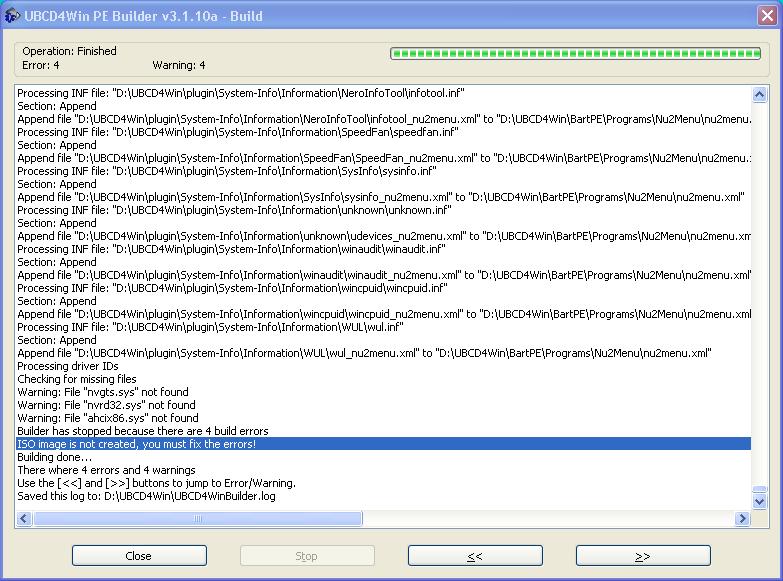
If the build process encounters ANY errors it will complete but NOT build the ISO. You must fix any errors before an ISO file will be created. The below screenshot shows a build that encountered 4 errors, the ISO file was not created, so if you see any errors as the build is going, you can save time by stopping and fixing the error.
 You can also create a Bootable Ubuntu rescue CD. The Pendrivelinux page has a link to an iso you can download and burn to CD. An alternate way to create a bootable Ubuntu CD is here. The Pendrivelinux version worked very well for me, but your mileage may vary (YMMV).
To create a bootable USB follow the instructions on the Pendrivelinux page. I found this very straightforward with little room for error. I suggest choosing the largest cache you can when given the option in the installer - I chose a 4gb sustained cache. (I recommend at least a 16gb stick). The installer on the Pendrive linux page makes it very easy. Although there are other instructions on the web to do the same thing (like the ones at How-To Geek or SARDU - an excellent page for creation of Rescue USB with antimalware and virus definition updates, the only downside to this one is that the menu system is not yet in English ) , none are as easy to follow and use.
UPDATE: SARDU is now not only in english, but has an enhanced interface. This is an excellent way to create a multiboot bootdisk/USB or just a single bootdisk all with a few button clicks. See my article here.
Now you are ready! Keep in mind though that there is a downside to having a bootable USB versus a CD. A USB is writable and therefore open to infection, while a CD, once you finish it, is no longer writable. Of course, the exact reason that a USB might be a problem is a pro as well since it is writable it doesn't have to write files on the disk you are trying to salvage and possibly recover files from.*
* If you are doing file recovery, check out my article on that as well.
Have a question about something in this article? You can receive help directly from the article author. Sign up for a free trial to get started.
Comments (3)
Commented:
Commented:
Thanks,
Author
Commented: