

Browse All Articles > Using the Google Maps API in PHP and JavaScript
Introduction
The Google Maps API offers various ways to draw dynamic and static maps. Using a combination of PHP and JavaScript, you can draw active JavaScript maps that allow pan-and-zoom in the client browser window. You can also draw "static" maps that are rendered in the form of PNG images (see below). Each approach has its advantages. This E-E question inspired the following example that uses a JSON object of map points to place markers on an active map.
A key concept in mapping is the "geocode," a numerical designation of a location on the earth. A geocode is part of a GPS coordinate. The geocode gives the latitude and longitude in the form of a pair of signed decimal numbers, separated by a comma. The latitude is always given first. Here is an example of a geocode that shows the location of my house: 38.930445,-77.148075. Six digits to the right of the decimal point is generally considered to be "rooftop accuracy" in mapping. The geocode can have greater accuracy, but as a practical matter, greater accuracy doesn't matter much to map applications.
Zoom, Center and Size
The usefulness of your maps and markers will depend on three principal components. These are the zoom level, center point, and the size of the map image. In Google Maps, zoom level numbers increase as you get closer to the earth. A map that has too low a zoom level number may show too much area to give needed detail. A map with too high a zoom level number may not be big enough to show all the markers you have placed.
The center point of the map will be placed at the center of the viewport (in the case of the JavaScript maps) or the center of the map image (in the case of static maps). The center point may optionally have a marker.
The size of the map is controlled by the size of the viewport (in the case of the JavaScript maps) or the requested size of the map image (in the case of static maps). The combination of zoom level and size will determine how much area is covered by the map. These choices will be determined by the locations of the markers. A large enough size will be needed to fit all of the important markers into the viewport; a desirable zoom level will show the most detailed map with all of the important markers visible at the time of page load. There is no error message associated with missing markers; out-of-bounds markers are simply off the chart.
JavaScript Maps with Pushpins
You can use the Google Maps API to easily draw JavaScript maps. JavaScript maps have a great advantage - they can be zoomed and panned, and can offer interactivity so clients can add their own markers to the maps, or click and drag to communicate with the server. This example shows a simple JavaScript map, teaching how a JSON-encoded object can be used to identify and label a map point.
First, let's look at one of the JSON objects that designate the map points. They are very simple, and look like the snippet below, telling us four things: (1) the latitude, (2) longitude, (3) an optional text field that will become a "tooltip" when the client mouse hovers over the marker, and (4) a marker icon. The marker icon is dynamically generated by the Google API. It looks like a Google push-pin with a dot in the middle. In this case the chld argument provides the marker character: %E2%80%A2 (a UTF-8 bullet), the pushpin color: 00CC00 (green), and the character color: 000000 (black).
The combination of PHP, to prepare the JSON objects, and JavaScript to draw the map, gives us a great deal of programmatic power. We could use PHP to extract location information from a database. We could use information from the database to color-code our map point push-pins, based on almost any criteria we think up. With a little additional programming, we can even make the maps interactive! Here is the complete script. It has no special dependencies beyond a reasonably modern PHP installation. You can copy this and install it on your server to see it in action.
![google_javascript_map.png]()
JavaScript Maps with Pushpins and Interactivity
You can add interactivity to the map. Using the same format for our MapPoint objects, this script adds the ability to put a legend on the map, and it lets us toggle the pushpins on or off with a mouse click on the matching icon in the legend box. When you "mouseover" the map pushpins, a tooltip appears to tell you what's located at that map point.
![map_x.png]()
JavaScript Maps with Server Communication
You can use Google Maps in combination with a jQuery AJAX request to send data from the client browser to the server. (See here for an introduction to jQuery and AJAX). The server can take actions, such as record the click location, and can send a response back to the browser. In this example we have two scripts - one for the server and one for the browser. Both are very simple "hello world" teaching examples. The server side of the application is a PHP script that takes the geocode information from the mouse click and normalizes it into a fixed number of decimal places. Then it sends the normalized geocode back to the browser for client display.
Here is the server side of the application.
The client side of the application allows the user to zoom and pan by clicking and dragging the map. When the client clicks on a location, the geocode of the location is sent to the server, where the script above normalizes the geocode and returns the normalized value to the client browser. You can install these scripts and run them to see them in action.
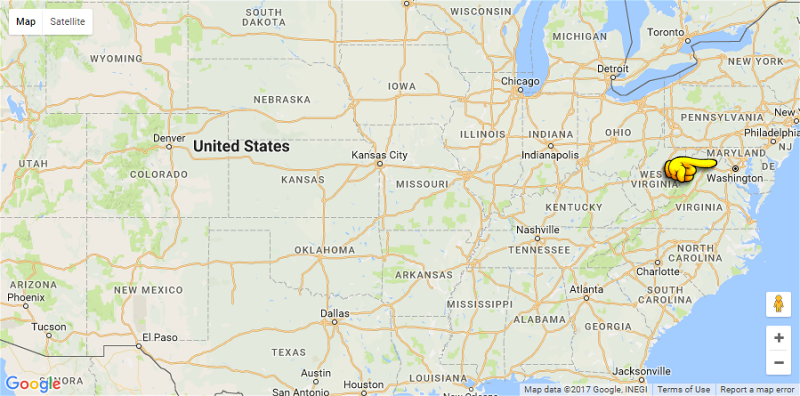
Once you have these two scripts installed (you will probably want to get a Google API key), try clicking near Washington, DC. The app will drop a pushpin at the location of your click. Go down to the lower right-hand corner of the map and zoom in with the plus-button. Click, hold and drag the mouse to move the map. If you zoom in toward the location of your mouse click, you can see how close you got to the exact location of Washington, DC.
![map_y.png]()
Static Maps
You can use the Google Maps API to easily draw "static" maps. This lets you present location-aware information to your web and mobile clients. Static Maps have a great advantage - they are rendered as a standard image. There is no Javascript or CSS needed. This means they are immediately useful on almost any browser and on almost any device.
Don't let the term "static" fool you -- this is a powerful mapping system. Just like the JavaScript maps, you can add markers, icons, paths, polygons and more to the maps. The maps are easy to draw because Google does all the heavy lifting. Your only requirement is to prepare a standard HTML tag that sends the data to the Google API. Google returns a PNG image (other image types are available, too) containing the map, markers and other characteristics that you have requested. The width and height of the map are completely under your control (up to the Google limits, currently 640px), so your page design is easily accommodated. And there are special features for mobile customers.
Designating Locations with Centerpoint, Markers and Icons
Let's start with a simple example -- a class that will return the HTML tag. We will create an object with some default settings, and we have setters to change the most important properties of the object. You might want to add your own twist to this class, including your custom icons, or setting your preferred default location for the center of the map. You might also want to extend the class to add more methods. Here are a couple of the most important functions.
The setCenter() method establishes the geographic center point for the map. You might or might not place a marker here. If you are creating a map that shows a client's home location and nearby stores, you might want to use setCenter() to center the map as close as possible to the client location. If all you have for the client location is a ZIP code, it might be best to omit the marker, since it is unlikely that the ZIP code is an exact pointer to the client address.
The setMarker() and setIcon() methods place visual cues on the map. You can set the marker locations by a variety of data types. If you know the "geocode" (latitude, longitude) you can use these numbers to place the marker. You can also place the marker by naming a famous spot ("The White House") or by a landmark in a city ("Landon School, Bethesda MD") or by a street address and ZIP code.
Or even just a ZIP code. ZIP codes are not exact locations (they are postal carrier routes) but often a ZIP code is good enough to get an approximate location. ZIP codes are often used to answer the question, "Where are the nearest stores?"
If you use anything other than the geocode, you need to be aware that Google may be "creative" in the way it interprets place names. For example, try using "THE US CAPITOL" as a center point. You may find that you really want, "THE US CAPITOL, WASHINGTON DC" instead. Generally more detail is better when you are giving a text description of a location to Google Maps.
Custom icons provide us with a creative way to decorate our maps. Your icons can be up to 64x64 pixels (which is relatively large since the largest map is 640x640) and you can have up to five different icons on each map (you can have more than 5 icons just no more than 5 different icons). To use a custom icon, you provide the Google Maps API with the fully qualified urlencoded path to the icon file.
A Complete Code Sample
The code snippet shows a class that will call the Google Static Map API. A couple of examples are there to help you get started using the API. This is a finished piece of code -- you can copy it, install it on your server and run it right away.
Note the use of the urlencode(urldecode()) functions in the setter methods. The intent of this decode-encode construct is to allow the geocodes or addresses or place names to be set without regard to the state of their encoding. These values become part of the URL sent to the Google Static Map API, so they must be urlencode() strings. In my test cases this double function never caused any problems, but it is one of those "interesting" programming steps that merits a moment of thought before it is put into use, especially if your script feeds external data to this class.
![google_static_map.png]()
Summary
In this article we have shown some ways to use Google's Maps API. We learned how to create a JavaScript map using the Google JavaScript Maps service, and a PHP mapping class using the Google Static Maps service. We have added standard and custom icons to the map and have shown methods that allow us to adjust the viewing area and zoom level.
Addendum (July 4, 2016)
When this article was originally written it was commonplace to use HTTP (not HTTPS) protocol. Today, HTTPS is considerably more common and preferred, even though the old HTTP links to Google still work. I recommend that you upgrade your server to serve your web pages over HTTPS. If you do so, you may find that you need an API key to use the Google Static Maps. You can get information about the terms of service, and how to get an API key here.
To Learn More
https://developers.google.com/maps/documentation/javascript/
https://developers.google.com/maps/documentation/static-maps/
Please give us your feedback!
If you found this article helpful, please click the "thumb's up" button below. Doing so lets the E-E community know what is valuable for E-E members and helps provide direction for future articles. If you have questions or comments, please add them. Thanks!
The Google Maps API offers various ways to draw dynamic and static maps. Using a combination of PHP and JavaScript, you can draw active JavaScript maps that allow pan-and-zoom in the client browser window. You can also draw "static" maps that are rendered in the form of PNG images (see below). Each approach has its advantages. This E-E question inspired the following example that uses a JSON object of map points to place markers on an active map.
A key concept in mapping is the "geocode," a numerical designation of a location on the earth. A geocode is part of a GPS coordinate. The geocode gives the latitude and longitude in the form of a pair of signed decimal numbers, separated by a comma. The latitude is always given first. Here is an example of a geocode that shows the location of my house: 38.930445,-77.148075. Six digits to the right of the decimal point is generally considered to be "rooftop accuracy" in mapping. The geocode can have greater accuracy, but as a practical matter, greater accuracy doesn't matter much to map applications.
Zoom, Center and Size
The usefulness of your maps and markers will depend on three principal components. These are the zoom level, center point, and the size of the map image. In Google Maps, zoom level numbers increase as you get closer to the earth. A map that has too low a zoom level number may show too much area to give needed detail. A map with too high a zoom level number may not be big enough to show all the markers you have placed.
The center point of the map will be placed at the center of the viewport (in the case of the JavaScript maps) or the center of the map image (in the case of static maps). The center point may optionally have a marker.
The size of the map is controlled by the size of the viewport (in the case of the JavaScript maps) or the requested size of the map image (in the case of static maps). The combination of zoom level and size will determine how much area is covered by the map. These choices will be determined by the locations of the markers. A large enough size will be needed to fit all of the important markers into the viewport; a desirable zoom level will show the most detailed map with all of the important markers visible at the time of page load. There is no error message associated with missing markers; out-of-bounds markers are simply off the chart.
JavaScript Maps with Pushpins
You can use the Google Maps API to easily draw JavaScript maps. JavaScript maps have a great advantage - they can be zoomed and panned, and can offer interactivity so clients can add their own markers to the maps, or click and drag to communicate with the server. This example shows a simple JavaScript map, teaching how a JSON-encoded object can be used to identify and label a map point.
First, let's look at one of the JSON objects that designate the map points. They are very simple, and look like the snippet below, telling us four things: (1) the latitude, (2) longitude, (3) an optional text field that will become a "tooltip" when the client mouse hovers over the marker, and (4) a marker icon. The marker icon is dynamically generated by the Google API. It looks like a Google push-pin with a dot in the middle. In this case the chld argument provides the marker character: %E2%80%A2 (a UTF-8 bullet), the pushpin color: 00CC00 (green), and the character color: 000000 (black).
{
                          "lat":38.9304552,
                          "lng":-77.1503227,
                          "txt":"Home",
                          "ico":"https:\/\/chart.googleapis.com\/chart?chst=d_map_pin_letter&chld=%E2%80%A2|00CC00|000000"
}The combination of PHP, to prepare the JSON objects, and JavaScript to draw the map, gives us a great deal of programmatic power. We could use PHP to extract location information from a database. We could use information from the database to color-code our map point push-pins, based on almost any criteria we think up. With a little additional programming, we can even make the maps interactive! Here is the complete script. It has no special dependencies beyond a reasonably modern PHP installation. You can copy this and install it on your server to see it in action.
<?php // demo/google_javascript_map.php
                      /**
                       * Demonstrate how to use the Google Maps API for a PHP / JavaScript map
                       *
                       * Optional centered pushpin
                       * Optional other pushpin(s) or icons
                       *
                       * MAN PAGE: https://developers.google.com/maps/documentation/javascript/
                       */
                      error_reporting(E_ALL);


                      // A CLASS TO REPRESENT A MAP POINT
                      Class MapPoint
                      {
                          public function __construct($lat, $lng, $txt=NULL, $ico=NULL)
                          {
                              $this->lat = $lat;
                              $this->lng = $lng;
                              $this->txt = $txt;
                              $this->ico = $ico;
                          }
                      }


                      // CREATING A ZOOM LEVEL
                      $zoom   = '12';

                      // DESIGNATING OUR CENTER POINT NEAR CHAIN BRIDGE
                      $center = json_encode( new MapPoint( 38.929932, -77.1165074 ) );

                      // CREATING A COLLECTION OF MAP POINT OBJECTS
                      $objs = array
                      ( new MapPoint( 38.9304552, -77.1503227, "Home",   'https://chart.googleapis.com/chart?chst=d_map_pin_letter&chld=%E2%80%A2|00CC00|000000' )
                      , new MapPoint( 38.9086018, -77.1298843, "Club",   'https://chart.googleapis.com/chart?chst=d_map_pin_letter&chld=%E2%80%A2|0000CC|000000' )
                      , new MapPoint( 38.9400024, -77.0893293, "Church", 'https://chart.googleapis.com/chart?chst=d_map_pin_letter&chld=%E2%80%A2|ffffff|000000' )
                      , new MapPoint( 38.9326919, -77.1774237, "Store",  'https://chart.googleapis.com/chart?chst=d_map_pin_letter&chld=%E2%80%A2|CC0000|000000' )
                      )
                      ;

                      // CREATING THE JSON STRING FROM THE ARRAY OF OBJECTS
                      $json = json_encode($objs);


                      // CREATE OUR WEB PAGE IN HTML5 FORMAT
                      $htm = <<<HTML5
                      <!DOCTYPE html>
                      <html dir="ltr" lang="en-US">
                      <head>
                      <meta charset="utf-8" />
                      <meta name="robots" content="noindex, nofollow" />
                      <meta name="viewport" content="width=device-width, initial-scale=1.0" />

                      <style type="text/css">
                      html, body, #map-canvas {
                          height:100%;
                          margin:0;
                          padding:0;
                      }
                      </style>

                      <script src="https://maps.googleapis.com/maps/api/js?v=3.exp"></script>

                      <script>
                      /* COPY INJECTED PHP VARIABLES INTO OUR JAVASCRIPT VARIABLES */
                      var zoom   = $zoom;
                      var center = $center;
                      var json   = $json;

                      var map;

                      function initialize() {
                          var mapOptions = {
                              zoom: zoom,
                              center: new google.maps.LatLng(center)
                          };

                          map = new google.maps.Map(document.getElementById('map-canvas'), mapOptions);

                          for(var i = 0; i < json.length; i++) {
                              var obj = json[i];
                              var marker = new google.maps.Marker({
                                  position: new google.maps.LatLng(obj.lat,obj.lng),
                                  map: map,
                                  title: obj.txt,
                                  icon: obj.ico
                              });
                          }
                      }

                      google.maps.event.addDomListener(window, 'load', initialize);
                      </script>

                      <title>E-E questions/28955215/Multiple-points-on-Google-Maps</title>
                      </head>
                      <body>

                      <noscript>Your browsing experience will be much better with JavaScript enabled!</noscript>

                      <div id="map-canvas"></div>

                      </body>
                      </html>
                      HTML5;


                      // RENDER THE WEB PAGE
                      echo $htm;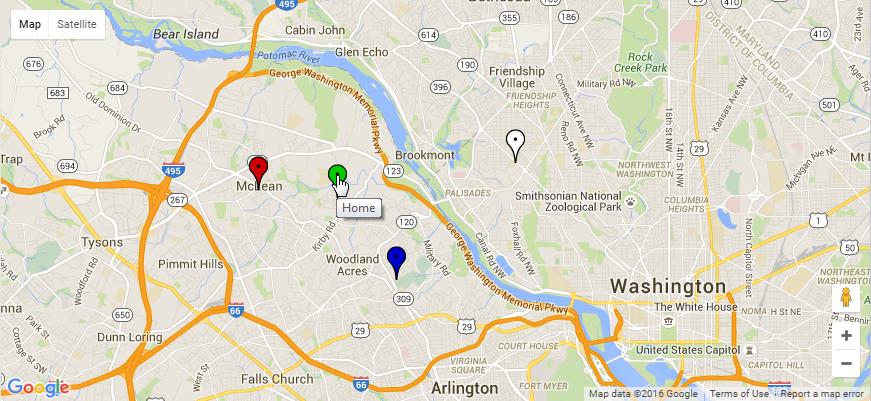
JavaScript Maps with Pushpins and Interactivity
You can add interactivity to the map. Using the same format for our MapPoint objects, this script adds the ability to put a legend on the map, and it lets us toggle the pushpins on or off with a mouse click on the matching icon in the legend box. When you "mouseover" the map pushpins, a tooltip appears to tell you what's located at that map point.
<?php // demo/google_javascript_interactive_map_x.php
                      /**
                       * Demonstrate how to use the Google Maps API for a PHP / JavaScript map
                       *
                       * Optional centered pushpin
                       * Optional other pushpin(s) or icons
                       * Optional toggle pushpin(s) by clickable legend icon
                       *
                       * Google API Key Information (January 2017)
                       * https://developers.google.com/maps/documentation/javascript/error-messages#no-api-keys
                       */
                      error_reporting(E_ALL);


                      // GET YOUR OWN API KEY FROM GOOGLE
                      $google_api_key = GOOGLE_API;


                      // A CLASS TO REPRESENT A MAP POINT
                      Class MapPoint
                      {
                          public function __construct($lat, $lng, $txt=NULL, $ico=NULL)
                          {
                              $this->lat = $lat;
                              $this->lng = $lng;
                              $this->txt = $txt;
                              $this->ico = $ico;
                          }
                      }


                      // CREATING A ZOOM LEVEL
                      $zoom   = '12';

                      // DESIGNATING OUR CENTER POINT NEAR CHAIN BRIDGE
                      $center = json_encode( new MapPoint( 38.929932, -77.1165074 ) );

                      // CREATING A COLLECTION OF MAP POINT OBJECTS
                      $objs = array
                      ( new MapPoint( 38.9304552, -77.1503227, "Home",   'https://chart.googleapis.com/chart?chst=d_map_pin_letter&chld=%E2%80%A2|00CC00|000000' )
                      , new MapPoint( 38.9086018, -77.1298843, "Club",   'https://chart.googleapis.com/chart?chst=d_map_pin_letter&chld=%E2%80%A2|FFFFFF|000000' )
                      , new MapPoint( 38.9400024, -77.0893293, "Church", 'https://chart.googleapis.com/chart?chst=d_map_pin_letter&chld=%E2%80%A2|FFFF00|000000' )
                      , new MapPoint( 38.9326919, -77.1774237, "Store",  'https://chart.googleapis.com/chart?chst=d_map_pin_letter&chld=%E2%80%A2|CC0000|000000' )
                      , new MapPoint( 38.872487,  -77.047564,  "Yacht",  'https://chart.googleapis.com/chart?chst=d_map_pin_letter&chld=%E2%80%A2|8888FF|000000' )
                      , new MapPoint( 38.921519,  -77.118267,  "Park",   'https://chart.googleapis.com/chart?chst=d_map_pin_letter&chld=%E2%80%A2|884400|000000' )
                      )
                      ;

                      // CREATING THE JSON STRING FROM THE ARRAY OF OBJECTS
                      $json = json_encode($objs);


                      // USE HEREDOC NOTATION TO CREATE OUR WEB PAGE IN HTML5 FORMAT
                      $htm = <<<HTML5
                      <!DOCTYPE html>
                      <html dir="ltr" lang="en-US">
                      <head>
                      <meta charset="utf-8" />
                      <meta name="robots" content="noindex, nofollow" />
                      <meta name="viewport" content="width=device-width, initial-scale=1.0" />

                      <style type="text/css">
                      html, body, #map-canvas {
                          height:100%;
                          margin:0;
                          padding:0;
                      }
                      #legend {
                          font-family:Verdana, sans-serif;
                          background:white;
                          padding:1em;
                          margin:1em;
                          border:2px solid black
                      }
                      #legend h3 {
                          margin-top:0;
                      }
                      #legend div {
                          margin: 0 auto;
                      }

                      </style>

                      <script src="https://maps.googleapis.com/maps/api/js?v=3.exp&key=$google_api_key"></script>

                      <script>
                      /* COPY INJECTED PHP VARIABLES INTO OUR JAVASCRIPT VARIABLES */
                      var zoom   = $zoom;
                      var center = $center;
                      var json   = $json;

                      var map;
                      var legend;
                      var legendIcon;
                      var gmarkers = [];
                      var viz;

                      function initialize() {
                          var mapOptions = {
                              zoom: zoom,
                              center: new google.maps.LatLng(center)
                          };

                          map = new google.maps.Map(document.getElementById('map-canvas'), mapOptions);
                          legend = document.getElementById('legend');

                          for(var i = 0; i < json.length; i++) {
                              var obj = json[i];
                              var marker = new google.maps.Marker({
                                  position: new google.maps.LatLng(obj.lat,obj.lng),
                                  map: map,
                                  title: obj.txt,
                                  icon: obj.ico
                              });
                              marker.setVisible(false);
                              marker.id = obj.txt;
                              gmarkers.push(marker);
                              legendIcon = document.createElement('div');
                              legendIcon.innerHTML = '<img src="' + obj.ico + '" alt="icon" /> ' + obj.txt;
                              legendIcon.style.cursor = 'pointer';
                              legendIcon.id = obj.txt;
                              legendIcon.addEventListener("click", function(){
                                  toggleIcons(this);
                              });
                              legend.appendChild(legendIcon);
                          }

                          map.controls[google.maps.ControlPosition.LEFT_TOP].push(legend);
                      }

                      function toggleIcons(icon) {
                          for (var i = 0; i < gmarkers.length; i++) {
                              if (gmarkers[i].id == icon.id) {
                                  viz = gmarkers[i].getVisible();
                                  if (viz) {
                                      gmarkers[i].setVisible(false);
                                  } else {
                                      gmarkers[i].setVisible(true);
                                  }
                              }
                          }
                      }

                      google.maps.event.addDomListener(window, 'load', initialize);
                      </script>

                      <title>Drop / Toggle Multiple Pointers Onto Google Maps</title>
                      </head>
                      <body>

                      <noscript>Your browsing experience will be much better with JavaScript enabled!</noscript>

                      <div id="map-canvas"></div>
                      <div id="legend"><h3>Click an Icon</h3></div>

                      </body>
                      </html>
                      HTML5;


                      // RENDER THE WEB PAGE
                      echo $htm;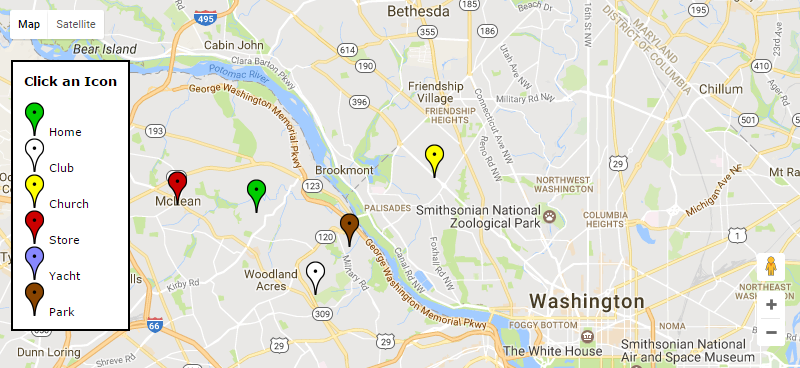
JavaScript Maps with Server Communication
You can use Google Maps in combination with a jQuery AJAX request to send data from the client browser to the server. (See here for an introduction to jQuery and AJAX). The server can take actions, such as record the click location, and can send a response back to the browser. In this example we have two scripts - one for the server and one for the browser. Both are very simple "hello world" teaching examples. The server side of the application is a PHP script that takes the geocode information from the mouse click and normalizes it into a fixed number of decimal places. Then it sends the normalized geocode back to the browser for client display.
Here is the server side of the application.
<?php // demo/latlng_server.php
                      /**
                       * Receive, normalize, return, and record a Geocode from a Google Map Click
                       * UTF-8 because the Google Maps often use JSON
                       * At least rooftop precision with 7 decimal places
                       *
                       * https://developers.google.com/maps/
                       * https://www.youtube.com/watch?v=ZE8ODPL2VPI
                       */
                      error_reporting(E_ALL);

                      // SET UP PHP AND BROWSER TO USE UTF-8
                      mb_internal_encoding('utf-8');
                      mb_regex_encoding('utf-8');
                      mb_http_output('utf-8');

                      // DEFAULT RETURN SHOWS ERROR VALUE
                      $geo = '-0,-0';

                      // TERNARY OPERATOR TO GET THE GEOCODE REQUEST VARIABLE
                      $q
                      = !empty($_GET['q'])
                      ? trim($_GET['q'])
                      : NULL
                      ;
                      if (!$q) die($geo);

                      // TERNARY OPERATOR TO GET THE PRECISION REQUEST VARIABLE
                      $p
                      = !empty($_GET['p'])
                      ? (int)trim($_GET['p'])
                      : 7
                      ;

                      // ROUND THE VALUES OF LAT,LNG PAIR TO '$p' DECIMAL PLACES
                      $llp = explode(',', $q);
                      $llp[0] = number_format($llp[0], $p);
                      $llp[1] = number_format($llp[1], $p);
                      $geo = implode(',', $llp);

                      // RESPOND WITH THE NORMALIZED GEOCODE
                      echo $geo;

                      // ADDITIONAL PROCESSING (MAYBE STORE IN DATABASE HERE)
                      $date = date('c');
                      $user = $_SERVER['REMOTE_ADDR'];
$mesg = "Geocode $date $user $geo";The client side of the application allows the user to zoom and pan by clicking and dragging the map. When the client clicks on a location, the geocode of the location is sent to the server, where the script above normalizes the geocode and returns the normalized value to the client browser. You can install these scripts and run them to see them in action.
<?php // demo/latlng_client.php
                      /**
                       * Click to drop a pin onto a Google Map
                       * Get the Geocode from Google and make an AJAX request
                       * The server will normalize decimal values for lat,lng
                       *
                       * Google API Key Information (January 2017)
                       * https://developers.google.com/maps/documentation/javascript/error-messages#no-api-keys
                       */
                      error_reporting(E_ALL);

                      // SET UP PHP AND BROWSER TO USE UTF-8
                      mb_internal_encoding('utf-8');
                      mb_regex_encoding('utf-8');
                      mb_http_output('utf-8');


                      // GET YOUR OWN API KEY FROM GOOGLE
                      $google_api_key = GOOGLE_API;


                      // CREATE THE WEB PAGE DOCUMENT USING PHP HEREDOC NOTATION
                      $html = <<<HTML
                      <!DOCTYPE html>
                      <html dir="ltr" lang="en-US">
                      <head>
                      <meta charset="utf-8" />
                      <meta name="robots" content="noindex, nofollow" />
                      <meta name="viewport" content="width=device-width, initial-scale=1.0">

                      <style type="text/css">
                      html, body {
                          padding:0;
                          margin:0;
                          height: 100%;
                          overflow:hidden;
                      }
                      #map {
                          width:100%;
                          height:100%;
                      }
                      #dataset {
                          position:absolute;
                          font-size:2em;
                          z-index:5;
                          top:2em;
                          opacity:0.8;
                          width:100%;
                          text-align:center;
                          display:block;
                          color:white;
                          margin:0 auto;
                      }
                      #origin {
                          background-color:green;
                      }
                      #target {
                          background-color:red;
                      }
                      </style>

                      <!-- jQuery -->
                      <script src="https://code.jquery.com/jquery-latest.min.js"></script>

                      <!-- Map Script -->
                      <script src="https://maps.googleapis.com/maps/api/js?v=3.exp&key=$google_api_key"></script>
                      <script>
                      var map;
                      var geocode;
                      var marker = null;

                      function mapinit() {
                          var mapOptions = {
                              zoom: 5,
                              disableDefaultUI: false,
                              center: new google.maps.LatLng(38.95939,-95.2654831), // Google Earth Center of USA in Lawrence, KS
                              mapTypeId: google.maps.MapTypeId.ROADMAP
                          };

                          map = new google.maps.Map(document.getElementById('map'), mapOptions);

                          google.maps.event.addListener(map, 'click', function(event) {
                              geocode = event.latLng.lat() + "," + event.latLng.lng();
                              $("#origin").html('GoogleMaps geocode: ' + geocode);
                              $.get("latlng_server.php", {q:geocode,p:7}, function(response){
                                  $("#target").html('Normalized geocode: ' + response);
                              });

                              if (marker) { // Remove old marker
                                  marker.setMap(null);
                              }

                              marker = new google.maps.Marker({ position: event.latLng, map: map});
                          });
                      }

                      google.maps.event.addDomListener(window, 'load', mapinit);
                      </script>

                      <title>Latitude and Longitude (Geocode) via Google Maps Click</title>

                      </head>
                      <body>

                      <div id="dataset">
                        <div id="origin"></div>
                        <div id="target"></div>
                      </div>

                      <div id="map"></div>

                      </body>
                      </html>
                      HTML;

echo $html;Once you have these two scripts installed (you will probably want to get a Google API key), try clicking near Washington, DC. The app will drop a pushpin at the location of your click. Go down to the lower right-hand corner of the map and zoom in with the plus-button. Click, hold and drag the mouse to move the map. If you zoom in toward the location of your mouse click, you can see how close you got to the exact location of Washington, DC.
Static Maps
You can use the Google Maps API to easily draw "static" maps. This lets you present location-aware information to your web and mobile clients. Static Maps have a great advantage - they are rendered as a standard image. There is no Javascript or CSS needed. This means they are immediately useful on almost any browser and on almost any device.
Don't let the term "static" fool you -- this is a powerful mapping system. Just like the JavaScript maps, you can add markers, icons, paths, polygons and more to the maps. The maps are easy to draw because Google does all the heavy lifting. Your only requirement is to prepare a standard HTML tag that sends the data to the Google API. Google returns a PNG image (other image types are available, too) containing the map, markers and other characteristics that you have requested. The width and height of the map are completely under your control (up to the Google limits, currently 640px), so your page design is easily accommodated. And there are special features for mobile customers.
Designating Locations with Centerpoint, Markers and Icons
Let's start with a simple example -- a class that will return the HTML tag. We will create an object with some default settings, and we have setters to change the most important properties of the object. You might want to add your own twist to this class, including your custom icons, or setting your preferred default location for the center of the map. You might also want to extend the class to add more methods. Here are a couple of the most important functions.
The setCenter() method establishes the geographic center point for the map. You might or might not place a marker here. If you are creating a map that shows a client's home location and nearby stores, you might want to use setCenter() to center the map as close as possible to the client location. If all you have for the client location is a ZIP code, it might be best to omit the marker, since it is unlikely that the ZIP code is an exact pointer to the client address.
The setMarker() and setIcon() methods place visual cues on the map. You can set the marker locations by a variety of data types. If you know the "geocode" (latitude, longitude) you can use these numbers to place the marker. You can also place the marker by naming a famous spot ("The White House") or by a landmark in a city ("Landon School, Bethesda MD") or by a street address and ZIP code.
Or even just a ZIP code. ZIP codes are not exact locations (they are postal carrier routes) but often a ZIP code is good enough to get an approximate location. ZIP codes are often used to answer the question, "Where are the nearest stores?"
If you use anything other than the geocode, you need to be aware that Google may be "creative" in the way it interprets place names. For example, try using "THE US CAPITOL" as a center point. You may find that you really want, "THE US CAPITOL, WASHINGTON DC" instead. Generally more detail is better when you are giving a text description of a location to Google Maps.
Custom icons provide us with a creative way to decorate our maps. Your icons can be up to 64x64 pixels (which is relatively large since the largest map is 640x640) and you can have up to five different icons on each map (you can have more than 5 icons just no more than 5 different icons). To use a custom icon, you provide the Google Maps API with the fully qualified urlencoded path to the icon file.
A Complete Code Sample
The code snippet shows a class that will call the Google Static Map API. A couple of examples are there to help you get started using the API. This is a finished piece of code -- you can copy it, install it on your server and run it right away.
Note the use of the urlencode(urldecode()) functions in the setter methods. The intent of this decode-encode construct is to allow the geocodes or addresses or place names to be set without regard to the state of their encoding. These values become part of the URL sent to the Google Static Map API, so they must be urlencode() strings. In my test cases this double function never caused any problems, but it is one of those "interesting" programming steps that merits a moment of thought before it is put into use, especially if your script feeds external data to this class.
<?php // demo/google_static_map_class.php
/**
* Demonstrate how to use the Google Maps API for a static map of specific size
*
* Optional centered pushpin
* Optional other pushpin(s) or icons
*
* MAN PAGE: http://code.google.com/apis/maps/documentation/staticmaps/
*/
error_reporting(E_ALL);
class GSM
{
// THE MAP CENTER GEOCODE, ADDRESS OR LANDMARK
protected $center;
// MARKER DATA ARRAY
protected $markers;
protected $default_icon;
// OUR VARIABLES FOR THE MAP DISPLAY
protected $maptype;
protected $width;
protected $height;
protected $zoom;
protected $format;
// OUR VARIABLES FOR THE GOOGLE URL AND IMAGE TAG
protected $alt;
protected $title;
protected $class;
protected $id;
protected $usemap;
protected $sensor;
protected $url;
private $img;
// A CONSTRUCTOR TO SET THE DEFAULT VALUES
public function __construct()
{
// THE URL AND IMG TAG PARAMETERS
$this->alt = FALSE;
$this->class = FALSE;
$this->id = FALSE;
$this->usemap = FALSE;
$this->sensor = FALSE;
$this->title = TRUE;
$this->url = '';
$this->img = '';
// THE CENTER AND ZOOM SCALE OF THE MAP (IF OMITTED, GOOGLE WILL CALCULATE)
$this->center = NULL;
$this->zoom = NULL;
// THE CHARACTERISTICS OF THE MAP IMAGE
$this->maptype = 'hybrid'; // CHOOSE
$this->maptype = 'terrain'; // AMONG
$this->maptype = 'satellite'; // THESE
$this->maptype = 'roadmap'; // OPTIONS
$this->width = '640';
$this->height = '640';
$this->format = 'png';
// THE DEFAULT ICON
$this->default_icon = 'http://maps.google.com/mapfiles/ms/micons/question.png';
// AN ARRAY OF MARKER ARRAYS
$this->clearMarkers();
} // END CONSTRUCTOR
// A METHOD TO CLEAR THE MARKERS
public function clearMarkers()
{
$this->markers = array();
}
// A SETTER TO ADD MARKERS TO THE MAP
public function setMarker($geocode, $color='blue', $label='X')
{
// NOTE THAT THIS WILL WORK CORRECTLY MOST OF THE TIME
$geocode = urlencode(urldecode($geocode));
$this->markers[]
= array
( 'color' => $color
, 'label' => $label
, 'geocode' => $geocode
, 'icon' => FALSE
)
;
}
// A SETTER TO ADD ICONS TO THE MAP - VIEW SOURCE HERE: http://www.visual-case.it/cgi-bin/vc/GMapsIcons.pl
public function setIcon($geocode, $icon=FALSE)
{
// NOTE THAT THIS WILL WORK CORRECTLY MOST OF THE TIME
$geocode = urlencode(urldecode($geocode));
if (!$icon) $icon = $this->default_icon;
$this->markers[]
= array
( 'color' => FALSE
, 'label' => FALSE
, 'geocode' => $geocode
, 'icon' => $icon
)
;
}
// A SETTER TO OVERRIDE EACH OF THE DEFAULT VALUES
public function setCenter($geocode=NULL)
{
// NOTE THAT THIS WILL WORK CORRECTLY MOST OF THE TIME
$geocode = urlencode(urldecode($geocode));
$this->center = $geocode;
}
public function setMaptype($x)
{
$this->maptype = $x;
}
public function setFormat($x)
{
$this->format = $x;
}
public function setWidth($x)
{
$this->width = $x;
}
public function setHeight($x)
{
$this->height = $x;
}
public function setZoom($x=NULL)
{
$this->zoom = $x;
}
public function setAlt($x=FALSE)
{
$this->alt = $x;
}
public function setTitle($x=TRUE)
{
$this->title = $x;
}
public function setClass($x=FALSE)
{
$this->class = $x;
}
public function setId($x=FALSE)
{
$this->id = $x;
}
public function setUsemap($x=FALSE)
{
$this->usemap = $x;
}
public function setSensor($x=FALSE)
{
$this->sensor = $x;
}
// A METHOD TO PREPARE AND RETRIEVE THE MAPPING URL
public function asURL()
{
$s = 'false'; // SEE http://code.google.com/apis/maps/documentation/staticmaps/#Sensor
if ($this->sensor) $s = 'true';
// IF ICONS OR MARKERS ARE ON THE MAP, 'IMPLODE' THE DATA INTO THE URL
$marker_string = '';
foreach ($this->markers as $marker)
{
// PROCESS FOR CUSTOM ICONS
if ($marker['icon'])
{
$marker_string
= $marker_string
. '&markers='
. 'icon:'
. urlencode($marker['icon'])
. '|'
. $marker['geocode']
;
continue;
}
// PROCESS FOR STANDARD MARKERS
$marker_string
= $marker_string
. '&markers='
. 'color:'
. $marker['color']
. '|'
. 'label:'
. $marker['label']
. '|'
. $marker['geocode']
;
}
// SET CENTER AND ZOOM, IF PRESENT
$c = '';
if ($this->center) $c = "¢er=$this->center";
$z = '';
if ($this->zoom) $z = "&zoom=$this->zoom";
// MAKE THE URL
$this->url
= "http://maps.google.com/maps/api/staticmap?sensor=$s"
. $c
. $z
. "&size=$this->width" . 'x' . "$this->height"
. "&format=$this->format"
. "&maptype=$this->maptype"
. "$marker_string"
;
return $this->url;
}
// A METHOD TO PREPARE AND RETRIEVE THE HTML IMAGE TAG
public function asIMG()
{
// GET THE URL
if (!$this->url) $this->url = $this->asURL();
// GET THE ALT TEXT
$a = "$this->maptype" . ' centered ' . "$this->center";
if ($this->alt !== FALSE) $a = $this->alt;
// REQUIRED FIELDS
$this->img = '<img src="' . $this->url . '" alt="' . $a . '"';
// OPTIONAL FIELDS - PROVIDE A DEFAULT TITLE
$t = "$this->maptype" . ' centered ' . "$this->center";
if ($this->title === TRUE ) { $this->img .= ' title="' . $t . '"'; }
elseif ($this->title !== FALSE) { $this->img .= ' title="' . $this->title . '"'; }
// OPTIONAL FIELDS MAY BE OMITTED
if ($this->class !== FALSE) { $this->img .= ' class="' . $this->class . '"'; }
if ($this->id !== FALSE) { $this->img .= ' id="' . $this->id . '"'; }
if ($this->usemap !== FALSE) { $this->img .= ' usemap="' . $this->usemap . '"'; }
// CLOSE THE IMAGE TAG AND CLEAR THE CONSUMED URL
$this->img .= ' />';
$this->url = FALSE;
return $this->img;
}
} // END CLASS
// MAKE A GOOGLE STATIC MAP OBJECT AND TEST IT OUT
$map = new GSM;
$map->setWidth(620);
$map->setHeight(620);
$map->setZoom(12);
// SET A CENTER POINT (BUT NO MARKER) BY LANDMARK NAME ALONE
// $map->setCenter("THE WHITE HOUSE");
// SET A MARKER BY GEOCODE (LAT/LON PAIR)
$map->setMarker("38.930387,-77.147777", 'green', 'H');
// SET A MARKER BY PLACE NAME, CITY, STATE
$map->setMarker("Landon School, Bethesda, MD", 'brown', 'L');
// SET A MARKER BY STREET ADDRESS AND ZIP CODE
$map->setMarker("1446 Colleen Lane 22101", 'orange', 'P');
// ECHO THE <img /> TAG INTO OUR HTML TO DRAW THE MAP
echo $map->asIMG();
echo PHP_EOL . '<br clear="all" />';
// SHOW THE OBJECT
echo "<pre>" . PHP_EOL;
print_r($map);
echo"</pre>" . PHP_EOL;
// USE THE GSM OBJECT TO DRAW ANOTHER MAP WITH A SWIMMER IN THE TIDAL BASIN
$map->clearMarkers();
$map->setZoom();
$map->setWidth(500);
$map->setHeight(400);
$map->setCenter("THE US CAPITOL, WASHINGTON DC");
$map->setMarker("THE WHITE HOUSE", 'red', 'W');
$map->setMarker("THE US CAPITOL, WASHINGTON DC", 'blue', 'C');
$map->setIcon("THE TIDAL BASIN, WASHINGTON DC", 'http://maps.google.com/mapfiles/ms/micons/swimming.png', 'false'); // NO SHADOW
echo $map->asIMG();
// SHOW THE OBJECT
echo "<pre>" . PHP_EOL;
print_r($map);
echo"</pre>" . PHP_EOL;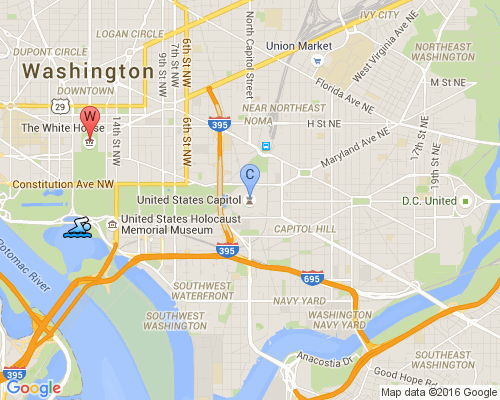
Summary
In this article we have shown some ways to use Google's Maps API. We learned how to create a JavaScript map using the Google JavaScript Maps service, and a PHP mapping class using the Google Static Maps service. We have added standard and custom icons to the map and have shown methods that allow us to adjust the viewing area and zoom level.
Addendum (July 4, 2016)
When this article was originally written it was commonplace to use HTTP (not HTTPS) protocol. Today, HTTPS is considerably more common and preferred, even though the old HTTP links to Google still work. I recommend that you upgrade your server to serve your web pages over HTTPS. If you do so, you may find that you need an API key to use the Google Static Maps. You can get information about the terms of service, and how to get an API key here.
To Learn More
https://developers.google.
https://developers.google.
Please give us your feedback!
If you found this article helpful, please click the "thumb's up" button below. Doing so lets the E-E community know what is valuable for E-E members and helps provide direction for future articles. If you have questions or comments, please add them. Thanks!
Have a question about something in this article? You can receive help directly from the article author. Sign up for a free trial to get started.
Comments (7)
Commented:
Good point about the features that would be left out with the static image. I had forgotten about them even though I am sure they would be something a developer may not want to omit. As you said, a "compromise".
Sort of nice to know there is an option that could be a quick way to provide a map. Without the need to get a key this may be something perfect for someone who just wants a simple map.
bol
Commented:
This is not usefull for me .Every expert is giving same code but this is not my requirement .In this code no infoWindow display.
I want to this type functionality :
see here : http://www.ifc.org/ifcext/spiwebsite1.nsf/$$MapView?openform
Thanks and Regards
Aasim Afridi
Author
Commented:Commented:
Could you please suggest which one to use Static map or javascript based map? I have a requirement like display multiple address with custom icon (it is simlar airbnb browse & display location details?)
Author
Commented:View More