

Browse All Articles > A Polyglot Web Site in PHP
Foreword (July, 2015)
Since I first wrote this article, years ago, a great many more people have begun using the internet. They are coming online from every part of the globe, learning, reading, shopping and spending money at an ever-increasing rate. I expected that nascent trend would continue, and it has. Everyone seems to recognize the trend. Yet to my amazement, relatively few web sites serve their content in any language other than English. Of course, why bother? Isn't English the language of technology?
Well, yes, English is the language of technology, but this is not about technology; it's about human nature. If you're in business to make money, a monoglot web site is a handicap and huge blind spot. If you're wondering whether it's economically feasible to offer site translations, this Tech.Co article may help you make up your mind. In its summary quote, we find this: "The good news is that the potential return on your investment is significant. Studies suggest that for every $1 spent on localization you can expect to see a $25 return."
There aren't many places you can get ROI like that! To learn how it's done, read on...
Introduction
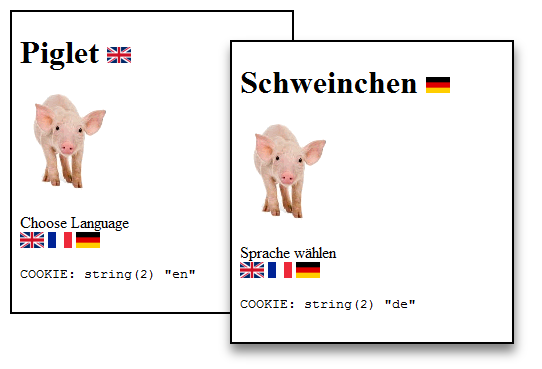
This article describes the general design elements of a multilingual web site. The site will be very simple, but all the important parts of the design will be present. Here are two images that show what the site looks like. By clicking on the flags at the bottom, our clients can change the languages.![Two examples showing English and German]() The Design of the Directory Structure
The Design of the Directory Structure
We want to be able to support many languages, but with a single, simple design. A directory structure that makes sense for this is in place at www.php.net. The PHP folks have organized the online manual this way, where XX indicates the language.
php.net/manual/XX/function.var-dump.php
The standard terminology for languages is prescribed by ISO639, an evolving standard that employs short abbreviation codes. See http://en.wikipedia.org/wiki/ISO_639-1 for more information. For our example we will develop our web site in four languages: English, French, Italian, and German. The abbreviations we will use for English, French, Italian, and German are en, fr, it, and de (from the endonym Deutsch), respectively.
Our directory structure will look like this with three separate language directories.
If we wanted to add a directory for a fifth language, for example Spanish (es), we would be able to copy any of the language directories and translate the text into Spanish.
What Language Should We Use?
We might want to consider using an IP-to-Location service to choose the language, but in practice this is problematical. Consider the French who travel in Germany. Even if they were accessing the web site from a German city, it would not be reasonable to assume that the French now wanted to use German language. So instead of using geolocation to make decisions, we will give the client a highly recognizable visual clue, the national flags. We will make these flag icons into links that activate a common script. The common script will recognize the language, set a cookie and redirect to the appropriate language directory. We can find images of the national flags here:
http://en.wikipedia.org/wiki/National_flags
And we can use a drawing program like Photoshop to create our icons. We will use English as the assumed language; our French, Italian, and German clients will be able to get their languages with a single click on the flag icon.
The Home Page in the WWW Root
Our home page will try to recognize the client's preferred language by looking for a long-lived cookie. If the cookie is not set or is invalid, we will choose English. We will redirect the browser to the appropriate directory.
The Language Page
In order to give our client the ability to change languages, we need a language selection page. Instead of using the value in $_COOKIE, it will use the URL argument in $_GET. It is no accident that this script looks very much like the home page of the web root.
Handling Common Elements
Our image files are common to all language versions. Similarly, our template script will be the same for all languages, so we will set up the template as a common script that can be included in each version of the web page. Near the bottom of this script you will see where we visualize the cookie. When we are able to see data like this, it makes debugging much easier.
Language-Specific Content for Different Languages
The use of "heredoc" notation makes PHP templating into a very simple task. We simply assign values to the variables that are embedded in the heredoc blocks. Learn more about heredoc and nowdoc on the PHP web site:
http://php.net/manual/en/language.types.string.php .
You may find, as I do, that the heredoc notation is much less confusing than trying to deal with escaped quotation marks, apostrophes, and concatenation operators.
Here are a couple of examples showing the home page in our different language directories.
Integrating a Database into This Design
We could certainly do many more interesting things. For example, the variables that make up our pages, $lang, $head, $text would be much more extensive. In any real-world implementation each language would come from a separate MySQL data base connection -- one database would house all of the information for English, another database would house all of the information for French, etc. These databases would be strictly parallel in design and construction. All of the table names and column names would be identical, allowing the same PHP code base to serve any language site. You can see how this would be done in the template.php script, above. (For more details, please see this article about using MySQL and PHP.)
Adding a New Language Translation
If we wanted to add another language, it would be fairly easy - clone the language-specific code base and database to produce the starting point for a new translation. Note that the new translation would not appear in the public view of the site yet because there would be no linking URLs. Our new translation could be worked on without disrupting any of the existing translations. Once our new translation is ready for publication, we would install a new flag icon, and we would make a simple change to the template script to add the new element to the $languages array.
The combination of a common template and separate language directories makes this a flexible design with an intuitive client interface.
See it in Action
http://iconoun.com/demo/polyglot/
Afterword
Since this article was conceived, the use of UTF-8 character encoding has grown greatly. Some Western European characters can collide with the UTF-8 signal byte, and a consequence of the increasing popularity of UTF-8 is an increasing incidence of character set collisions. The usual symptom is a burst of garbage characters on the browser screen. If you find this happening to you, please read this article on Character Sets.
Google Guidance (June 2016)
https://support.google.com/webmasters/answer/182192?hl=en&ref_topic=2370587
Useful References
http://www.omniglot.com/language/time/seasons.htm
http://www.omniglot.com/language/time/months.htm
http://www.omniglot.com/language/time/days.htm
http://en.wikipedia.org/wiki/List_of_ISO_639-1_codes
Please give us your feedback!
If you found this article helpful, please click the "thumb's up" button below. Doing so lets the E-E community know what is valuable for E-E members and helps provide direction for future articles. If you have questions or comments, please add them. Thanks!
Since I first wrote this article, years ago, a great many more people have begun using the internet. They are coming online from every part of the globe, learning, reading, shopping and spending money at an ever-increasing rate. I expected that nascent trend would continue, and it has. Everyone seems to recognize the trend. Yet to my amazement, relatively few web sites serve their content in any language other than English. Of course, why bother? Isn't English the language of technology?
Well, yes, English is the language of technology, but this is not about technology; it's about human nature. If you're in business to make money, a monoglot web site is a handicap and huge blind spot. If you're wondering whether it's economically feasible to offer site translations, this Tech.Co article may help you make up your mind. In its summary quote, we find this: "The good news is that the potential return on your investment is significant. Studies suggest that for every $1 spent on localization you can expect to see a $25 return."
There aren't many places you can get ROI like that! To learn how it's done, read on...
Introduction
This article describes the general design elements of a multilingual web site. The site will be very simple, but all the important parts of the design will be present. Here are two images that show what the site looks like. By clicking on the flags at the bottom, our clients can change the languages.
 The Design of the Directory Structure
We want to be able to support many languages, but with a single, simple design. A directory structure that makes sense for this is in place at www.php.net. The PHP folks have organized the online manual this way, where XX indicates the language.
php.net/manual/XX/function.var-dump.php
The standard terminology for languages is prescribed by ISO639, an evolving standard that employs short abbreviation codes. See http://en.wikipedia.org/wi
Our directory structure will look like this with three separate language directories.
www_root
                      |
                      |__ image/
                      |__ index.php
                      |__ language.php
                      |__ template.php
                      |
                      |__ en
                      |   |__index.php
                      |
                      |__ fr
                      |   |__index.php
                      |
                      |__ it
                      |   |__index.php
                      |
                      |__ de
|__index.phpIf we wanted to add a directory for a fifth language, for example Spanish (es), we would be able to copy any of the language directories and translate the text into Spanish.
What Language Should We Use?
We might want to consider using an IP-to-Location service to choose the language, but in practice this is problematical. Consider the French who travel in Germany. Even if they were accessing the web site from a German city, it would not be reasonable to assume that the French now wanted to use German language. So instead of using geolocation to make decisions, we will give the client a highly recognizable visual clue, the national flags. We will make these flag icons into links that activate a common script. The common script will recognize the language, set a cookie and redirect to the appropriate language directory. We can find images of the national flags here:
http://en.wikipedia.org/wi
And we can use a drawing program like Photoshop to create our icons. We will use English as the assumed language; our French, Italian, and German clients will be able to get their languages with a single click on the flag icon.
The Home Page in the WWW Root
Our home page will try to recognize the client's preferred language by looking for a long-lived cookie. If the cookie is not set or is invalid, we will choose English. We will redirect the browser to the appropriate directory.
<?php // demo/polyglot/index.php
                      /**
                       * https://www.experts-exchange.com/articles/8910/A-Polyglot-Web-Site-in-PHP.html
                       */
                      error_reporting(E_ALL);

                      // THE DEFAULT LANGUAGE
                      $lang = 'en';

                      // IF WE REMEMBER A LANGUAGE PREFERENCE
                      if (isset($_COOKIE["lang"]))
                      {
                          switch($_COOKIE["lang"])
                          {
                              case 'en' : $lang = 'en';
                              break;

                              case 'fr' : $lang = 'fr';
                              break;

                              case 'de' : $lang = 'de';
                              break;

                              case 'it' : $lang = 'it';
                              break;
                          }
                      }

                      // SET THE HOME PAGE
                      $ndx = $lang . DIRECTORY_SEPARATOR;

                      // PRESERVE OUR GET-ARGUMENTS
                      $get = NULL;
                      if (!empty($_GET)) $get = http_build_query($_GET);

                      $url = $ndx . '?' . $get;
                      header("Location: $url");
exit;The Language Page
In order to give our client the ability to change languages, we need a language selection page. Instead of using the value in $_COOKIE, it will use the URL argument in $_GET. It is no accident that this script looks very much like the home page of the web root.
<?php // demo/polyglot/language.php
                      /**
                       * https://www.experts-exchange.com/articles/8910/A-Polyglot-Web-Site-in-PHP.html
                       */
                      error_reporting(E_ALL);

                      // THE DEFAULT LANGUAGE
                      $lang = 'en';

                      // IF WE ARE GIVEN A LANGUAGE PREFERENCE
                      if (isset($_GET["lang"]))
                      {
                          switch(strtolower($_GET["lang"]))
                          {
                              case 'en' : $lang = 'en';
                              break;

                              case 'fr' : $lang = 'fr';
                              break;

                              case 'de' : $lang = 'de';
                              break;

                              case 'it' : $lang = 'it';
                              break;
                          }
                          unset($_GET['lang']);
                      }

                      // SET THE LANGUAGE FOR A YEAR
                      setcookie('lang', $lang, time()+365*24*60*60, DIRECTORY_SEPARATOR);

                      // PRESERVE OUR GET-ARGUMENTS
                      $get = NULL;
                      if (!empty($_GET)) $get = '?' . http_build_query($_GET);

                      // REDIRECT TO THE LANGUAGE VERSION OF THE SITE
                      $home = $lang . DIRECTORY_SEPARATOR;
                      header("Location: $home$get");
exit;Handling Common Elements
Our image files are common to all language versions. Similarly, our template script will be the same for all languages, so we will set up the template as a common script that can be included in each version of the web page. Near the bottom of this script you will see where we visualize the cookie. When we are able to see data like this, it makes debugging much easier.
<?php // demo/polyglot/template.php
                      /**
                       * https://www.experts-exchange.com/articles/8910/A-Polyglot-Web-Site-in-PHP.html
                       */
                      error_reporting(E_ALL);


                      // OUR LANGUAGES
                      $languages = array
                      ( 'en' => 'English'
                      , 'fr' => 'French'
                      , 'de' => 'Deutsch'
                      , 'it' => 'Italiano'
                      )
                      ;

                      // OUR CHOSEN LANGUAGE IS INJECTED INTO THE TEMPLATE
                      if (!array_key_exists($lang, $languages))
                          trigger_error("Language $lang not recognized", E_USER_ERROR);


                      // CHOOSE OUR LANGUAGE-SPECIFIC DATABASE NAME
                      $db_name = $lang . '_database';

                      // CONNECT TO OUR LANGUAGE-SPECIFIC DATABASE
                      $mysqli = new mysqli($db_host, $db_user, $db_word, $db_name);

                      /** READ THE DATABASE TO ADD INFORMATION TO OUR LANGUAGE-SPECIFIC WEB PAGE **/


                      // CREATE THE PAGE TEMPLATE USING HEREDOC NOTATION
                      $html_1 = <<<TEMPLATE
                      <!DOCTYPE html>
                      <html dir="ltr" lang="$lang">
                      <head>
                      <meta charset="utf-8" />
                      </head>
                      <body>
                      <h1>$head <img src="../image/flag_$lang.png" /></h1>
                      <p>
                      <img src="../image/piglet.png" />
                      </p>
                      TEMPLATE;


                      // PRESERVE OUR GET-ARGUMENTS
                      $get = NULL;
                      if (!empty($_GET)) $get = '&' . http_build_query($_GET);

                      // CREATE OUR FLAG LINKS
                      $html_2 = $text . '<br/>';
                      foreach ($languages as $abbr => $language)
                      {
                          // CREATE OUR LINKS USING HEREDOC NOTATION
                          $choices = <<<CHOICES
                      <a title="$language" href="../language.php?lang=$abbr$get"><img src="../image/flag_$abbr.png" /></a>
                      CHOICES;

                          // APPEND EACH FLAG LINK TO THE HTML STRING
                          $html_2 .= $choices . PHP_EOL;
                      }

                      // WRITE THE HTML STRINGS TO THE BROWSER
                      echo $html_1;
                      echo $html_2;

                      // OPTIONAL, FOR TESTING ONLY SHOW THE COOKIE IF IT HAS BEEN SET
                      if (!empty($_COOKIE))
                      {
                          if (isset($_COOKIE["lang"]))
                          {
                              echo "<pre>COOKIE: ";
                              var_dump($_COOKIE["lang"]);
                          }
}Language-Specific Content for Different Languages
The use of "heredoc" notation makes PHP templating into a very simple task. We simply assign values to the variables that are embedded in the heredoc blocks. Learn more about heredoc and nowdoc on the PHP web site:
http://php.net/manual/en/l
You may find, as I do, that the heredoc notation is much less confusing than trying to deal with escaped quotation marks, apostrophes, and concatenation operators.
Here are a couple of examples showing the home page in our different language directories.
<?php // /de/index.php DEUTSCH
                      error_reporting(E_ALL);

                      // SET LANGUAGE AND TEXT
                      $lang = 'de';
                      $head = 'Schweinchen';
                      $text = 'Sprache wählen';

                      // LOAD THE TEMPLATING SCRIPT
require_once('../template.php');<?php // /en/index.php ENGLISH
error_reporting(E_ALL);
// SET LANGUAGE AND TEXT
$lang = 'en';
$head = 'Piglet';
$text = 'Choose Language';
// LOAD THE TEMPLATING SCRIPT
require_once('../template.php');Integrating a Database into This Design
We could certainly do many more interesting things. For example, the variables that make up our pages, $lang, $head, $text would be much more extensive. In any real-world implementation each language would come from a separate MySQL data base connection -- one database would house all of the information for English, another database would house all of the information for French, etc. These databases would be strictly parallel in design and construction. All of the table names and column names would be identical, allowing the same PHP code base to serve any language site. You can see how this would be done in the template.php script, above. (For more details, please see this article about using MySQL and PHP.)
Adding a New Language Translation
If we wanted to add another language, it would be fairly easy - clone the language-specific code base and database to produce the starting point for a new translation. Note that the new translation would not appear in the public view of the site yet because there would be no linking URLs. Our new translation could be worked on without disrupting any of the existing translations. Once our new translation is ready for publication, we would install a new flag icon, and we would make a simple change to the template script to add the new element to the $languages array.
The combination of a common template and separate language directories makes this a flexible design with an intuitive client interface.
See it in Action
http://iconoun.com/demo/po
Afterword
Since this article was conceived, the use of UTF-8 character encoding has grown greatly. Some Western European characters can collide with the UTF-8 signal byte, and a consequence of the increasing popularity of UTF-8 is an increasing incidence of character set collisions. The usual symptom is a burst of garbage characters on the browser screen. If you find this happening to you, please read this article on Character Sets.
Google Guidance (June 2016)
https://support.google.com/webmasters/answer/182192?hl=en&ref_topic=2370587
Useful References
http://www.omniglot.com/la
http://www.omniglot.com/la
http://www.omniglot.com/la
http://en.wikipedia.org/wi
Please give us your feedback!
If you found this article helpful, please click the "thumb's up" button below. Doing so lets the E-E community know what is valuable for E-E members and helps provide direction for future articles. If you have questions or comments, please add them. Thanks!
Have a question about something in this article? You can receive help directly from the article author. Sign up for a free trial to get started.
Comments (2)
Commented:
Commented:
Congratulations; your article has been selected as EE-Approved.
ericpete
Page Editor