Link to home
Create AccountLog in
Software Firewalls

Software Firewalls

--

Questions

--

Followers

Top Experts

Avatar of Ray Drummond
Ray Drummond🇺🇸

Setting up WatchGuard's XTM Series 2
Hello experts

First, let me say I have no experience with the newer WatchGuard products.  I'm workig with a XTM 2 series appliance running the 11.2.B software.  I understand most of what I'm seeing in the webui, but I can't get to the internet when I have the appliance in place.  It gives out IP addresses internally, but it won't let me talk to the SMC cable modem.

Does anyone have some experience with this appliance or know where I can find a detailed explanation of how to get this setup?  I've searched the Watchguard site, but haven't found any documents that address my issue.

Thanks.

Zero AI Policy

We believe in human intelligence. Our moderation policy strictly prohibits the use of LLM content in our Q&A threads.


Avatar of ipburn3ripburn3r

Well first off your watchgaurd will need a IP address also,  make sure that DHCP is turned on in your SMC cable modem.
 You can also test this by removing the watchgaurd and connect your pc directly to the SMC modem and see if the PC is getting an IP from it.
 It sounds like the watchgaurd is not being assigned and IP address or does not have a gateway to connect to.

Avatar of Ray DrummondRay Drummond🇺🇸

ASKER

Ok, my SMC is giving out IP addresses.  A lot slower than I would have expected, but my laptop does get an IP address after a bit.  I have the External interface set for DHCP, though I'm not sure if that's correct.

If the SMC is taking more then 30 secs to issue and IP address this might cause the WatchGuard give up on getting and IP address from the SMC.

You might want to change the IP Address Assignment to client or relay and see if that helps also.

Reward 1Reward 2Reward 3Reward 4Reward 5Reward 6

EARN REWARDS FOR ASKING, ANSWERING, AND MORE.

Earn free swag for participating on the platform.


Avatar of Ray DrummondRay Drummond🇺🇸

ASKER

Since I can make this change on each port on the XTM, should they all be set to DHCP or just the external?  Do ports 1 - 5 need IP addresses if I'm just going to use them as switch ports?

 The XTM is handing out IP's already by what I can tell.    What we need is to make sure the XTM is getting 1 IP address from the SMC, which will be the default gateway for all the computer connected to the XTM.

 Only 1-5 need DHCP the external should not be set as a DHCP server, we need to retrieve an IP from the SMC.

Avatar of Ray DrummondRay Drummond🇺🇸

ASKER

Ok, I can get to the internet if I put in static IP information.  I can't get DHCP from the router if I go thru the Firebox.

Free T-shirt

Get a FREE t-shirt when you ask your first question.

We believe in human intelligence. Our moderation policy strictly prohibits the use of LLM content in our Q&A threads.


Avatar of Ray DrummondRay Drummond🇺🇸

ASKER

What I have right now is

Port 0 = external - dhcp - connected to SMC router.
Port 1 = trusted - 10.1.10.2  (when I have my laptop plugged into this port, I can get to the internet, if I plug the main switch into this port, I can't get to the internet).
Port 2 = ?  ( i don't know what to set this port to so that I can have my WAP connect to the internet)

Also, I can only access the internet if I give a static IP address to my laptop and use the DNS of 8.8.8.8

Ok what port do you have the main cable (From the SMC router to the XTM) plugged into when looking at the image below.


xtm2w-lt-rear-lrg.jpg

Avatar of Ray DrummondRay Drummond🇺🇸

ASKER

The main cable is plugged into the first port on the left.  My laptop is plugged into the port next to that and the WAP is in the port next to that.

Reward 1Reward 2Reward 3Reward 4Reward 5Reward 6

EARN REWARDS FOR ASKING, ANSWERING, AND MORE.

Earn free swag for participating on the platform.


Ok so your WAP device is not working correctly?

Set port 2 identically to port 1 setup and see if that works.  


Avatar of Ray DrummondRay Drummond🇺🇸

ASKER

I can do that, but when it wants an IP address, I can't put in the next logical address (10.1.10.3).  It complains that it's on the same network as port 1.

ASKER CERTIFIED SOLUTION
Avatar of ipburn3ripburn3r

Link to home
membership
Log in or create a free account to see answer.
Signing up is free and takes 30 seconds. No credit card required.
Create Account

Avatar of Ray DrummondRay Drummond🇺🇸

ASKER

I've done that.  What type of interface should I set it to?  I can choose...

External
Trusted
Optional
Disabled
Bridge
VLAN

Port 2 currently set to External which is how Port 0 is setup.  Port 1 required an IP address based on what the guy at Watchguard said..  When I set Port 2 to Trusted and use DHCP relay, it asks for the IP addresses of other interfaces that use the DHCP.  I gave it the IP address of Port 1, but it complained that it was on the same network as Port 1.

Free T-shirt

Get a FREE t-shirt when you ask your first question.

We believe in human intelligence. Our moderation policy strictly prohibits the use of LLM content in our Q&A threads.

Avatar of Ray DrummondRay Drummond🇺🇸

ASKER

Oh, I just discovered Drop-in mode.  That will work better for me.  It will setup all the ports to use the same IP address to get out to the internet.  I just need help configuring that now.

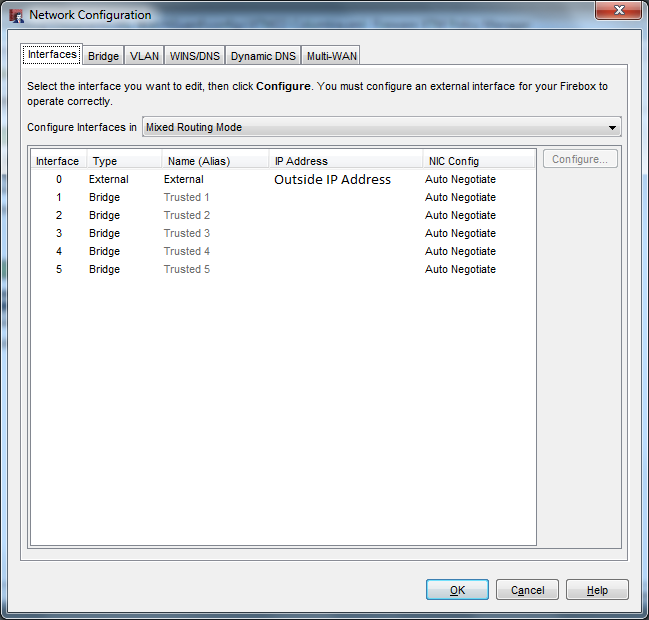
I ran into the same issue & found if you want to use Ports 1-5 on a single Local "Trusted" Network you must put all the ports into a bridge. The easiest way to do this is to use the Watchguard System Manager & not the web Interface. Using the System Manager under Tools - Policy Manger - Under the Network Menu - Configuration. Set the trusted interface to an ip outside of the internal network you want to use. Go under the bridge tab & create a new bridge with the correct internal "Trusted" network information including DHCP server info. Change all internal ports (1-5) to bridge and select the newly configured bridge for each interface. Save to the firebox and your finished User generated imageBridge.png
Software Firewalls

Software Firewalls

--

Questions

--

Followers

Top Experts

Software firewalls, also known as host-based firewalls, provide a layer of software on one host that controls network traffic in and out of that single machine. Most operating systems now include firewall software, but many available software firewalls include central distribution, antivirus systems and disaster recovery.