
Exchange
--
Questions
--
Followers
Top Experts

Autodiscover in Outlook 2010 connected to exchange 2010 fails (0x80070057) (0x80004005)
Hi Everyone
I have just set up a new Exchange 2010 server, on windows 2008R2. I am experiencing outlook constantly prompting for a username and password on our internet network, and when I run the outlook connectivity tests, I get this:
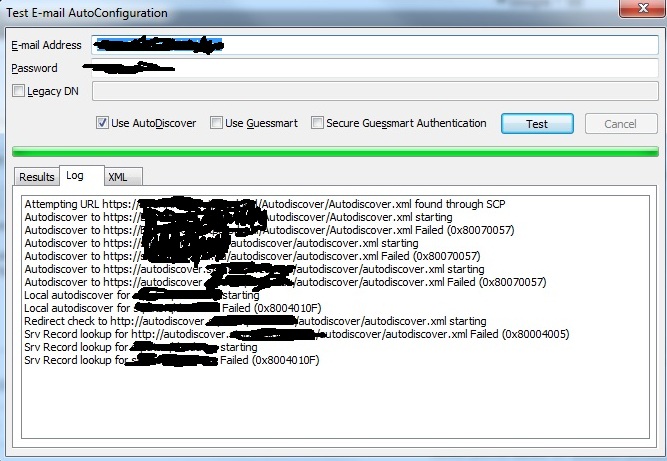
Can someone please point me in the right direction regarding the resolution. The password popup box is a pain in the butt. Email will still work though.
I'm freely available to answer any questions, or post anything you need.
Thanks
Jono
I have just set up a new Exchange 2010 server, on windows 2008R2. I am experiencing outlook constantly prompting for a username and password on our internet network, and when I run the outlook connectivity tests, I get this:
Can someone please point me in the right direction regarding the resolution. The password popup box is a pain in the butt. Email will still work though.
I'm freely available to answer any questions, or post anything you need.
Thanks
Jono
Zero AI Policy
We believe in human intelligence. Our moderation policy strictly prohibits the use of LLM content in our Q&A threads.
Ok, so I have turned off the proxy, and now I get sucess, and instead of asking me for a password, it now tells me that the certificate is not trusted.
We are using a self generated Exchange certificate.
I need to know:
1. how to tell this autodiscovery to bypass the proxy
2. how to install our self generated certificate into the Certificate authority store. There are 500 users so I assume this will be passed around?
Thanks
We are using a self generated Exchange certificate.
I need to know:
1. how to tell this autodiscovery to bypass the proxy
2. how to install our self generated certificate into the Certificate authority store. There are 500 users so I assume this will be passed around?
Thanks
More information now that its sort of working. Here is the screenshot.
It looks like I will need to add another name into the certificate so that it matches the issuer?
Does this mean generating another certificate?
certmessage.jpg
It looks like I will need to add another name into the certificate so that it matches the issuer?
Does this mean generating another certificate?
certmessage.jpg
Another comment - Something as simple as adding in the internet explorer proxy exceptions list has solved the autodiscover problem - "https://exchangeserver.*"
Now I just need to solve the certificate problem -
"The Name on the security certificate is invalid or does not match the name of the site"
Picture in above post.
Now I just need to solve the certificate problem -
"The Name on the security certificate is invalid or does not match the name of the site"
Picture in above post.


EARN REWARDS FOR ASKING, ANSWERING, AND MORE.
Earn free swag for participating on the platform.
ASKER CERTIFIED SOLUTION


membership
Log in or create a free account to see answer.
Signing up is free and takes 30 seconds. No credit card required.
Did that, and all systems go. Not more cert prompts in outlook connected locally.
As for the original issue, seems that using wildcards to list the exchange server the the proxy exception list didn't work. I had to specify the full autodiscover address, for outlook to be able to see the exchange server and set outlook up correctly.
I think down the track, I will convince the people upstairs to buy a Third Party Certificate so that we don't have any cert issues with OWA or mobile device connectivity.
Its had been a long week, was a simple one, but thanks for the answer and nudge along mate.
Points awarded.
As for the original issue, seems that using wildcards to list the exchange server the the proxy exception list didn't work. I had to specify the full autodiscover address, for outlook to be able to see the exchange server and set outlook up correctly.
I think down the track, I will convince the people upstairs to buy a Third Party Certificate so that we don't have any cert issues with OWA or mobile device connectivity.
Its had been a long week, was a simple one, but thanks for the answer and nudge along mate.
Points awarded.
Thanks for the points
Exchange
--
Questions
--
Followers
Top Experts
Exchange is the server side of a collaborative application product that is part of the Microsoft Server infrastructure. Exchange's major features include email, calendaring, contacts and tasks, support for mobile and web-based access to information, and support for data storage.