
Photos / Graphics Software
--
Questions
--
Followers
Top Experts

I'm having problems with a 3d rendering software called Artlantis.
I have 6 Pc's with high spec hardware that run Artlantis and they all got the same problem.
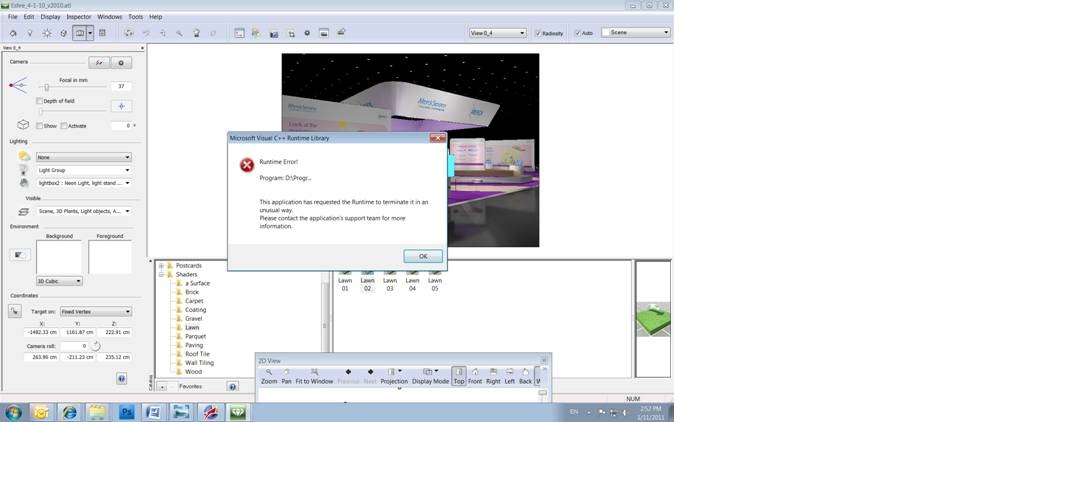
the crash is Happening at different times (attached screen shot of the error).
Also i would like to add that i installed the latest visual studio (2010 version).
the Artlantis works in parallel with The VectorWorks 2010. the VW is a 3D modeling software and the Artlantis Render the models.
every thing is up to date
the hardware is:
I7 950
12GB ram
500GB H.D
NVIDIA Quadro FX1800
Win7 64Bit pro.
Zero AI Policy
We believe in human intelligence. Our moderation policy strictly prohibits the use of LLM content in our Q&A threads.

also check your Application Error Logs to see if there is more information logged there
Start -> Control Panel -> Administrative Tools -> Event Viewer
After a week and still they cant find the problem. feels like they are avoiding the issue.
talked to VW also, they do not support 3rd party render software.

right click the shortcut and select 'Run as administrator'
make sure to do that for both programs


EARN REWARDS FOR ASKING, ANSWERING, AND MORE.
Earn free swag for participating on the platform.
the computers are tailor made by me, they are very powerfull and are over the spec that Artlantis or VW
Require.
there are 2 logs, ill attach them so you could take a look.
one log is from the directX and the other is a log that was taken from the artlantis folder right after it crashed.
the support of artlantis asked me to send them those logs, but nothing happen.
im trying again. DxDiag.txt ArtlantisRenderLog.txt ArtlantisRenderLog.txt DxDiag.txt
http://www.nvidia.com/object/quadro-win7-winvista-64bit-266.45-whql-driver.html
http://www.apple.com/quicktime/download/
Does the program crash if you use any demo/tutorial files or just your own files?
Get a FREE t-shirt when you ask your first question.
We believe in human intelligence. Our moderation policy strictly prohibits the use of LLM content in our Q&A threads.
video driver was updated and Quicktime must remain with an old version...compliance issue by Artlantis.
Did you find anything in the Application Event Logs?
I would like to add that the software never crashed while rendering.
it crashes only when its idle.
EARN REWARDS FOR ASKING, ANSWERING, AND MORE.
Earn free swag for participating on the platform.
the crash is Happening on 6 different PC's with different work on them.
also tried the 64 bit version and 32 bit. the 32 bit crashes less.
right click the program shortcut -> select 'Properties' -> select the 'Compatibility' tab -> check the box for 'Run this program in compatibility mode for:' and select Windows XP (Service Pack 3)
Get a FREE t-shirt when you ask your first question.
We believe in human intelligence. Our moderation policy strictly prohibits the use of LLM content in our Q&A threads.
Photos / Graphics Software
--
Questions
--
Followers
Top Experts
Photo and imaging software is used to edit and compose raster images; Adobe Photoshop dominates the market. Common actions include cropping, slicing, retouching, color replacement, masking and erasing. Other programs include GIMP, Serif PhotoPlus, Pixlr, PhotoScape, Picasa and IrfanView.