
SBS
--
Questions
--
Followers
Top Experts

The existing XP machines on the Domain have a GP that redirects their My Documents to a network share \\server\users\username. This all works fine.
Before Adding the Win7 Machines I loaded the RSAT tools on one and created a WMI filtered GP just for the folder redirections. I created a test OU and added a test user to this and linked the GP.
The Policy has Basic Redirect setup to \\server\userdata\username
All options Disabled.
I created the 'userdata' share on the server and gave System & Admin Full Control, Domain Users: Traverse Folders/Execute , List / Read , Read Attib, Read Extended, read Permissions.
I Created a test user and set their Home Folder to H: \\server\userdata\%usernam
I then logged in on the Win7 Machine.
Looking on the server I can see that the Documents folder is created under the Userdata\username.
Looking at the WIn7 Machine:
When I check the My Documents from the desktop it's still pointing to C: Drive.
When I check the Event logs I get:
Failed to apply policy and redirect folder "Documents" to "\\server\UserData\test.us
Redirection options=0x1000.
The following error occurred: "Failed to update known folder's paths".
Error details: "The system cannot find the file specified.
When I check GPsvc.log
GPSVC(3a0.ac0) 13:31:57:068 ProcessGPOList: Entering for extension Folder Redirection
GPSVC(3a0.ac0) 13:31:57:068 UserPolicyCallback: Setting status UI to Applying Folder Redirection policy...
GPSVC(3a0.ac0) 13:31:57:068 GetWbemServices: CoCreateInstance succeeded
GPSVC(3a0.ac0) 13:31:57:099 ConnectToNameSpace: ConnectServer returned 0x0
GPSVC(3a0.ac0) 13:31:57:099 LogExtSessionStatus: Successfully logged Extension Session data
GPSVC(3a0.ac0) 13:31:57:583 ProcessGPOList: Extension Folder Redirection returned 0x3eb.
GPSVC(3a0.ac0) 13:31:57:583 ProcessGPOList: Extension Folder Redirection was able to log data. RsopStatus = 0x0, dwRet = 1003, Clearing the dirty bit
GPSVC(3a0.ac0) 13:31:57:583 Releasing console lock.
GPSVC(3a0.ac0) 13:31:57:583 UnLockPolicySection called for user <S-1-5-21-2038963976-41155
GPSVC(3a0.ac0) 13:31:57:583 UnLocked successfully
GPSVC(3a0.ac0) 13:31:57:583 ProcessGPOs: Extension Folder Redirection ProcessGroupPolicy failed, status 0x3eb.
Any Ideas? I have the feeling I'm missing something obvious but can't see the woods for the trees after having messed around with this for a few days.
Cheers
Zero AI Policy
We believe in human intelligence. Our moderation policy strictly prohibits the use of LLM content in our Q&A threads.

i.e. I Choose:
Basic - Redirect everyone's folder to the same location
Create a Folder for each user under the root path
\\server\userdata
The tooltip below that give the example of
\\server\userdata\username
I created the 'username' directory under the 'userdata' folder by setting the H: Home Folder in ADUC.
The Documents folder under that is created the first time I log the user in, but the Local Win7 My Docs does not point to it and I get the error messages above.
The Documents folder created seems to have the correct permissions setup: Admin, Creator Owner, the user and system have full Control.
I can browse to the documents folder from the workstation and created / delete files folders etc.


EARN REWARDS FOR ASKING, ANSWERING, AND MORE.
Earn free swag for participating on the platform.
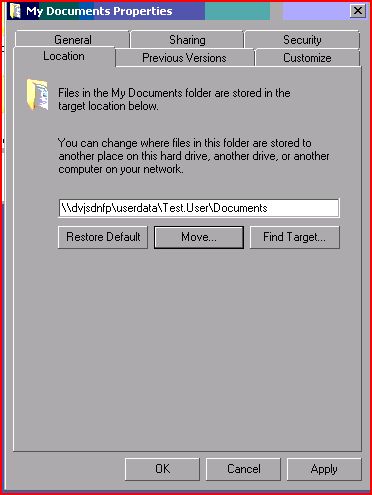
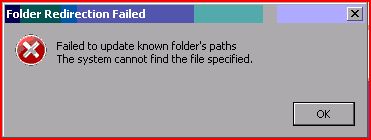
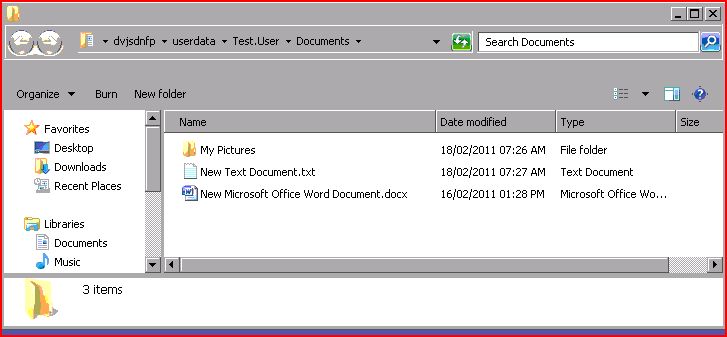
Just noticed that after I hit apply to Move the location of the My Documents I said yes to copy contents.
The 'New Microsoft Office Word Documents.docx' you can see in the 3rd screenshot was on the C: drive in My docs and ended up on the network drive....
The My Docs still didnt redirect though.
Tried XP Machine - Same Error - Copied Word Document to the folder Again.
Tried Local C:\kits Directory - Same Error - Checked Directory , had renamed 'Kits' to 'My Documents' Original My Docs folder still pointed to 'Users' etc. under Location though.
I'm missing something fundamental just cant work out what it is though.
Get a FREE t-shirt when you ask your first question.
We believe in human intelligence. Our moderation policy strictly prohibits the use of LLM content in our Q&A threads.
It has to be something to do with our Windows 7 setup or 2003 SBS setup, though this workstation has virtually no GP's applied other than the Folder redirection one.

I grabbed a new HP machine and turned it on and got to the basic desktop, took it down to the site joined to the domain and everything worked.
I'm now looking at what we do on Our Windows 7 Builds to see how this breaks folder re-direction.
Thanks for your help, going over the various steps helped me to turn the problem back to the machine.
EARN REWARDS FOR ASKING, ANSWERING, AND MORE.
Earn free swag for participating on the platform.
SBS
--
Questions
--
Followers
Top Experts
Small Business Server (SBS) is a line of server operating systems targeted at small businesses by bundling the operating system with a number of other Microsoft products that would normally need to be purchased or licensed separately. The most notable inclusions are Exchange, SQL Server, SharePoint and ISA/TMG (Microsoft's firewall and proxy server).