Link to home
Create AccountLog in
Networking

Networking

--

Questions

--

Followers

Top Experts

Avatar of Pau Lo
Pau Lo

Moving devices - AD impact
What are the potential 'realistic' issues/risks that could arise from teams moving a PC from one department and plugging it in at a network port in another department, potentially a different building - when it comes to network / AD management? It seems rife in our organisation, but I wanted to know if its risky practice in terms of AD? And the overall impact it could have to the AD/network

Zero AI Policy

We believe in human intelligence. Our moderation policy strictly prohibits the use of LLM content in our Q&A threads.


SOLUTION
Avatar of Confucious2Confucious2🇿🇦

Link to home
membership
Log in or create a free account to see answer.
Signing up is free and takes 30 seconds. No credit card required.
Create Account

Avatar of Pau LoPau Lo

ASKER

Could you go a little deeper into the ad ou issue for someone not to tech with ad ie manager speak, many thanks tho for the reply

ASKER CERTIFIED SOLUTION
Avatar of ronnypotronnypot🇳🇱

Link to home
membership
Log in or create a free account to see answer.
Signing up is free and takes 30 seconds. No credit card required.

Avatar of Pau LoPau Lo

ASKER

Yeah physical movement, I heard it can cause big issues in AD but was not sure really what - or just how risky these issues actually are...

Avatar of ronnypotronnypot🇳🇱

no physical moving an computer from one location to another would not be any problem, think about mobile computers they do exactly the same. So as long they can resolve a DC and DNS it is alright

Reward 1Reward 2Reward 3Reward 4Reward 5Reward 6

EARN REWARDS FOR ASKING, ANSWERING, AND MORE.

Earn free swag for participating on the platform.


Avatar of Pau LoPau Lo

ASKER

Does it not mess up AD in terms of administration of OU's etc, and I think I read somehwere about departmental logon scripts... you'll still get the old OU policies and login scripts unless you move the object in AD - could that cause any major problems?

Avatar of ronnypotronnypot🇳🇱

If you have setup rights based on OU access then it will get the configuration from the OU it is in, so if it needs to go to another location which needs settings from another OU you need to move the object to the other OU yes that is correct.

Avatar of Pau LoPau Lo

ASKER

Is that not typical then, that you set rights via an OU?

Free T-shirt

Get a FREE t-shirt when you ask your first question.

We believe in human intelligence. Our moderation policy strictly prohibits the use of LLM content in our Q&A threads.


Avatar of ronnypotronnypot🇳🇱

I always set rights through security groups and user accounts not computer objects. Only thing for OU's are GPO's but than when I move a pc to another location and it needs the othe GPO I would also move the computer object to the other OU.

Avatar of Pau LoPau Lo

ASKER

Is there any easy way in AD you could identify PC's that have moved from one OU to another? Upping points? And then verify whether it has been moved in AD, or if its still in the old OU and still picking up the old GPO's applied to its old OU, or whether its been moved an is getting its new GPO to reflect its new OU it lives in

Does OU not have anything to do with geographic location of the device, i.e. just by moving it an having it hooked up to a switch in a different office, doesnt affect which OU it is in.

And also, can a user/PC be in more than one OU?

Avatar of ronnypotronnypot🇳🇱

I don't know if there is a way to see if a pc has changed an OU, but becuase it is a manual action you may need to introduce a procedure in your organization.

PC's cannot be member of multiple OU's. OU's are nothing more than a way to easify administrative tasks, if this makes things not easier for you you may need to introduce a ne OU structure.

You can ofcourse create an OU in a OU and another OU below that level, GPO's are applying down the tree so if a pc is in the lowest OU it will get all GPO's from the above OU's

Reward 1Reward 2Reward 3Reward 4Reward 5Reward 6

EARN REWARDS FOR ASKING, ANSWERING, AND MORE.

Earn free swag for participating on the platform.


Avatar of Pau LoPau Lo

ASKER

Thing that confused me about multiple OU's was output of grpresult

COMPUTER SETTINGS
------------------
    CN=removed,OU=Computers,OU=Laptops,OU=mydept,DC=removed,DC=net


Avatar of ronnypotronnypot🇳🇱

An Organizational Unit (OU) is a container which gives a domain hierarchy and structure. It is used for ease of administration and to create an AD structure in the company’s geographic or organizational terms.

Here is an example of an OU structure
http://learnthat.com/files/2008/07/image003.jpg
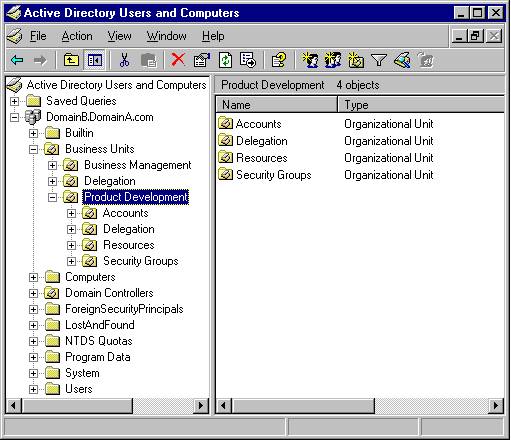
in your case the OU structure would be:
Mydept, Laptops, Computers

On all levels you could setup gpo's, if a gpo is set on the mydept ou it applies to all objects of that OU but also on Laptops and computers. When a gpo is set on the computers OU it only applies to objects in the computers OU.

hope this clarifies how the OU's work
Networking

Networking

--

Questions

--

Followers

Top Experts

Networking is the process of connecting computing devices, peripherals and terminals together through a system that uses wiring, cabling or radio waves that enable their users to communicate, share information and interact over distances. Often associated are issues regarding operating systems, hardware and equipment, cloud and virtual networking, protocols, architecture, storage and management.