
Microsoft Server OS
--
Questions
--
Followers
Top Experts

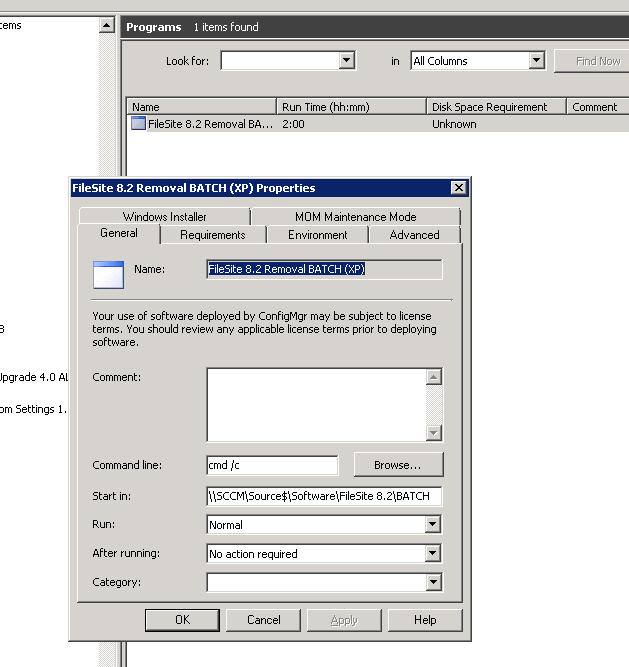
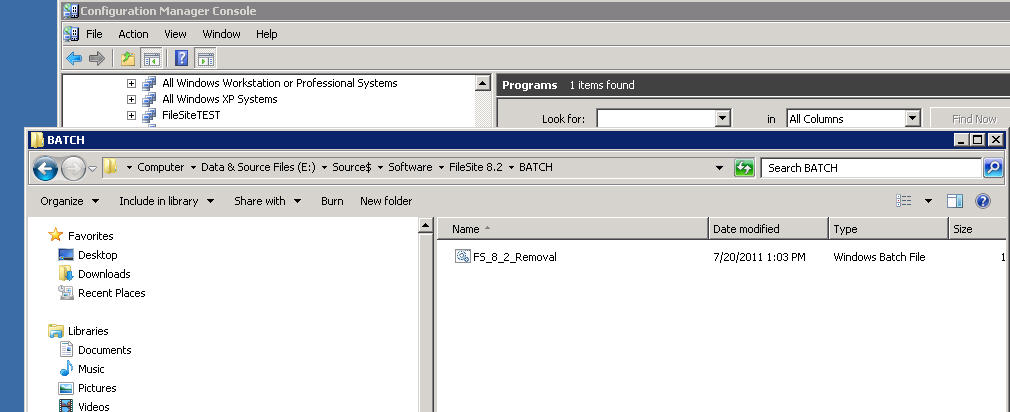
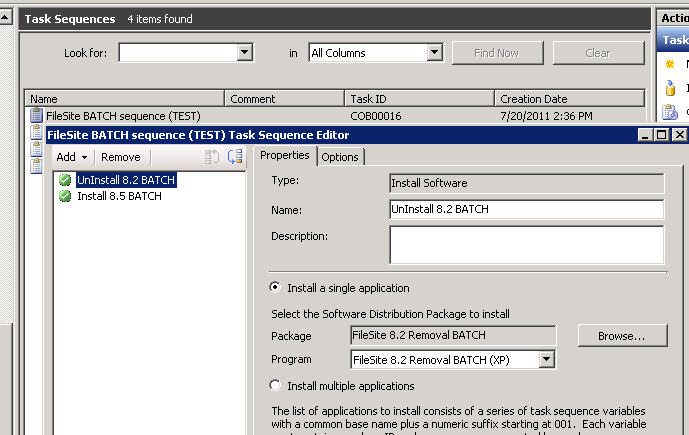
The .bat folder is in a folder called Batch for that particular application on the SCCM server (it does call other batch files from other locations which are on network shares but I think that is not an issue). My question is how do I actually call it up, or is this correct and I need to tweak other areas. After I created the Program for two batch files to run which are set up identical I created a task sequence and advertised it.
Included are screen shots in the order I described it. My feeling is there is something about the command line in the first screen shot I may need to change. Help would be greatly appreciated!
Zero AI Policy
We believe in human intelligence. Our moderation policy strictly prohibits the use of LLM content in our Q&A threads.

Just configure the following as command line:
cmd /c FS_8_2_Removal.bat
the "Start in" option is not needed.
As you already configured the path in the package the batch file will be found.


EARN REWARDS FOR ASKING, ANSWERING, AND MORE.
Earn free swag for participating on the platform.

I will try this next
cmd /c FS_8_2_Removal.bat
as you suggested, but haven't been able to place the /qb-! effectively
The batch command line should work as i suggested.
Could you please explain once more what now is the problem and make some screenshots how you configured it and post the content of the batch file please
Get a FREE t-shirt when you ask your first question.
We believe in human intelligence. Our moderation policy strictly prohibits the use of LLM content in our Q&A threads.
The task sequence is the same except I added a restart in between the removal program and the new installation program as well as at the end of the sequence to clear folders and registry.
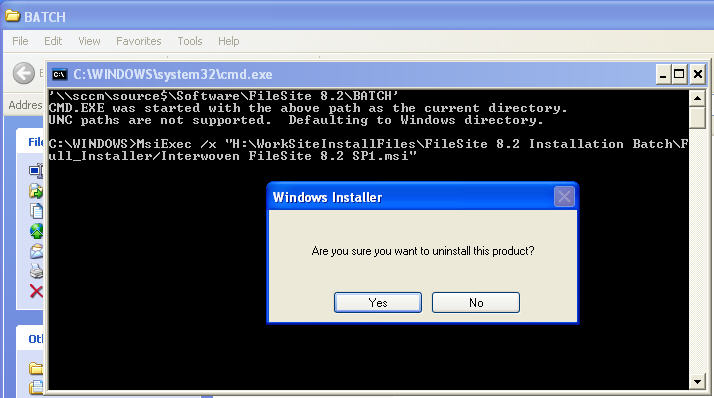
Both independend batch files (the removal and the installation respectively), work when I run them independently, but the former (the removal) as mentioned above still prompts me when I run it manually "Am I sure I really want to remove this product?" and I have to click yes to continue. *I believe as before this is what is holding up the install. Before I made the removal a mandatory predecessor to the upgrade installation, the removal would time out and the upgrade would run resulting in two versions of the product installed. I fixed that but now it doesn't run at all because it is still stuck on the removal process. Here are some of the combinations I have tried in the removal batch.. and if it doesn't like the script I get a pop up for command options, if it does like the script I still get the pop up 'am I sure I want to remove this product?' : <script inside removal .bat>
MsiExec /x "H:\WorkSiteInstallFiles\F
I have tried to place your suggestions after the /x
MsiExec /x /qb-! "H:\WorkSiteInstallFiles\F
MsiExec /x /q "H:\WorkSiteInstallFiles\F
MsiExec /x /qb "H:\WorkSiteInstallFiles\F
I have tried these and many combinations but it for sure does not like the "-!" and I have tried to remove the dash, replace with a +, create a separate switch for the ! but I cannot get the prompt to go away. I even played with /qn and /q /n
Any suggestions would be greatly appreciated.
I figured it out - this was the line that worked. You were probably right about the qb-! but I wasn't placing it after the .msi file directly as above. There are alternatives to that suggestion, but since I am new to scripting I didn't realize I needed to place it after the file path.
Thanks for your help. I got a tip off from another application script I was working on, but your input was very valuable.
EARN REWARDS FOR ASKING, ANSWERING, AND MORE.
Earn free swag for participating on the platform.
Microsoft Server OS
--
Questions
--
Followers
Top Experts
The Microsoft Server topic includes all of the legacy versions of the operating system, including the Windows NT 3.1, NT 3.5, NT 4.0 and Windows 2000 and Windows Home Server versions.