
Outlook
--
Questions
--
Followers
Top Experts

Zero AI Policy
We believe in human intelligence. Our moderation policy strictly prohibits the use of LLM content in our Q&A threads.
It says Rules in Error - cannot reply to message.

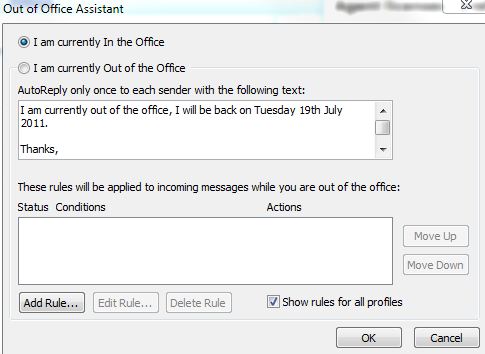
You want to make sure you are using the Out of Office Assistant rather than creating a rule under 'Rules and Alerts'. The Out of Office Assistant will only reply once to each email address that has sent mail, it is also preconfigured so that all you need to do is put in a message and that is it.
In Outlook 2007 go to Tools -> Out of Office Assistant and then write your message. Then tick the I am currently Out of the Office box and you are done. Just remember to turn it off afterwards :)


EARN REWARDS FOR ASKING, ANSWERING, AND MORE.
Earn free swag for participating on the platform.

I'm afraid a rule it is. You will need Outlook running for it to work and to create your reply as a text file for the rule to pick up and use. Using the wizard create a blank rule and ensure that it looks like the following:
'Apply this rule after message arrives'
'Reply using C:\path\to\reply.txt'
Get a FREE t-shirt when you ask your first question.
We believe in human intelligence. Our moderation policy strictly prohibits the use of LLM content in our Q&A threads.
EARN REWARDS FOR ASKING, ANSWERING, AND MORE.
Earn free swag for participating on the platform.


Get a FREE t-shirt when you ask your first question.
We believe in human intelligence. Our moderation policy strictly prohibits the use of LLM content in our Q&A threads.
Outlook
--
Questions
--
Followers
Top Experts
Microsoft Outlook is a personal information manager from Microsoft, available as a part of the Microsoft Office suite. Although often used mainly as an email application, it also includes a calendar, task manager, contact manager, note-taker, journal, and web browser.