
Exchange
--
Questions
--
Followers
Top Experts

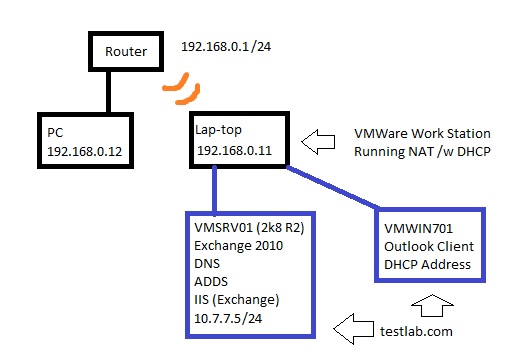
Here's the network setup:
1) SMC Router is configured as a DHCP server. All computers on my home network are part of the 192.168.0.0/24 subnet.
2) I have a PC and Laptop with the addresses shown above.
3) My laptop is running VMWare Workstation with two Virtual Machines. One is a Server 2008 R2 VM which has been promoted to a domain controller for the "testlab.com" domain, had the DNS role installed, and has a copy of Exchange 2010 runing. The other VM is a Win 7 Enterprise VM with an Outlook client for testing purposes.
4) Both VM's are part of the 10.7.7.0/24 subnet and use NAT in conjuction with VMWare through my laptop to access external resources. My server is 10.7.7.5 and the Win 7 box is dynamic.
5) Both VM's are currently able to access the internet and other external resources (they can ping the PC on my 192.168.0.0 subnet for instance). Also my VM server's DNS seems to be working correctly and I have no forwarder installed. The default gateway for the virtual network is 10.7.7.2 as configured by VMWare.
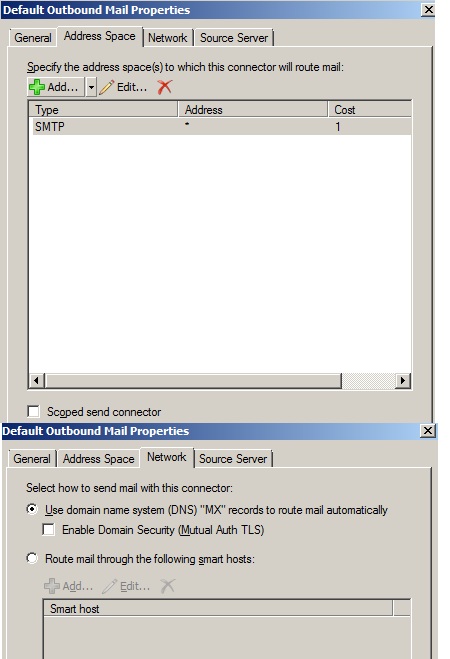
I've installed and configured Exchange 2010 SP1 and right now I'm trying just to be able to send mail to an external domain over the internet from the VM (if that's even possible given my network structure). I'm not concerned about receiving mail at this point, just sending it out. I set up the proper "Internet" send connector under the hub transport roll and configured it as follows:
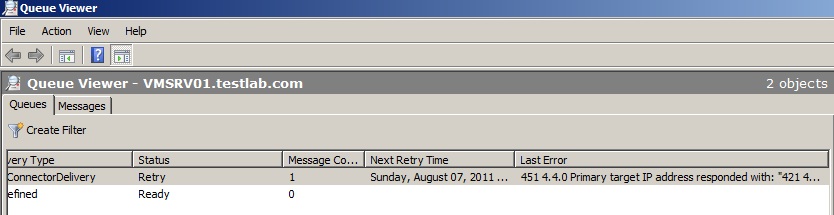
When I try to send an e-mail from my Outlook client it goes into the sent folder, but the item appears to get stuck in the queue on my Exchange server:
Excluding my ISP blocking this type of traffic is there any other configuration I could be missing. I mean technically this server is not internet-facing. I'm passing the request to a virtual router which then needs to pass through my home network router and to the internet. I'm not sure if this type of functionality is possible, but I thought I'd ask the experts :)
Zero AI Policy
We believe in human intelligence. Our moderation policy strictly prohibits the use of LLM content in our Q&A threads.

Check who is running DHCP. VMware NAT wants to assign addresses, your router is probably a DHCP server and the Server VM may also be a DHCP server.
... Thinkpads_User


EARN REWARDS FOR ASKING, ANSWERING, AND MORE.
Earn free swag for participating on the platform.
You might try Bridged mode to see if it helps resolve the problem. You can always change back. NAT is somewhat trickier because it adds firewall complexity and put the virtual machines on a different subnet. .... Thinkpads_User

See links for installation and configuration guide http://araihan.wordpress.com/2009/11/16/exchange-server-2010-edge-transport-role/ and http://www.msexchange.org/articles_tutorials/exchange-server-2010/migration-deployment/exchange-server-2010-edge-server-microsoft-threat-management-gateway.html
Note: you have an option of not using a TMG.
Hope this helps :)
http://technet.microsoft.com/en-us/library/bb738138.aspx
I can try the bridged mode setup, but I'd prefer to keep the NAT if possible.
Get a FREE t-shirt when you ask your first question.
We believe in human intelligence. Our moderation policy strictly prohibits the use of LLM content in our Q&A threads.

Exchange
--
Questions
--
Followers
Top Experts
Exchange is the server side of a collaborative application product that is part of the Microsoft Server infrastructure. Exchange's major features include email, calendaring, contacts and tasks, support for mobile and web-based access to information, and support for data storage.