Link to home
Create AccountLog in
Exchange

Exchange

--

Questions

--

Followers

Top Experts

Avatar of giovanni5553
giovanni5553

outlook 2007 autodiscovery not setting up account from exchange 2007
Okay here is what has happened. I have a windows 2008 box new and exchange 2007, we will call this new exchange box.  I am moved exchange mailboxes off old exchange 2007 box.

GC - dbserver1
GC- dc01
old exchange 2003 box - exchange 2003 box
Old exchange box - old exchange box -exchange 2007
new exchange box - new exchange box - exchange 2007

Okay i installed new exchange box and migrated mailboxes off old exchange box to new .  I am unable to use autodiscover.  I have the new users working fine. I had one computer go down and I installed outlook and it tried to connect to outlook but did not.

I then took a look at autodiscovery. It finds username and email. Then it prompts for username and password. But whatever i put in nothing gets me past it.

I then hit cancel and box comes up with server name and user. I hit check name and unable to connect . I am not sure why

i have even set autodiscover to the server name and that is on the ssl certificate .

I am unsure why this keeps doing it. I installed a UCC certificate.
funny thing is i used wireshark to see what was going on and found out that outlook was going to old server . I had to change old server autodiscover to new server.domain.com. Then at least i could see wireshark that outlook this time was hitting the new server.

I am lost at why it even did that. Any help would be great.

Zero AI Policy

We believe in human intelligence. Our moderation policy strictly prohibits the use of LLM content in our Q&A threads.


Avatar of LazarusLazarus🇺🇸

From your new Exchange server ADUC, Check your Security (Advanced) on all of the old exchange mailboxes that you have moved and make sure they are including inhertiable permissions from this objects parent (checkbox)

Avatar of LazarusLazarus🇺🇸

I should have also said that even though it is checked, uncheck it, then answer add then click on include inhererit again, this should add all the new servers permissions

Avatar of giovanni5553giovanni5553

ASKER

This is odd on my new exchange server i do not have active directory users and computers. I do not have any admin tools for active directory.  ??? confused. I did run prepare AD  but nothing is there plus i thought since already an AD was on with old exchange server that would not matter ?  suggestions ?

Reward 1Reward 2Reward 3Reward 4Reward 5Reward 6

EARN REWARDS FOR ASKING, ANSWERING, AND MORE.

Earn free swag for participating on the platform.


On the old exchange server i do have AD ?

Okay i am going to install active directory role . Should i join it to the forest and will that work fine with exchange ? Also run the wizard and add it to existing forest ?  Or should i not do this ?

Avatar of LazarusLazarus🇺🇸

Your mail server should already be joined to the domain, but dont make it a domain controller, only add the AD DS and AD LDS tools

Free T-shirt

Get a FREE t-shirt when you ask your first question.

We believe in human intelligence. Our moderation policy strictly prohibits the use of LLM content in our Q&A threads.


Okay i have installed both . Now what should I do ?

Do i need to go through the lightweight wizard ? I never have done that ?I am unable to find advanced tab.

Avatar of LazarusLazarus🇺🇸

You should have see the the Active Domain Users and Computers now in your Administrative Tools, from that you can see your users.

Reward 1Reward 2Reward 3Reward 4Reward 5Reward 6

EARN REWARDS FOR ASKING, ANSWERING, AND MORE.

Earn free swag for participating on the platform.


yes that is correct

Avatar of LazarusLazarus🇺🇸

you should be able to look ath the security tab of each user now and go into the advanced settings. uncheck the include inherited permisions then answer to add then check again the the include inherited permissions, it should tell you how many permissions it is adding if it is missing them. then enter ok till it's out of the profile. You would have to do this on all user profiles. I would just test that one persone first though before trying to do them all to make sure that it is the reall issue.

That is the problem there is no security tab and usually in older servers i could look into view and enable it.

Free T-shirt

Get a FREE t-shirt when you ask your first question.

We believe in human intelligence. Our moderation policy strictly prohibits the use of LLM content in our Q&A threads.


Avatar of LazarusLazarus🇺🇸

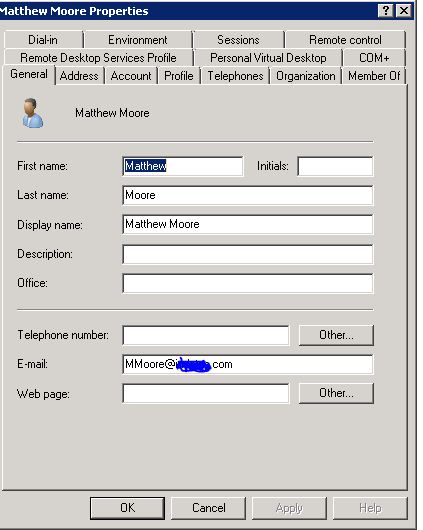
Giovanni, Are you looking in the Active Directory Users and Computers (ADUC) on the new Exchange Server or somewhere else? Can you send an image of what you are seeing?

Yes i am on the new server. I am in the properties of the user.  User generated image

Okay i got it. I forgot the view I did not have advanced . I went in and then advanced and bottom check mark was not in there so i clicked it and then tested outlook again and same thing. I put check mark in include parent object.

Reward 1Reward 2Reward 3Reward 4Reward 5Reward 6

EARN REWARDS FOR ASKING, ANSWERING, AND MORE.

Earn free swag for participating on the platform.


Avatar of LazarusLazarus🇺🇸

Let me make sure I understand this then. The new accounts that are created on the new 2007 mail server have no issues correct? But the old accounts that are being transfered to the new are not finding the new server with there Outlook client using the AutoDiscover? So i assume that they are no longer able to use the Client after transfer?

Well i just added a new user and it does the same thing unable to connect. It did connect first time when i pulled outlook up but then i went and took outlook profile out and tried again it was unable to connect. I know before it was looking at old server and i change autodiscovery to new server for me to see any traffic at all going to the new server from outlook.

No one is able to use client with new server unless they are just moved. They are able to get into outlook but if i blow the profile away they get the popup for username and password. Then if i cancel and i see the server name in the box and check name it says unable to find server. I can put the IP in the box , or a GC and still the same thing. I even tried the old server.

Avatar of LazarusLazarus🇺🇸

It's sounding like your box is not configured correctly. And thats a whole world of another hurt trying to get to the fix on that. There is alot involved. Are you able to contact MS possibly on this issue?

Free T-shirt

Get a FREE t-shirt when you ask your first question.

We believe in human intelligence. Our moderation policy strictly prohibits the use of LLM content in our Q&A threads.


No i do I am unsure as i have setup exhange before and no issues at all. This is the only box I have had issues with.

oh i think i figured out what is happening . Not sure but if i type the name of new server in IE address bar it is redirected to secure website. I have looked all over IIS and do not see any entried. I did find one change but i removed that redirect and then did iisrestart but still a redirect when i type the server. I think this maybe one issue closer.

Okay i finally figured out what is happening and need help. I got autodiscover working . Here is the scenerio. I have to do this sometimes a lot and sometimes not at all.

I log into outlook and it goes to auto discover. It then pops up my name and email address.

mmoore@onedomain.com  <~one of my emails
then password

then i hit next ..it pulls up username and password again. Sometimes i have to change to my new exchange server name \mmoore and then password it fails ...then i put in anotherdomain/mmoore then password it fails ..keep doing it and then magically it logs me in and pulls outlook . This even happen with my test user

our dns we have

@onedomain.com
then
@seconddomain.com

it always pops up my onedomain.com email address.

Any ideas ? Is it dns ? like i said before for some reason when i was doing autodiscover i had to put old mail server to new one because it the outlook client was going to old server and not new ?

Reward 1Reward 2Reward 3Reward 4Reward 5Reward 6

EARN REWARDS FOR ASKING, ANSWERING, AND MORE.

Earn free swag for participating on the platform.


ASKER CERTIFIED SOLUTION
Avatar of giovanni5553giovanni5553

ASKER

Link to home
membership
Log in or create a free account to see answer.
Signing up is free and takes 30 seconds. No credit card required.
Create Account
Exchange

Exchange

--

Questions

--

Followers

Top Experts

Exchange is the server side of a collaborative application product that is part of the Microsoft Server infrastructure. Exchange's major features include email, calendaring, contacts and tasks, support for mobile and web-based access to information, and support for data storage.