Link to home
Create AccountLog in
Hardware

Hardware

--

Questions

--

Followers

Top Experts

Avatar of Lico_w
Lico_w

RAM Upgrade for Packard Bell Desktop Tower
I have tried upgrading the RAM on my Packard Bell UTOW - Rio however I keep getting problems. I only have 2 slots and currently each contains a 512mb chip. I want to update this to 2gb and have some old memory lying around from another upgrade. However whenever I swap them for the new memory my pc just beeps frequently and doesn't startup.

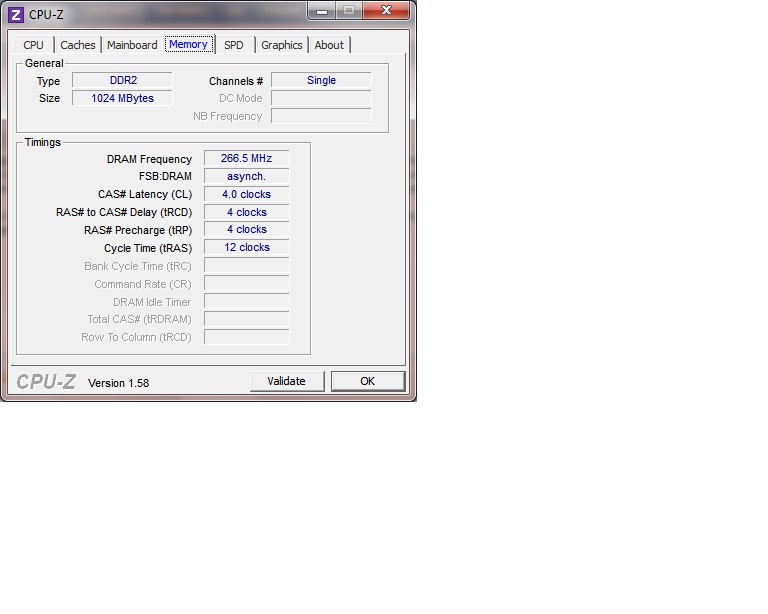
I have installed CPU-Z to get the information on the type of memory (please see screenshot attached). I am not sure of the clock speeds etc of the replacement RAM I have so could it be this?  User generated image
Zero AI Policy

We believe in human intelligence. Our moderation policy strictly prohibits the use of LLM content in our Q&A threads.


Avatar of Sean ScissorsSean Scissors🇺🇸

What I would suggest is the run the Crucial Memory Scanner tool. It scans what motherboard you have and then tells you what kind of RAM and how much will fit on it. It also gives you good prices for new RAM from Crucial.

http://www.crucial.com/systemscanner/

Avatar of Dr. KlahnDr. Klahn

Dig out the owner's manual.  Somewhere in the manual, it will list what memory stick sizes can be used by the system.  If it states that 128, 256 and 512 MB sticks can be used, then a 1 GB stick is too large.

I was unable to find a manual for this product at the PB web site.  If you don't have the owner's manual, you may be able to find it here.  Unfortunately, it is sorted by item number and not by product name.


Avatar of CallandorCallandor🇺🇸

CPU-Z is accurate, so if it says DDR2-266 with 4-4-4-12 timings, then that's what will work.  What did you try to install?

Reward 1Reward 2Reward 3Reward 4Reward 5Reward 6

EARN REWARDS FOR ASKING, ANSWERING, AND MORE.

Earn free swag for participating on the platform.


Avatar of Lico_wLico_w

ASKER

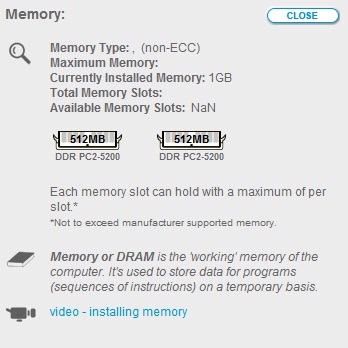
I have tried Crucial but no good, see screenshot below:

Also I don't have the owners manual.

Previously I tried to install 2 x 1gb DDR2 6400  6-6-6-12
 User generated image

ASKER CERTIFIED SOLUTION
Avatar of coral47coral47🇧🇸

Link to home
membership
Log in or create a free account to see answer.
Signing up is free and takes 30 seconds. No credit card required.
Create Account

SOLUTION
Avatar of CallandorCallandor🇺🇸

Link to home
membership
Log in or create a free account to see answer.
Signing up is free and takes 30 seconds. No credit card required.

Avatar of coral47coral47🇧🇸

>> ...don't think DDR2 had the density problems...

Doh... The 512MB in the screenshot, messed me up. My turn for more coffee.  : |

Avatar of coral47coral47🇧🇸

Thank you much.    : )

Free T-shirt

Get a FREE t-shirt when you ask your first question.

We believe in human intelligence. Our moderation policy strictly prohibits the use of LLM content in our Q&A threads.

Hardware

Hardware

--

Questions

--

Followers

Top Experts

Hardware includes cell phones and other digital living devices, tablets, computers, servers, peripherals and components, printers and scanners, gaming consoles, networking hardware such as routers, hubs, switches and modems, storage devices and security equipment such as firewalls and other appliances.