
Exchange
--
Questions
--
Followers
Top Experts

Zero AI Policy
We believe in human intelligence. Our moderation policy strictly prohibits the use of LLM content in our Q&A threads.

Issue Warning: set size limit
Prohibit Send: set size limit
Prohibit Send and Receive: set size limit
Check your storage quota settings for the target mailbox and see what the settings are.
Also make sure that Quota Message Service for Exchange is installed and setup.
Here is a good article on how to do it:
http://www.msexchange.org/articles/customizing-mailbox-limit-warnings-quota-message-service.html
If the email was sent from outlook, the email would bounce back with notification that they need to contact system administrator or free up space.
Also any emails which been sent to them would bounce back with a note that user ran out of space in mailbox if exchange was set to prohibit both send and receive.
Bit hard to believe that user would not notice.
To be more clear on my question, if the prohibit send limit is exceeded, and the user received but did not read the system email stating that, and then sent an email via the OWA interface sometime later, they would receive another system notification? This is important because the exchange server configuration is being blamed for a lapse in communication between my company and a customer.
The user has not received any additional notifications upon trying to send emails, only the original one that the mailbox was over the limit.
This user receives alot of email traffic and was distracted by a personal issue. I really need to know if she should have received a warning for every send attempt?
Thanks so much for your input!
Thanks so much.


EARN REWARDS FOR ASKING, ANSWERING, AND MORE.
Earn free swag for participating on the platform.

Even with the notification user can still click send button and send mail which will fail delivery and would generate bounce back notification.
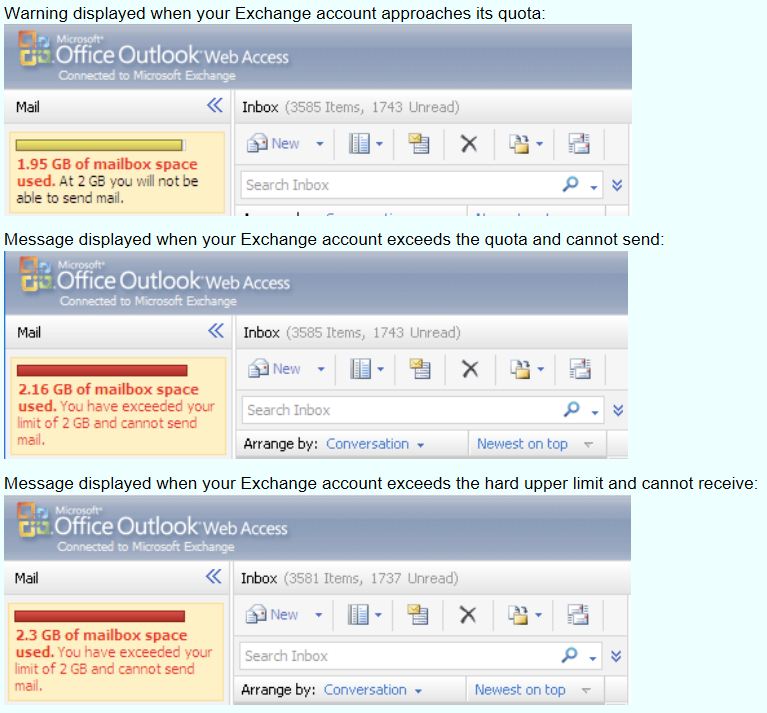
Please see:
http://kb.mit.edu/confluence/display/ist/What+happens+when+a+mailbox+goes+over+quota
I will get back to you with more info.
Cheers.
Get a FREE t-shirt when you ask your first question.
We believe in human intelligence. Our moderation policy strictly prohibits the use of LLM content in our Q&A threads.
Exchange
--
Questions
--
Followers
Top Experts
Exchange is the server side of a collaborative application product that is part of the Microsoft Server infrastructure. Exchange's major features include email, calendaring, contacts and tasks, support for mobile and web-based access to information, and support for data storage.