
Microsoft Legacy OS
--
Questions
--
Followers
Top Experts

You can see the file is origin from SnagIt
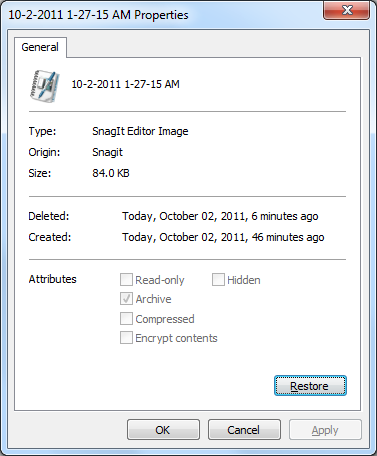
Then I restore it back to the SnagIt Library by clicking restore button in the Recycle Bin,
the file restored from the recycle bin (i.e. disappered), but it doesn't restored back to the C:\Users\<username>\AppDat
Then where is the file?
Hope someone can help!
Zero AI Policy
We believe in human intelligence. Our moderation policy strictly prohibits the use of LLM content in our Q&A threads.


Search Everything is a small, free search tool which searches all files/folders on your whole computer quickly and easily.
http://www.voidtools.com/
IV
SnagIt will rename the file before move it from
c:\Users\<username>\AppDat
to the Recycle Bin
So when I restore the file from the Recycle Bin, it will restore to
C:\Users\<Username>\Docume
Accepted answer: 0 points for mawingho's comment http:/Q_27375514.html#36898288
for the following reason:
I tested it myself.<br />Thank you for your help!


EARN REWARDS FOR ASKING, ANSWERING, AND MORE.
Earn free swag for participating on the platform.
I would accept that. It would be better if you can tell me it get renamed.
I would give B for that answer. Thank you!
Get a FREE t-shirt when you ask your first question.
We believe in human intelligence. Our moderation policy strictly prohibits the use of LLM content in our Q&A threads.
I opened Snagit and captured a bit here. As I recalled, it does not attempt to make a name in Snagit Editor until I do a Save As. Then it uses a time stamp as the date. See below. I think the use of a time stamp as the filename is at the bottom of why it gets renamed (the time changes).
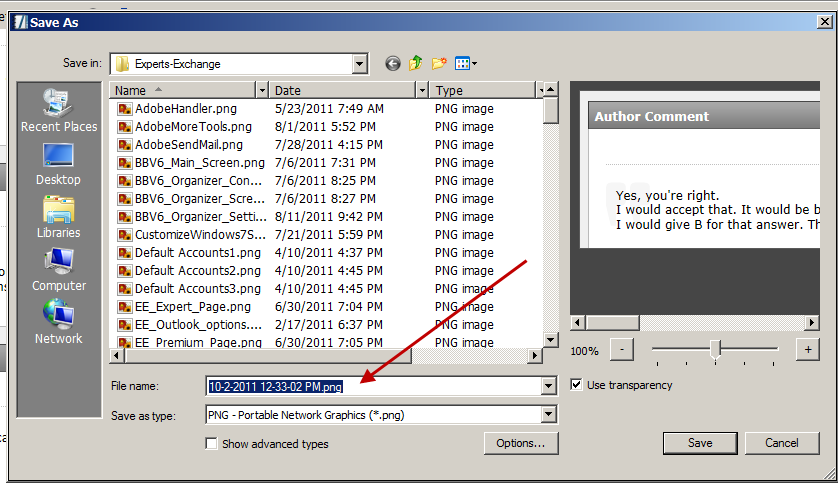
I instinctively give my files real names (I have a couple of hundred such files for use here at E-E). Time stamps would quickly be hard to use. Now when I save as a real name, it saves always in Documents\Snagit, never in the temp folder. I looked here (C:\Users\thinkpads_user\A
When I delete my real files, a restore from the recycle bin will always bring them back to Documents\Snagit with the same name. I think it is the temporary files you are deleting getting a new name.
So my suggestion is to save your images in the Documents\Snagit folder and then I think your problems will go away.
... Thinkpads_User
Microsoft Legacy OS
--
Questions
--
Followers
Top Experts
The Microsoft Legacy Operating System topic includes legacy versions of Microsoft operating systems prior to Windows 2000: All versions of MS-DOS and other versions developed for specific manufacturers and Windows 3/3.1, Windows 95 and Windows 98, plus any other Windows-related versions, and Windows Mobile.