
Routers
--
Questions
--
Followers
Top Experts

Anyway, these units have been in place since around 2007 and have worked without issue. Firmware version on all units is 10.0.2.
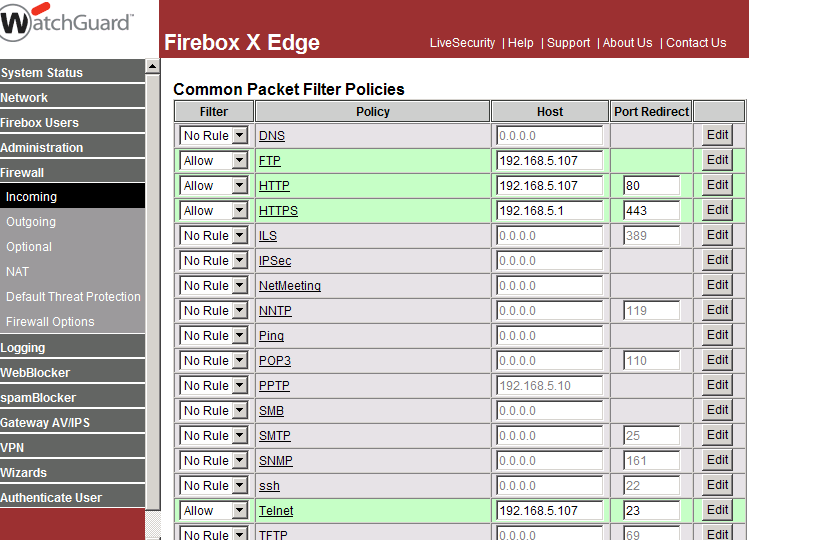
What should be a 30 second job is turning into a bit of a challenge. I've opened the necessary ports on the branch Firebox on the Firewall>Incoming screen and checked I've used the same method as the head office router - but it's not passing any traffic.
Initially I had created a custom packet filter policy with the 3 necessary ports included 21, 23 and 80. But the logs showed that incoming traffic to these ports was being blocked.
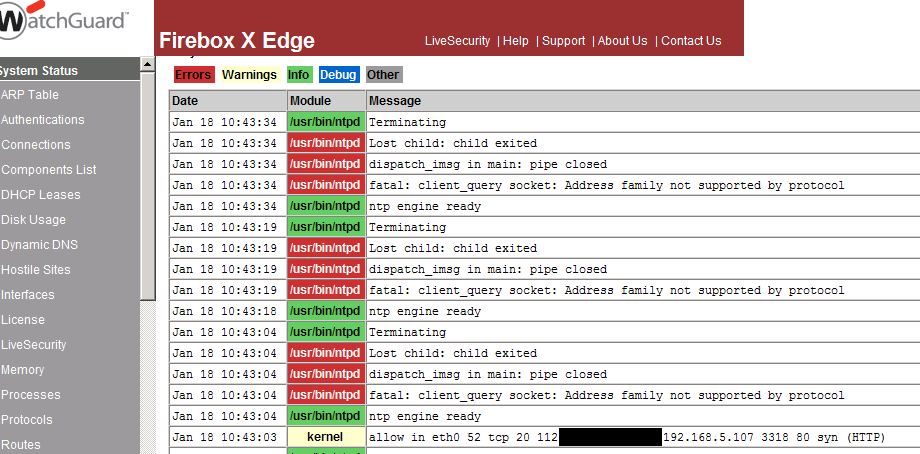
So I used the existing common packet filters for HTTP, FTP and Telnet. Now the logs are showing that the traffic is being let through, but closely followed by a number of errors - see attached screenshots.
I've tested the ports to the CCTV internally and all are working - it appears these errors in the logs are the cause, but have no idea how to resolve them.
Any ideas?
Zero AI Policy
We believe in human intelligence. Our moderation policy strictly prohibits the use of LLM content in our Q&A threads.


I can telnet to 192.168.5.107 on 21, 23 and 80 inside the firewall - so must be something that's happening on the Firebox.
That last log entry does show an allowed packet going through the HTTP policy. Strange.
Is there a VLAN or anything behind this Watchguard? Are there any outgoing policies that could be redirecting the traffic?
Yes, I've compared all the settings pages on the router at the main site with this branch site - can't see any difference apart from different ports are open.
No outgoing policies and no VLANs setup.
As you can see from the screenshot, I've opened up 443 to go to the router itself - this works fine.


EARN REWARDS FOR ASKING, ANSWERING, AND MORE.
Earn free swag for participating on the platform.
Just tried something - tried to ping the host from one of the other branches (no firewalls between branches) - no response.
Looks like the CCTV unit itself is blocking traffic from outside the local subnet. I'll check with the installers.
Get a FREE t-shirt when you ask your first question.
We believe in human intelligence. Our moderation policy strictly prohibits the use of LLM content in our Q&A threads.
Routers
--
Questions
--
Followers
Top Experts
A router is a networking device that forwards data packets between computer networks. Routers perform the "traffic directing" functions on the Internet. The most familiar type of routers are home and small office cable or DSL routers that simply pass data, such as web pages, email, IM, and videos between computers and the Internet. More sophisticated routers, such as enterprise routers, connect large business or ISP networks up to the powerful core routers that forward data at high speed along the optical fiber lines of the Internet backbone. Though routers are typically dedicated hardware devices, use of software-based routers has grown increasingly common.