
Web Graphics Software
--
Questions
--
Followers
Top Experts

No matter what I do ... I get ugly blurry pixelated pictures.
LinkedIn's profile page image is 80x80. But next to comments - its 60x60. LinkedIn controls the resize method. Can't believe a 20 pixel change can ruin a picture. Obviously, I'm going from 80 to 60.
Am I missing some trick? Like should I use gif instead of png?
Is there a definitive source on how to resize to smaller images?
I've been working with web graphics for almost a decade and I'm lost my mojo. :)
I've tried bicubic sharpening, gif, png, jpg, and on and on.
Thanks, A. L.
P.S. Is there a graphic specific experts-exchange type web site? I never went to school for graphic design and I need help.
Zero AI Policy
We believe in human intelligence. Our moderation policy strictly prohibits the use of LLM content in our Q&A threads.


I have to say that I saw an BASIC Profile and the image is not 80x80 pixels, but 100x100 pixels.
And when I searched the person I gave the list with SHRINKED images that have 80x80 pixels !!!
Then I went to page for login and there is a image with a resolution 50x50 pixels.
I will attach all these images in one ZIP file:
images.zip
So, the question is - do you need to upload an image with 100x100 pixels? I think that you have to do just this, because when I INSPECT a code of these web pages with Firefox Inspector I could see that image with 80x80 px and image with 50x50 px are marked in an folder as SHRINKED image !!! That means that original image HAS a higher resolution than shrinked images and the only one such image is this with resolution 100x100 px !!!
You can also see a Properties.jpg for that 100x100 px image. The DPI value is 96 DPI and the height and width is 1.04 inches. That is also important.
Well, in IrfanView you can also set a size of image in inches to get this 100x100 px image.
And you have a field where you can put your DPI value that is for LinkedIn images a 96 DPI.
Here in attachment you can download an short video tutorial ( 1 min and 40 seconds ) that shows how to easily resample the images in IrfanView:
Final.flv
Nrisimha

I know this question is closed now, but I thought I would just add some information that you might find useful.
When resizing an image, always use the "resample" option rather than the basic "resize" option. It is slower, which won't be an issue on anything other than huge images, but you will invariably get better results.
What you should also be aware of is that the different image scaling (resizing/resampling) filters work better for different types of digital image, and some work better for reducing and others are better for enlarging.
While, for example, a "pixel resize" method may provide better results when resizing very hard-edged images, Bicubic, Bilinear or Lanczos resampling would usually be better for resizing photo-realistic images.
Additionally, one filter may be better for reducing than enlarging, and vice versa. I think Bicubic is better for enlarging and Bilinear is better for reducing an image, but the results are subject to the type of image content mentioned in the paragraph above.
If you do a google search for something like:
digital image scaling resizing resampling filters
you will get some very good pages that list the many different odd named filters, although obviously not all image editing applications will have the full range available.
Bear in mind that some images could well have a mixture of hard edges, soft edges, etc, and so you need to experiment with all the different types of resizing/resampling filters and check the results at the size it is intended for display and on the device (mobile, laptop, large screen) and in the software (browser, program dialog, etc) where it will be displayed.
Lanczos is probably the best compromise for most image types (probably why it is the IrfanView default) but as with everything in this world there are those who will always dispute what most others agree on.
Color Depth of an image may also have an influence on the results of resizing an image. Generally resizing filters work by comparing adjacent pixels, removing pixels or adding some that weren't there before, depending on what you are doing. An image with less unique colours than another may suffer more when resized with one or other of the filters available than one with more unique colours.
One last thing to remember is that, depending on the image format you do your final "Save As" to, what you were seeing on your monitor within the editing application may be different from how the image will look when reopened.
You will undoubtedly be aware that JPG images use a form of compression that degrades the quality by different degrees depending on the % compression chosen. There is an optimum level for the viewable size of the image where file size can be reduced but the loss in quality isn't noticeable at the viewed size, but for something like a LinkedIn avatar file size isn't really an issue and you should be choosing no compression at all if saving to small JPG images like this.
You really want to be avoiding GIF in this day and age because .... how can I say this? ...... it is crap for anything other than simple animated images or the simplest little still image icon or logo of limited color depth where quality doesn't matter too much. Flash type animations are often preferable to animated GIFs if they need to be of good quality.
PNG supports the transparency that many people sought in the GIF format, but with full color depth and other benefits, and where PNG is an allowable image format I think it is the best for most things web based these days.
Back to filters again, I have a strong feeling that IrfanView actually only uses the image filters shown in the drop-down list in the dialog (Image > Resize/Resample) for enlarging images. I believe that it just uses a fixed resampling filter for downsizing images, although I could be wrong. That is not to say that I am dismissing IrfanView, because it is an excellent program with many features that are better than expensive retail software, and I use it all the time with fine results.
Another free and extremely capable image editor with even more good quality resize/resample filters than IrfanView is XnView. It is available as a "portable" application that will run from your USB Flash Drive if you don't want to clutter up your computer with even more installed programs. They have a command line program nConvert that is a handy tool also.
Note:
Irfanview IS a portable application as it comes, as long as you don't choose the user options to integrate it with the Windows shell to show a "Browse with IrfanView" right-click menu and associate it with any specific file extensions. It saves all its settings to an *.INI file in the program folder rather than using the Registry. It's just a case of unpacking the installer, but it's just as easy to install it, copy the program folder created across to a USB Flash Drive, and then uninstall it from the computer. When run from the Flash Drive the INI file will be created there and any changes of settings will be saved to that.
Hope you find this informative, but if not just ignore it ;-)
Bill


EARN REWARDS FOR ASKING, ANSWERING, AND MORE.
Earn free swag for participating on the platform.
Well, you said right now something very, very ... hm ... I speak and write English very bad and I couldn't find an eufemistic word other then - "something strange" ...
Simultaneously, you "have a strange feeling" what in a language of psychology means - I think !!! And you think or suppose that IrfanView uses these filters only for enlarging.
At the same time you said "that it just uses a fixed resampling filter for downsizing images" and you add - "although I could be wrong" !!!
So, it is not good to have in mind the TWO opinions that are, look at this very carefully - TOTALLY OPPOSED !!!
So, where is a solution? Here is a solution - "That is not to say that I am dismissing IrfanView, because it is an excellent program with many features that are better than expensive retail software, and I use it all the time with fine results."
One old Chinese proverb says - "One image worths more than a thousands of words".
And I will show you here the images from IrfanView. And short explanations.
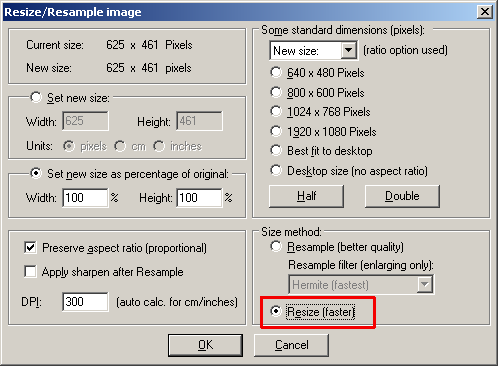
When you open IrfanView and select Image menu and select Resize/Resample you wil get an windows where you always choose parameters for resizing and resampling.
In the left bottom corner you can see "Size method" with two options - first is Resample ( better quality ) !!! That means that is a option for filter selecting and applying !
Second is only bad "Resize" option that gives a pixelated images !
Here is that window:
I have a big problem on EE a few weeks ago until now, because I always have to explain to people that images I attached here have an excellent quality and that are displayed totally streched or shrinked.
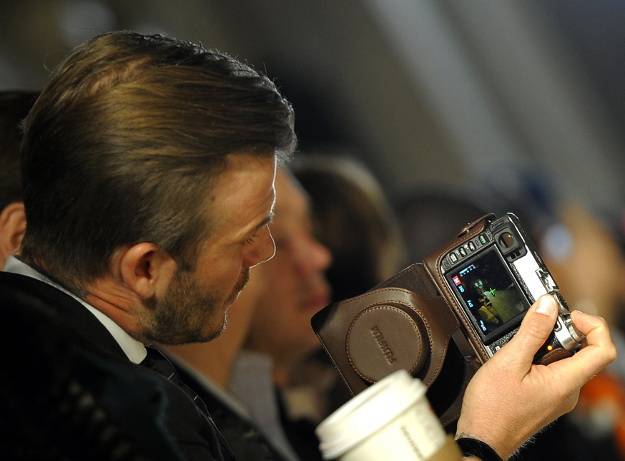
My basic image is this:
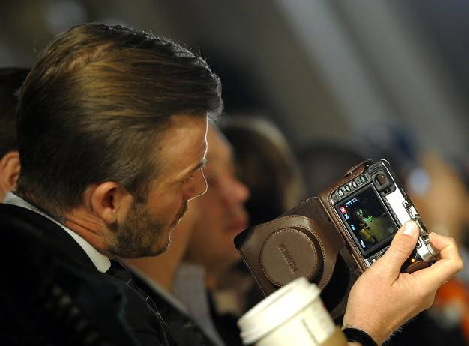
BillDL, try to use Resize ( faster ) option and set the image size to 75%.
You will get an poor image with a pixelated areas around a Beckham's big toe, photo camera, the border of white tube and Beckham's collar is totally pixelated. Maybe it is good for some bad web pages, but not for professional web designer and programmer. Look these results and download and open the image on your PC:
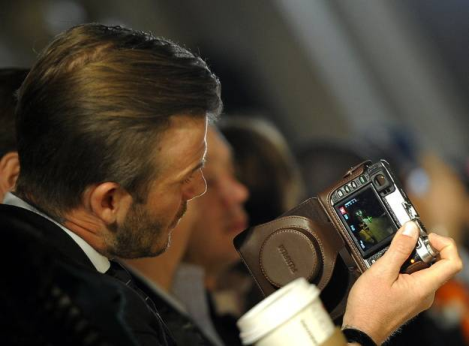
Then, use Undo and use option Resample ( better quality ) then choose Lanczos filter or Hermite ( fastest ) if you want, but now not for enlarging image, but for decreasing that image. And set the image size to 75%. Click on OK button.
Here is the result image that is NOT pixelated as previous. It looks fantastic. I used the resample filter here not for enlarging image, but for decreasing that image.
Here is that resampled image with Hermite filter applied:
And that's it. Easy converting with a great result and excellent quality.
regards
Nrisimha
You know, I don't really care for being lectured in either Psychology or correct use of the English language, because I am perfectly qualified in both disciplines.
My reason for saying that I had a "strong feeling" was that I distinctly remembered reading Irfan Skiljan's description of the resizing options offered within his own program, and specifically about differences in the downsizing method employed. I could not, however, recall specifically (and I mean word for word) what had been stated by him, hence the "I could be wrong" caution.
Now that I have had a bit more time to find what I remember reading, perhaps you would care to interpret exactly what Mr. Skiljan means by this statement:
"Note: the showed Resample filters are used for enlarging only. For shrinking, a special/fast resample filter is used."
You will find this in the IrfanView help file (Help Menu > Ifranview Help) by expanding the "Image Menu" section and selecting the "Resize/Resample" sub-section. This has existed in help files back to version 3.xx of the program and through to the current version 4.32 (installed and portable versions). It is vaguely possible that this is a reference to a much older version of the program and which should since have been removed from the help file, but it is still there to read it yourself.
That is what I recall reading, and is what I was referring to. Precisely what filters are "showed" (should have used the word "shown" to be linguistically precise), and where they are displayed, is something that I am not absolutely sure about. Perhaps you will be able to enlighten me by explaining what the statement means and exactly what it is referring to. On receipt of a satisfactory explanation demonstrating that I have completely misinterpreted what the developer states about his own program, or read it out of context, I would be perfectly happy to change my statement of "I could be wrong" and openly tell the world that "I was wrong". It is not important enough for me to stay around arguing this though.
I am glad that you have had the time to demonstrate, through images of David Beckham apparently grasping a digital camera with his foot (yes, you said "big toe" instead of "thumb", but let's not split hairs), that all the filters are applied to both reducing and enlarging images. If that is definitive enough for you then that is fine by me.
Anyway, I'm not here to argue. You do not own this question, nor any other question that you happen to be a participant in. It is entirely up to aprillougheed to experiment with the different filters and see what works best for her own images and for the intended purpose. It is for that reason that I added the last paragraph to my comment thus:
"Hope you find this informative, but if not just ignore it ;-)"
Enough said, I will "unmonitor" this question and so will not know what your follow-on comments are.
aprillougheed
I am sorry to have cluttered up your question with this comment, but I don't really appreciate being lectured in the nuances of the English language by somebody for whom English is a second language.
Bill
All glory to you. You are a one of the only 3 experts on this Forum that I really respect.
I apologize to you sincerely.
regards
Nrisimha
Get a FREE t-shirt when you ask your first question.
We believe in human intelligence. Our moderation policy strictly prohibits the use of LLM content in our Q&A threads.
I'd like to share this thread on Pininterest, or Facebook or Twitter. Please let me know if you oppose. If you don't want me to share the thread, may I take quotes from above and write a blog?
I've struggled and struggled with profile pictures for all the social media sites. It was so kind of all of you to write such thoughtful answers, it is just good karma to share with everyone.
I am CERTAIN I'm not the only one having troubles. Just look at all the blurry, faded photos at LinkedIn.
I started over from scratch last night with a fresh scan and still have pixelation issue ... oh, I should open a new question. Let me do that so I can at least award points for all the help
I agree. Although, I don't know will anybody become enlightened when read my sentences:))
And BillDL said - "Enough said, I will "unmonitor" this question and so will not know what your follow-on comments are".
So, you have ask him also for permission.
I started over from scratch last night with a fresh scan and still have pixelation issue ...
Well, try to start with an image with 100x100 px. Of course, you can open a new question.
I am only curious about such false displayed mystical icons.
It is just good karma to share with everyone.
Thank you. How to make a good karma? I have read many books of the great spiritual persons of human history.
I have read an book 18 years ago and even today it is for me the best spiritual book after Holly Scriptures of many Religions.
The writer Paramahansa Yogananda was an enlightened Guru. I have to announce that 2 days ago at 7th March 2012 was a 60th anniversary of his mahasamadhi:
Anyone can read his reproduction of the original 1946 edition of "Autobiography of a Yogi", complete with the original photos and original text on-line:
http://www.ananda.org/auto
So, for zooming use CTRL++.
regards
Nrisimha
Web Graphics Software
--
Questions
--
Followers
Top Experts
Websites use graphics to enhance information, assist navigation, and generally improve the user’s experience. To create those graphics, developers use any number of programs, like the Adobe Creative Suite (Photoshop and Flash have their own topics), the CorelDraw suite, Xara, Gimp, ACDSee, Serif, ULead and others.