
Microsoft Excel
--
Questions
--
Followers
Top Experts

Office 2010 Save and Send not working
We are just starting to migrate to Windows 7 and Office 2010 and have come across the following problem with Excel/Outlook 2010.
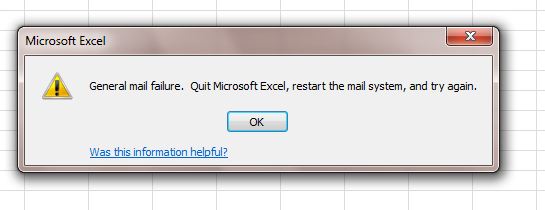
In Excel if I go to File > Save and Send > Send Using E-mail > Send as Attachment
I get the following error message:
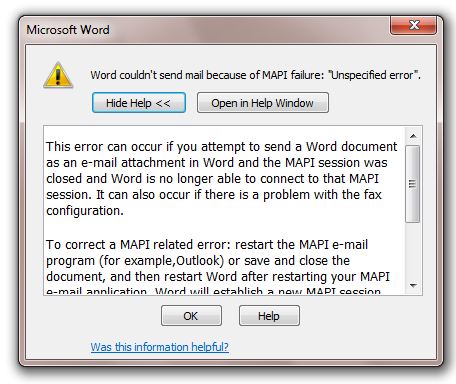
The same process in Word gives this error message:
And in Powerpoint gives this error message:

The errors occur whether Outlook 2010 is running or not.
Also, if from the desktop I right-click on a file > Send To > mail Recipient
Nothing happens. The attachment can only be sent from within Outlook and by 'adding' an Attachment.
This problem is happening on 2 laptops with Window 7 (64bit) + Office 2010 and 1 desktop with Windows 7 (64bit) + Office 2010. All are completely up to date with Windows updates.
I have another laptop with Windows 7 (64bit) +Office 2010 that works perfectly!!
These are all fresh installs of Windows + Office + All Updates.
Does anyone know what is going on here?
Thanks for your time
Neil
In Excel if I go to File > Save and Send > Send Using E-mail > Send as Attachment
I get the following error message:
The same process in Word gives this error message:
And in Powerpoint gives this error message:
The errors occur whether Outlook 2010 is running or not.
Also, if from the desktop I right-click on a file > Send To > mail Recipient
Nothing happens. The attachment can only be sent from within Outlook and by 'adding' an Attachment.
This problem is happening on 2 laptops with Window 7 (64bit) + Office 2010 and 1 desktop with Windows 7 (64bit) + Office 2010. All are completely up to date with Windows updates.
I have another laptop with Windows 7 (64bit) +Office 2010 that works perfectly!!
These are all fresh installs of Windows + Office + All Updates.
Does anyone know what is going on here?
Thanks for your time
Neil
Zero AI Policy
We believe in human intelligence. Our moderation policy strictly prohibits the use of LLM content in our Q&A threads.

Can you confirm if outlook has been set as the default program
Internet Explorer --> Tools --> Internet Option --> Programs --> Internet Programs --> set programs. Find Microsoft Outlook and then highlight and click Set this program as default
Internet Explorer --> Tools --> Internet Option --> Programs --> Internet Programs --> set programs. Find Microsoft Outlook and then highlight and click Set this program as default
Here is another two possible fixes as well. Look at the responses from William Zhou and Bearcat_w
http://social.technet.microsoft.com/Forums/en-US/officeappcompat/thread/9e322291-7bf5-4116-a110-6d58018ed357
http://social.technet.microsoft.com/Forums/en-US/officeappcompat/thread/9e322291-7bf5-4116-a110-6d58018ed357
Here is what i have tried already:
Solution 1
1. Click on Windows [Start]
2. Type: Default Programmes in the search box
3. Run Default Programmes
4. Make sure Outlook is the Default e-mail client
Solution 2
1. Click on Windows [Start]
2. Type Outlook.exe in the search box
3. Right click Outlook.exe and choose Properties
4. Compatibility Tab Nothing should be ticked
Solution 3
1. Click on Windows [Start]
2. Type fixmapi in the search box
3. Run fixmapi
None worked.
From browsing through many forums it seems that this 'save & send' problem is not uncommon, and obviously I have not found a solution yet.
I hope that the 'Exchange Experts' can succeed where so many others have failed
Thanks again
Solution 1
1. Click on Windows [Start]
2. Type: Default Programmes in the search box
3. Run Default Programmes
4. Make sure Outlook is the Default e-mail client
Solution 2
1. Click on Windows [Start]
2. Type Outlook.exe in the search box
3. Right click Outlook.exe and choose Properties
4. Compatibility Tab Nothing should be ticked
Solution 3
1. Click on Windows [Start]
2. Type fixmapi in the search box
3. Run fixmapi
None worked.
From browsing through many forums it seems that this 'save & send' problem is not uncommon, and obviously I have not found a solution yet.
I hope that the 'Exchange Experts' can succeed where so many others have failed
Thanks again


EARN REWARDS FOR ASKING, ANSWERING, AND MORE.
Earn free swag for participating on the platform.

have you tried disabling addins in Outlook?
try start > run > outlook.exe /safe and see if it helps.
try start > run > outlook.exe /safe and see if it helps.
ASKER CERTIFIED SOLUTION


membership
Log in or create a free account to see answer.
Signing up is free and takes 30 seconds. No credit card required.
Many thanks apache9
Everything working well now.
It was the delete/recreating of the Microsoft Outlook subkey in the registry that fixed it.
I can't believe Microsoft have not sorted this. There seems to be hundreds of forums listing this problem and have been listing it for a least 2 years!!
Thanks again
Everything working well now.
It was the delete/recreating of the Microsoft Outlook subkey in the registry that fixed it.
I can't believe Microsoft have not sorted this. There seems to be hundreds of forums listing this problem and have been listing it for a least 2 years!!
Thanks again
Microsoft Excel
--
Questions
--
Followers
Top Experts
Microsoft Excel topics include formulas, formatting, VBA macros and user-defined functions, and everything else related to the spreadsheet user interface, including error messages.