
Microsoft Access
--
Questions
--
Followers
Top Experts

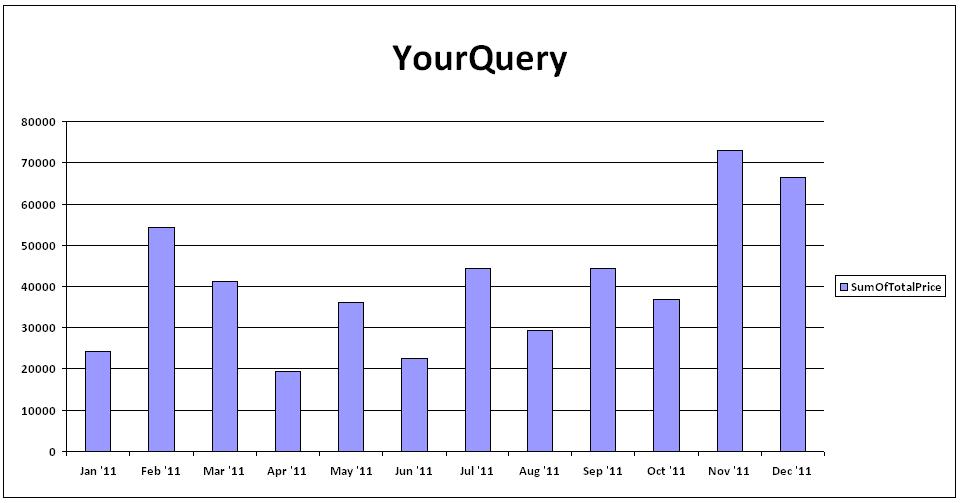
Chart represent monthly total cost in one year
Hi:
In table tblMaintenance, I have MntID & WorkshopInDate
In table tblTechnicianTransaction, I have MntID & Cost (One To Many) .
I need to build a yearly chart of total cost per month(I. e. 12 month Bars and each Bar represent the total cost per month.
How could I do such thing?
Please help
Relation.JPG
In table tblMaintenance, I have MntID & WorkshopInDate
In table tblTechnicianTransaction, I have MntID & Cost (One To Many) .
I need to build a yearly chart of total cost per month(I. e. 12 month Bars and each Bar represent the total cost per month.
How could I do such thing?
Please help
Relation.JPG
Zero AI Policy
We believe in human intelligence. Our moderation policy strictly prohibits the use of LLM content in our Q&A threads.

Then you first need to create a query that joins these two tables and only filters for the desired year.
There is no "Cost" field in either table, (that I can see) , so I am not sure how this would be done?
In other words, it seems you would also need to join the "Cost" table in with the two tables shown.
The bottom line is that if you have a query that displays all the info you need, the chart wizard will walk you through the steps of creating a chart "By Month"
As always, a sample db and a graphic of the *exact* output you are expecting is always the best thing to do to get the answer you are seeking, in the shortest period of time.
There is no "Cost" field in either table, (that I can see) , so I am not sure how this would be done?
In other words, it seems you would also need to join the "Cost" table in with the two tables shown.
The bottom line is that if you have a query that displays all the info you need, the chart wizard will walk you through the steps of creating a chart "By Month"
As always, a sample db and a graphic of the *exact* output you are expecting is always the best thing to do to get the answer you are seeking, in the shortest period of time.
ASKER CERTIFIED SOLUTION

membership
Log in or create a free account to see answer.
Signing up is free and takes 30 seconds. No credit card required.
wonderful
thank you very much boag2000
thank you very much boag2000


EARN REWARDS FOR ASKING, ANSWERING, AND MORE.
Earn free swag for participating on the platform.
;-)
Microsoft Access
--
Questions
--
Followers
Top Experts
Microsoft Access is a rapid application development (RAD) relational database tool. Access can be used for both desktop and web-based applications, and uses VBA (Visual Basic for Applications) as its coding language.