
C#
--
Questions
--
Followers
Top Experts

i get this example put not understand
https://km.zebra.com/kb/in
int bitmapDataOffset = 62;
int width = 255;
int height = 255;
int bitsPerPixel = 1; // Monochrome image required!
int bitmapDataLength = 8160;
double widthInBytes = Math.Ceiling(width / 8.0);
Zero AI Policy
We believe in human intelligence. Our moderation policy strictly prohibits the use of LLM content in our Q&A threads.
int bitmapDataOffset = 62;
and
int bitmapDataLength = 8160;
double widthInBytes = Math.Ceiling(width / 8.0);
"BitmapData.Scan0" and "BitmapData.Stride" can help you to find the parameter "bitmapDataLength". Also "Height", "Width", "PixelFormat" properties of "Bitmap" can help you to find rest of the parameters.
Does it help you ?
but not working !!


EARN REWARDS FOR ASKING, ANSWERING, AND MORE.
Earn free swag for participating on the platform.
CT~~CD,~CC^~CT~
^XA~TA000~JSN^LT0^MNW^MTT^PON^PMN^LH0,0^JMA^PR2,2~SD30^JUS^LRN^CI0^XZ
~DG000.GRF,04864,076,
,kU02,kU07,kU02,kV040,kV0E0,kU07C0,K080kN060I080,K0C0gK010S010gL030gL040U0C0,K0C0gK0180R0180gK020gL060U0C0,J01C010041C00180H030181C0010H01C030181C0010H01C030181C0010I0401070H030H07004010780030H01C03070H040H0701C03070H0404001C018041C00180H030181C001,K0E0380E1E00180H030183E00380038030183E00380038030183E00380H0E038F80060H0380E038F80060H01C060F800E0H0E01C060F800E0J0E0380E1E00180H030183E00380,K0607C1E3F003C0H0703C7F007C001C0703C7F0078001C0703C7F007C001F078FE00F0H0100F07CFE00F0H01C0F1FC01E0H0701C0F1FC01E040H0607C1E3F003C0H0703C7F00780,K0203C0607802C0H0F82C0F80080H080F82C0F80080H080F82C0F80080H0E0080E00B0I080E0080E00B0H03E0B03E0060H0203E0B03E006060H0203C0607802C0H0F82C0F80080,K0705C1701C046001D84707C0DC0H040D84607C0DC0H041D84707C1DC001B0DC07819800181B0DC07819800371981F0170H010371981F017060H0604C1701C0470H0D84607C0DC0,K0200C3B00E0660H0H8H601E0EC0H040886601E0EC0H040886601E0EC00190EC0381980H081B0EC03819800221980F83B0H010221980F83B020H0204C3B00E0660H0H8H601E0EC0,I01FE067FLFE0H0CFMFC01FC0DFMFC01FC0DFMFC0011FMF807F811FMF80037FMFH07F037FNFE01FE067FLFE0H0DFMFC0,J0FE07FMFE0H0OFC03FC0FNFC03FC0FNFC0H0OF803F80FNF8003FMFE007E03FOFE00FE07FMFE0H0OFC0,I01FE07FDFJFDF0H07FDFJF7C01FC0FFDFJF7C01FC07FDFJF7C001FF7FKF807F81FF7FJF78001FLFDF007F01FF7FIFDFHF01FF07FDFJFDE0H0HFDFJF7C0,J0FE03F83FIF060H03F07FHFE0C01FC03F07FHFE0801F803F07FHFE0C0H0FE0FIFC1803F80FE0FIFC18001FC1FIF83003F01FC1FIF83FE00FE03F83FIF060H03F07FHFE080,N0C0P010S010S010Q070S070Q060S060U0C0P01,M0180N02030Q02030Q02030Q060S060O080C0Q080C0T0180N0203,K01C780N010F0Q01070Q010F0O031F0Q031E0O041C0Q041C0S0C780N0107,L03F0P0FE0R0FE0R0FE0O01FC0Q01FC0O03F80Q03F80S03F0P0FE,L03F0P07C0R07C0R07C0P0FC0R0FC0O01F0R01F0T03F0P07C,M0C0P0380R0380R0380P030S030Q060S060U0E0P038,,^XA
^MMT
^PW609
^LL0406
^LS0
^FT0,128^XG000.GRF,1,1^FS
^PQ1,0,1,Y^XZ
^XA^ID000.GRF^FS^XZDownloading and Printing Graphic Images
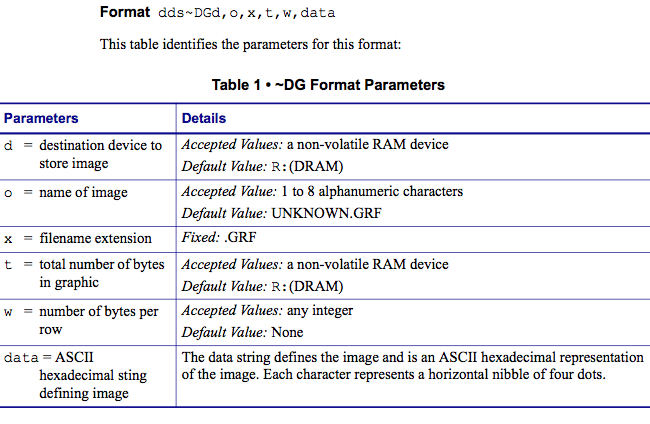
The ~DG command requires parameters indicating the size of the graphic image.
Format dds~DGd,o,x,t,w,data
Get a FREE t-shirt when you ask your first question.
We believe in human intelligence. Our moderation policy strictly prohibits the use of LLM content in our Q&A threads.
you can read header format of Bitmap and evaluates these parameters. Check this out:
http://www.fastgraph.com/help/bmp_header_format.html
Read the Bitmap File with:
System.IO.File.ReadAllByte
and evaluates bytes:
byte 10 (bitmapDataOffset ),
byte 18 (width)
byte 22 (height)
byte 28 (bits per pixel)
for bitmapDataLength :
bitmapDataLength = Total number of Bytes in file - bitmapDataOffset
i.e.,
8222 - 62 = 8160 ( values for test.bmp) given in the link you have attached in question
hope it helps!
EARN REWARDS FOR ASKING, ANSWERING, AND MORE.
Earn free swag for participating on the platform.
a part from my prev post:
Read the Bitmap File with:
System.IO.File.ReadAllBytes(.....)
and evaluates bytes:
byte 10 (bitmapDataOffset ),
byte 18 (width)
byte 22 (height)
byte 28 (bits per pixel)
for bitmapDataLength :
bitmapDataLength = Total number of Bytes in file - bitmapDataOffset
i.e.,
8222 - 62 = 8160 ( values for test.bmp) given in the link you have attached in question

the code is working if image width=255
if change width to 100 or 300 or any size not print image print the black image
also and the image print invert
Get a FREE t-shirt when you ask your first question.
We believe in human intelligence. Our moderation policy strictly prohibits the use of LLM content in our Q&A threads.
int width = int.Parse(bitmapFileData[1
my image width is 320 pixc
but the width in program is 64 i dont no why return 64
double widthInBytes = Math.Ceiling(width / 8.0);
widthInBytes=Math.Ceiling(
but
widthInBytes should be equal 40
greets
Piotr
int bitmapDataOffset = int.Parse(bitmapFileData[1
int width = 624;// int.Parse(bitmapFileData[1
int height = int.Parse(bitmapFileData[2
int bitsPerPixel = int.Parse(bitmapFileData[2
int bitmapDataLength = bitmapFileData.Length - bitmapDataOffset;
double widthInBytes = Math.Ceiling(width / 8.0)+2;
EARN REWARDS FOR ASKING, ANSWERING, AND MORE.
Earn free swag for participating on the platform.
the widthInBytes must be a multiple of 8, if the image is small or big is necessary to resize it.
C#
--
Questions
--
Followers
Top Experts
C# is an object-oriented programming language created in conjunction with Microsoft’s .NET framework. Compilation is usually done into the Microsoft Intermediate Language (MSIL), which is then JIT-compiled to native code (and cached) during execution in the Common Language Runtime (CLR).