
Microsoft Excel
--
Questions
--
Followers
Top Experts

Custom hover text based off data marker in Excel Scatter Plot Chart
Excel charts isn't exactly one of my fortes, so please forgive me if I mix up the terminology.
I have to admit, this is strictly because of an iOS game called Valor. But since this is done in excel, I thought It'd be a pretty neat thing to learn now than spend countless sleepless hours stressing how this could be done when I actually need this particular application.
The game's map data isn't exactly accurate at times and the game itself won't let you zoom in and out to see your neighbors around you; which is both an advantage and a disadvantage. No I'm not trying to cheat the game, just trying to find out how to better plan my attacks based of how numerous my enemies are vs my allies.
I decided to plot every city's info into a excel spreadsheet the way the map actually displays it in the game. Aside from the copious amounts of data that had to be entered, I encountered a major problem, I had to keep referring back to the worksheet when looking at the chart to find out who owns what city. Data labels were just too tacky since they could go on top of other cities, which leads data labels out of the picture. So I thought there has to be another way. Looking at my chart, I noticed that when selecting a data marker, I'd get
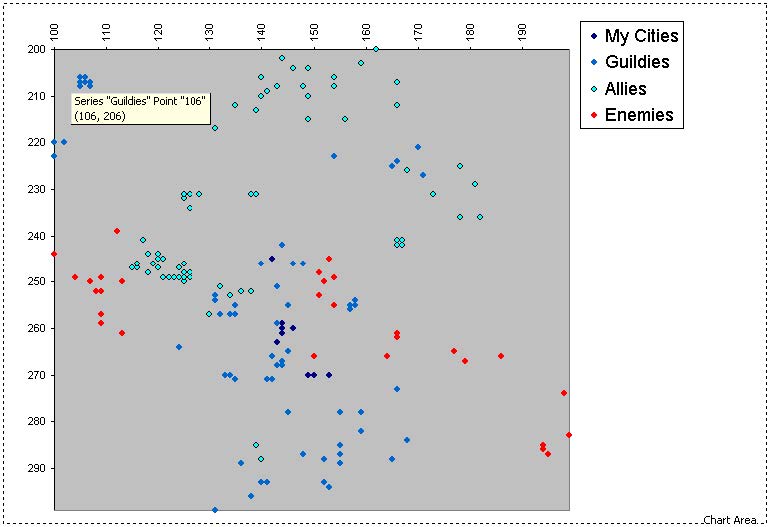 I was wondering if that miraculous hovering text could be exploited in any way to fit my needs. I've come to the conclusion that you probably can't since its tied to the series formula, but I haven't asked the experts that wouldn't take no for an answer.
If that couldn't be done, then maybe one static data label/textbox on the chart that would say which owner and city the data marker points to.
I've seen coding somewhere on the internet that involves using the microsoft help characters, but that involves programming every city in the vba coding.
Max points to the person who gives me a working solution to my problem.
Valor-Map.xls
I have to admit, this is strictly because of an iOS game called Valor. But since this is done in excel, I thought It'd be a pretty neat thing to learn now than spend countless sleepless hours stressing how this could be done when I actually need this particular application.
The game's map data isn't exactly accurate at times and the game itself won't let you zoom in and out to see your neighbors around you; which is both an advantage and a disadvantage. No I'm not trying to cheat the game, just trying to find out how to better plan my attacks based of how numerous my enemies are vs my allies.
I decided to plot every city's info into a excel spreadsheet the way the map actually displays it in the game. Aside from the copious amounts of data that had to be entered, I encountered a major problem, I had to keep referring back to the worksheet when looking at the chart to find out who owns what city. Data labels were just too tacky since they could go on top of other cities, which leads data labels out of the picture. So I thought there has to be another way. Looking at my chart, I noticed that when selecting a data marker, I'd get
Series "Series Name" Point "X" (xxx,yyy) If that couldn't be done, then maybe one static data label/textbox on the chart that would say which owner and city the data marker points to.
I've seen coding somewhere on the internet that involves using the microsoft help characters, but that involves programming every city in the vba coding.
Max points to the person who gives me a working solution to my problem.
Valor-Map.xls
Zero AI Policy
We believe in human intelligence. Our moderation policy strictly prohibits the use of LLM content in our Q&A threads.
Just wanted to clarify I want to change the hover text from
Series "Guildies" Point "106" (106,206)MissJelly Riverrun (106,206)ASKER CERTIFIED SOLUTION


membership
Log in or create a free account to see answer.
Signing up is free and takes 30 seconds. No credit card required.
This also works in MS Excel 2007, now to get my guildies this information as we conquer this
virtual world (insert evil laugh here).
Max points awarded as promised.
virtual world (insert evil laugh here).
Max points awarded as promised.


EARN REWARDS FOR ASKING, ANSWERING, AND MORE.
Earn free swag for participating on the platform.
Microsoft Excel
--
Questions
--
Followers
Top Experts
Microsoft Excel topics include formulas, formatting, VBA macros and user-defined functions, and everything else related to the spreadsheet user interface, including error messages.