
Microsoft Legacy OS
--
Questions
--
Followers
Top Experts

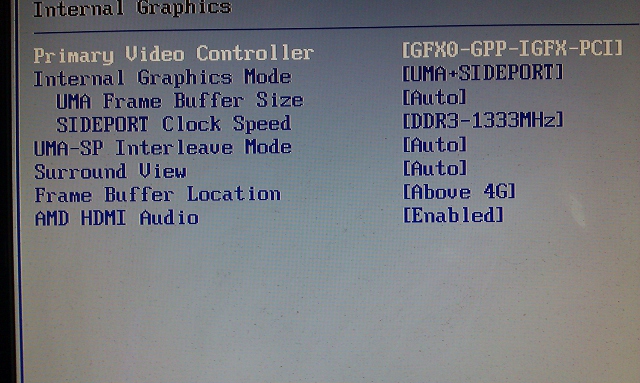 I’m pretty sure that my bio video settings are causing my crashes. I’ve reinstated the default settings, and no more crashing.
I have a four monitor setup.
The Sapphire card is handling 3 of them ok now. (1 HDMI, 2 DVI - I thought but maybe a D-sub, per confusing specs)
My 4th monitor connects to the HDMI on-board port on the Mobo. It is not being seen by
PC presently, because I have not reset the bios. I’d like to get it running, and maybe get some suggestion on whether I should keep 3 monitors on the Card or divide them between On board video.
I’ve been guessing on how to set the bios, but I think that’s my crash problem.
I’m not sure how to deal with these settings below.
BIOS SETTINGS:
GFXO = Primary video controller on a PCI-e x16 slot
GPP = Primary video controller on a PCI-e XL slot
IGFX = onboard video display output
PCI = Primary video controller on a PCI slot.
MOTHER BOARD AND VIDEO CARD SPECS:
ASUS M4A88TD-V EVO USB3
Multi-VGA output support: HDMI/DVI/RGB ports
Dual independent displays support with HDMI/DVI and D-Sub
Dual independent displays support with HDMI/DVI and D-Sub
SAPPHIRE HD 6770 1GB GDDR5
Output • 1 x D-Sub (VGA) • 1 x Dual-Link DVI • 1 x HDMI
Interface: PCI Express 2.1 x16 HDCP
Ports:
HDMI – 1
Display Port – 1 (whatever this is?)
DVI 2 x DVI (1 single, 1 Dual link)
Zero AI Policy
We believe in human intelligence. Our moderation policy strictly prohibits the use of LLM content in our Q&A threads.

If you want a 4th monitor you will need to install a second video card.
Thanks for response.
I've been running monitors from both for some time. Just wanted to add another, and wanted to make I was setting it right.
The features of the motherboard claim it can run both...
?


EARN REWARDS FOR ASKING, ANSWERING, AND MORE.
Earn free swag for participating on the platform.


I'll try the change. to > 2,5
Yes, regardless of those posted settings, it's using the pci-e for three monitors.
I'm trying to connect the 4th monitor to the on-board chip via HDMI.
This is the port placement when system was crashing, but it quit crashing when I restored default bios settings.
And, to try and be clear, I'm now trying to get the system to recoginize the 4th monitor. It's not seeing that or the built in graphic at all. I'm sure that's a setting but was waiting for some advice before changing.
What processor do you have. If you have a DVI or d-sub monitor. See whether connecting anything to the on-board causes this situation.
Get a FREE t-shirt when you ask your first question.
We believe in human intelligence. Our moderation policy strictly prohibits the use of LLM content in our Q&A threads.
I have AMD Penathelon X2 550 - 3300 speed
I had only two options in the fame buffer, above 4g and below 4 gig, so I left it alone.
I got the vga from the on-board going now, after booting up, but lost the HDMI from the pci-e, I'm checking resolution dialog now to see if it became disabled.
EARN REWARDS FOR ASKING, ANSWERING, AND MORE.
Earn free swag for participating on the platform.
Wen the on board is plugged and the bios is set to on board, the pci-e is not initialized.
The VGA monitor is working fine on the on-board.
I can identify the 2nd (hdmi) display on the on-board but it defaults to vga and then errors, saying it can't save settings. I'm going to check it's connection and reboot.
I should have mentioned earlier, that though the HDMI was not working, and that was user error, the other two displays on the pci-e were working.
I think that surround setting I changed is that bios setting you refer to, that allows both cards to work.
Get a FREE t-shirt when you ask your first question.
We believe in human intelligence. Our moderation policy strictly prohibits the use of LLM content in our Q&A threads.
I unplugged the d-sub from the on-board and the HDMI came in.
Now the d-sub is showing disabled in the Control pannel display dialog, but I have a feeling it would work if I plugged the d-sub back in.
But don't think I really need 5 monitors...
I'm hitting the hay, I'll check back for any thoughts you may have tommorow.
Microsoft Legacy OS
--
Questions
--
Followers
Top Experts
The Microsoft Legacy Operating System topic includes legacy versions of Microsoft operating systems prior to Windows 2000: All versions of MS-DOS and other versions developed for specific manufacturers and Windows 3/3.1, Windows 95 and Windows 98, plus any other Windows-related versions, and Windows Mobile.