
Active Directory
--
Questions
--
Followers
Top Experts

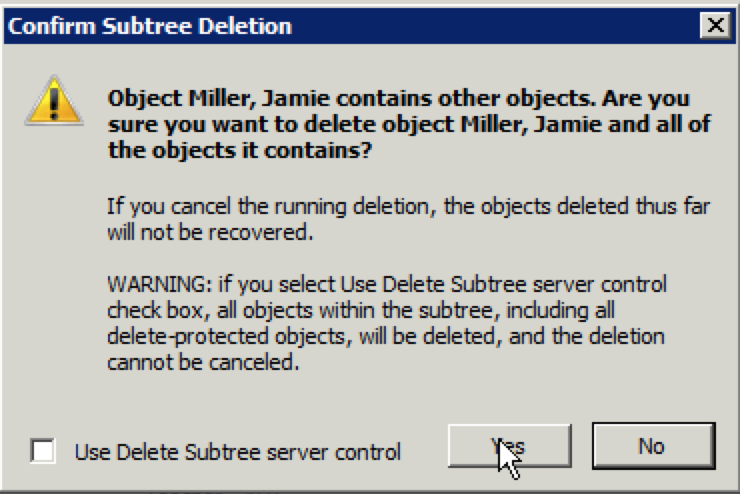
If i click yes, the delete is successful. How can i get the delete to work in powershell?
Search-ADAccount -AccountExpired -UsersOnly | Where { $_.AccountExpirationDate -lt (
Get-Date).AddDays(-30) } | Remove-ADUser
heres the error message i get
Remove-ADUser : The directory service can perform the requested operation only on a leaf object
At line:1 char:125
+ Search-ADAccount -AccountExpired -UsersOnly | Where { $_.AccountExpirationDate -lt (Get-Date).AddDays(-30) } | Remove
-ADUser <<<<
+ CategoryInfo : NotSpecified: (CN=Doe\, John...DC=contoso,DC=org:A
+ FullyQualifiedErrorId : The directory service can perform the requested operation only on a leaf object,Microsof
t.ActiveDirectory.Manageme
Zero AI Policy
We believe in human intelligence. Our moderation policy strictly prohibits the use of LLM content in our Q&A threads.

Search-ADAccount -AccountExpired -UsersOnly | Where { $_.AccountExpirationDate -lt (
Get-Date).AddDays(-30) }
Remove-ActiveSyncDevice "UserName"
- Rancy
Im looking fo a way to put this into a script so the process happens automatically. Your suggestion requires a manual step of running Remove-ActiveSyncDevice "UserName"
Search-ADAccount -AccountExpired -UsersOnly | Where { $_.AccountExpirationDate -lt (
Get-Date).AddDays(-30) } | Remove-ActiveSyncDevice
- Rancy


EARN REWARDS FOR ASKING, ANSWERING, AND MORE.
Earn free swag for participating on the platform.


Can I add something to your script to delete the mailbox as well?
Cannot process argument transformation on parameter 'Mailbox'. Cannot convert the "CN=Doe\, John,OU=sped redirects,OU
=Special ED,OU=Central Office,OU=NewAD,DC=contoso
t.ADAccount" to type "Microsoft.Exchange.Config
+ CategoryInfo : InvalidData: (:) [Get-ActiveSyncDeviceStati
+ FullyQualifiedErrorId : ParameterArgumentTransform
Get a FREE t-shirt when you ask your first question.
We believe in human intelligence. Our moderation policy strictly prohibits the use of LLM content in our Q&A threads.

Active Directory
--
Questions
--
Followers
Top Experts
Active Directory (AD) is a Microsoft brand for identity-related capabilities. In the on-premises world, Windows Server AD provides a set of identity capabilities and services, and is hugely popular (88% of Fortune 1000 and 95% of enterprises use AD). This topic includes all things Active Directory including DNS, Group Policy, DFS, troubleshooting, ADFS, and all other topics under the Microsoft AD and identity umbrella.