
Windows Networking
--
Questions
--
Followers
Top Experts

Zero AI Policy
We believe in human intelligence. Our moderation policy strictly prohibits the use of LLM content in our Q&A threads.


EARN REWARDS FOR ASKING, ANSWERING, AND MORE.
Earn free swag for participating on the platform.
1. Enable routing on HP.
2. Create the second VLAN on HP and give it an IP on both VLANs
3. Assign the second VLAN to the port connecting HP to the Netgear
4. Add the route to the first VLAN on Netgear
Get a FREE t-shirt when you ask your first question.
We believe in human intelligence. Our moderation policy strictly prohibits the use of LLM content in our Q&A threads.
1. Check the subnet masks of the VLANs on each switch to verify they are correct
2. Check the default routes on the Netgear, it should point to HP's VLAN 10 Interface IP, or add a route to 192.168.5.x valn)
3. You don't have to create a trunk from HP to Netgear, just use untagged VLAN (HP term) on the interface linking the switches.
EARN REWARDS FOR ASKING, ANSWERING, AND MORE.
Earn free swag for participating on the platform.

You need a route on the computer to get to 192.168.10.50. You can change the default gateway to 192.168.5.x (IP of the HP switch in that subnet) or add a static route via command line..
route add 192.168.10.0 mask 255.255.255.0 192.168.5.x
If that works, you can make the route permanent by adding -p to the above command (just after route)
Thanks.
Get a FREE t-shirt when you ask your first question.
We believe in human intelligence. Our moderation policy strictly prohibits the use of LLM content in our Q&A threads.
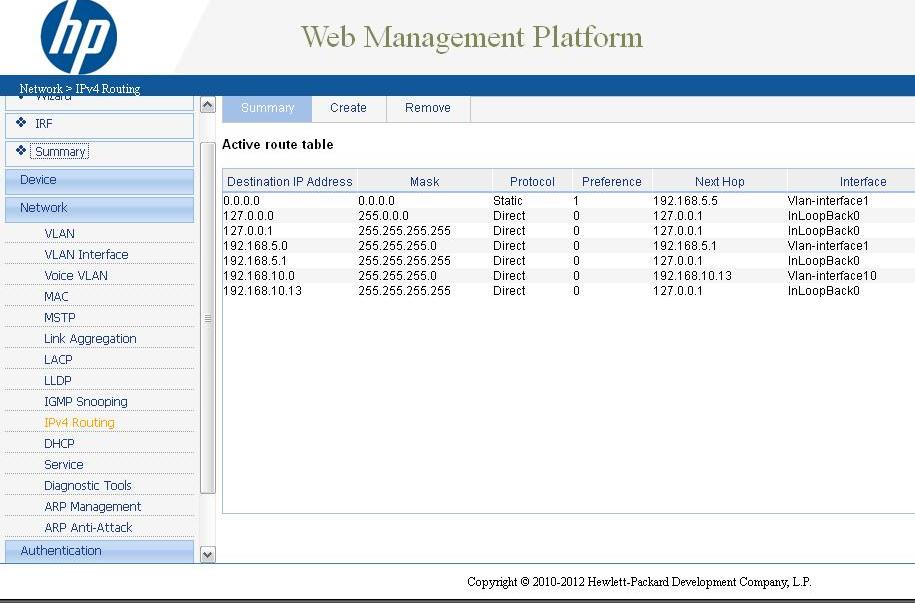 Are these routes on the HP switch okay? I remoted into a computer on the 192.168.5.x network, that is directly connected to the HP switch, added the static route and tried to ping but got not response. I can still ping from the HP switch to the PBX at 192.168.10.50.
HP Switch
Native VLAN: 192.168.5.0
Native VLAN IP: 192.168.5.1
Default Gateway: 192.168.5.5
VLAN 10 IP: 192.168.10.13
Routing Enabled between VLANs
Clients connected to this switch should have an IP on 192.168.5.x range and have 192.168.5.1 as their default gateway. Make sure you remove the static route first and try pinging 192.168.10.13 from a computer connected to this network. If it worked, then ping 192.168.10.x (Netgear's IP) and then the destination you want to reach (IP Phone server).
Netgear
Native VLAN: 192.168.10.0
Native VLAN IP: 192.168.10.x
Default Gateway: 192.168.10.13
Set 192.168.10.13 as the default gateway for clients on this network and ping 192.168.10.13. If it worked, then ping 192.168.5.1 (HPs native VLAN IP) and then move on to ping any other device on the 192.168.5.x subnet.
Double check the settings and follow the checks and let me know.
HP Switch
Y-Native VLAN: 192.168.5.0
Y-Native VLAN IP: 192.168.5.1
Y-Default Gateway: 192.168.5.5
Y-VLAN 10 IP: 192.168.10.13
?-Routing Enabled between VLANs
*** Can't find where to enable this
Y-Clients connected to this switch should have an IP on 192.168.5.x range and have 192.168.5.1 as their default gateway.
Yes this works - Make sure you remove the static route first and try pinging 192.168.10.13 from a computer connected to this network.
Y - If it worked, then ping 192.168.10.x (Netgear's IP)
No - and then the destination you want to reach (IP Phone server).
***however I can ping another device on the 192.168.10.x network(192.168.10.55)
Netgear
Y-Native VLAN: 192.168.10.0
Y-Native VLAN IP: 192.168.10.x
Y-Default Gateway: 192.168.10.13
***The following I will have to go onsite for later today:
Set 192.168.10.13 as the default gateway for clients on this network and ping 192.168.10.13. If it worked, then ping 192.168.5.1 (HPs native VLAN IP) and then move on to ping any other device on the 192.168.5.x subnet.
Double check the settings and follow the checks and let me know.
EARN REWARDS FOR ASKING, ANSWERING, AND MORE.
Earn free swag for participating on the platform.
Get a FREE t-shirt when you ask your first question.
We believe in human intelligence. Our moderation policy strictly prohibits the use of LLM content in our Q&A threads.

Thanks Raj-GT!
Windows Networking
--
Questions
--
Followers
Top Experts
The Windows operating systems have distinct methodologies for designing and implementing networks, and have specific systems to accomplish various networking processes, such as Exchange for email, Sharepoint for shared files and programs, and IIS for delivery of web pages. Microsoft also produces server technologies for networked database use, security and virtualization.