
Hardware
--
Questions
--
Followers
Top Experts

We've received an Avocent AMX5000 KVM switch and it looks like it would be pretty slick, but the reason that we have it is because the former owner forgot his password and it's useless to him now. We've tried all the default passwords for Avocent KVM switches (found here http://community.emerson.com/networkpower/support/w/support/283.default-password-for-all-avocent-product-in-one-sheet.aspx), but nothing's worked. We don't receive any opportunities to interrupt the boot process, the default IP address has changed so we can't do a TFTP boot, and I'm hesitant to open the chassis and look for a reset switch or a battery of some kind because it might all be saved in NVRAM, making a battery reset useless.
Any ideas?
Zero AI Policy
We believe in human intelligence. Our moderation policy strictly prohibits the use of LLM content in our Q&A threads.

password is admin
use the port on the back with a null modem cable.
Unless this port was locked down, you should be able to get in it and change things.
If its locked down, better pull the battery.
Tried that password using a serial cable as you described and received the same "invalid login" error. I'd like to use the battery-pulling as a last resort, since I'm not positive that there's even a battery IN the unit.
Anything else?


EARN REWARDS FOR ASKING, ANSWERING, AND MORE.
Earn free swag for participating on the platform.
You can manually reset the flash module, and re-load it with TFTP.
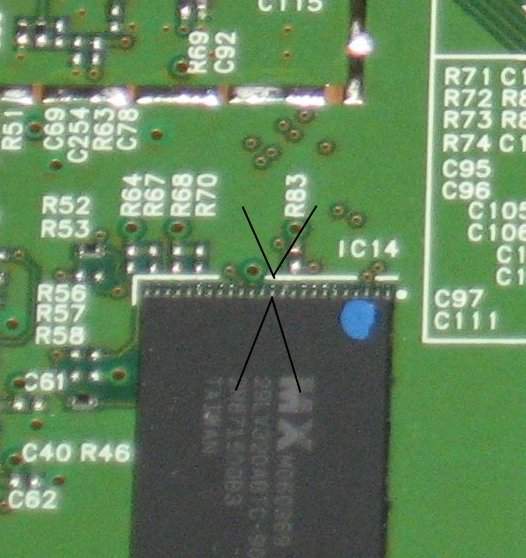
Locate the flash module on the board and post a picture of it. Ill pull the datasheet on the module and tell you which you will have to use. Its a bit tricky, but what will happen is you will take a small wire, strip 2 ends of it and will short out the chip between 2 pins. You will have a computer set with a static IP address and will plug the KVM to a switch and the computer into a switch. Based on which flash module is on the unit, Ill give you a link for which software to use. The TFTP software will run on the PC, and start trying to contact the KVM. You power on the KVM with the pins shorted which will put the KVM into TFTP recovery mode. It only "listens" for the firmware image for a few seconds, thats why you use the switch inbetween.... The PC will see the KVM on-line and will send the firmware. The KVM will automatically re-flash the chip after it receives the image via TFTP.
Its a bit tricky, but it works. This is the only way besides JTAG flashing the flash.... this can be done as well, but is more difficult....
So if interested in doing this, post a picture of the flash module on the board.... here is an example:
Here is an example of a typical board JTAG interface
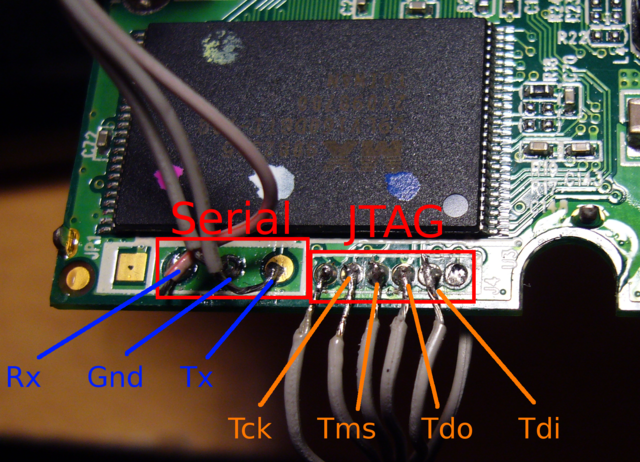
Jtag programs the chip directly and requires a compatible JTAG programmer for your flash unit...
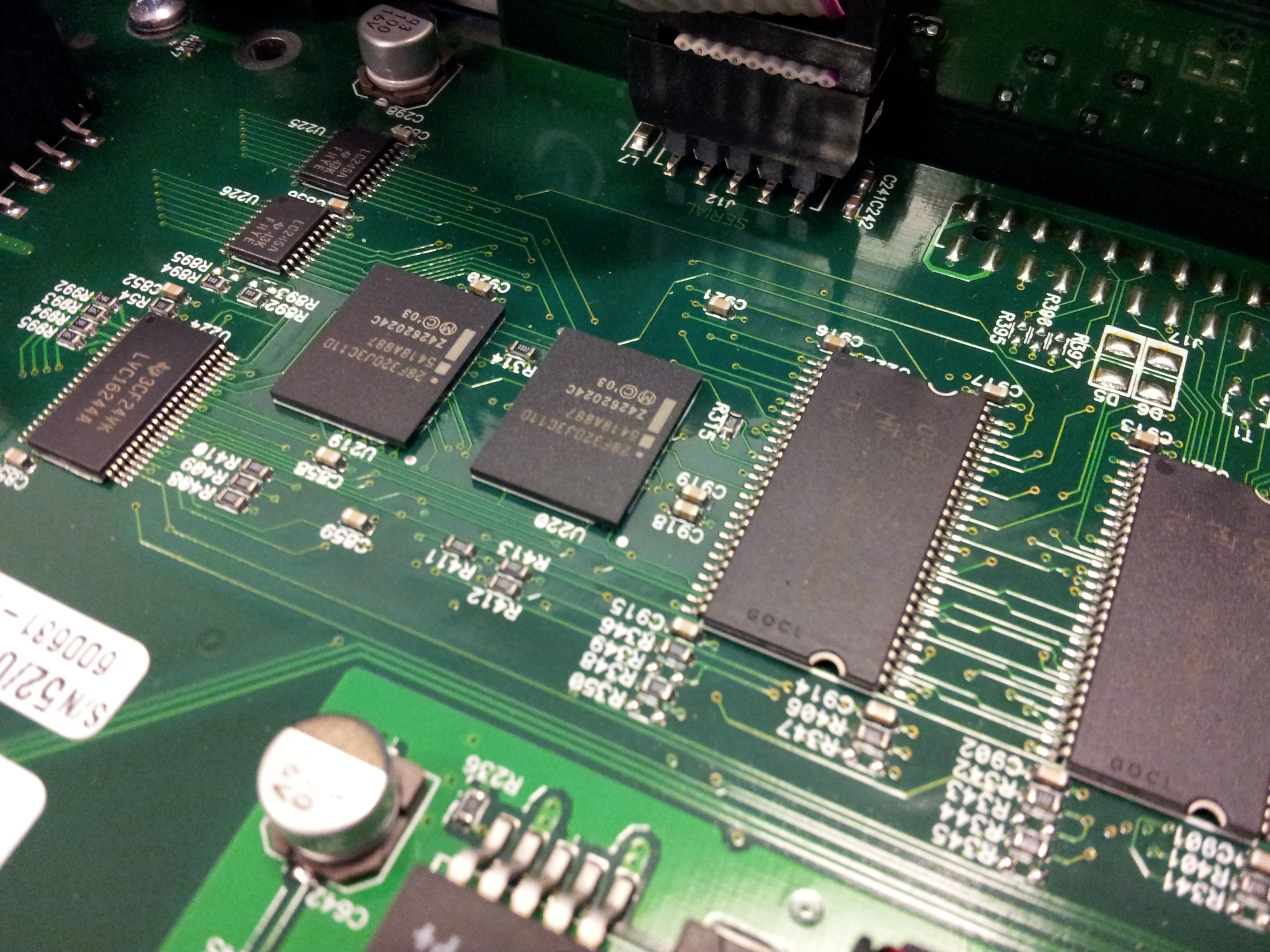
Let me know if what we're looking for is in here or not.

Look on the unit, find the model number and see if there are anything like rev1 or any more details..... This setup is more intelligent and should be easier to put into a recovery mode, as long as the device manufacturer followed standard coding for how the flash works, we should be able to issue a command through a serial port or through the network cable that will put the flash into listen / recover / flash.
Get a FREE t-shirt when you ask your first question.
We believe in human intelligence. Our moderation policy strictly prohibits the use of LLM content in our Q&A threads.
I'm not sure how intelligent the setup is, because I called the manufacturer and they said that the only way that THEY can reset the password is by putting a whole new chip on the board, and that it would cost $2,178 to do this thing. Yuck.
Anyways, I see a "PCB NO." and that is 610-204-001-A. Other things of note:
-A sticker on the power supply fan that says "540-424-002 Rev A"
-A sticker on the RJ45 jacks that says "FLASH FL0032-014"
-A stamp to the right of the PCB number that says "ML-1 94V-0"
-3 stickers on the PCB that read:
-ICT 3
-600-631-001 5204
-S/N 52/04000522 600631-KBM1
I was told by the people at Avocent that despite that number having "S/N" in front of it that it is NOT a serial number. I can provide that if it's needed.
And believe it or not, there's a couple of 10-pin connectors on the board, one's labelled "JTAG" and the other "BDM".
So yeah, I'm seeing those two chips you were talking about, and I'm not too sure, but it looks as though I'll have to get at the underside of this PCB to get those shorts going, is that right?
It will be a few more days, I will have to figure out how to flash this setup and avoid corrupting the bootloader and other parts of the flash. The manufacturer typically will receive these boards complete and just assemble them. These methods of re-loading a flash module are not officially supported and mostly used by manufacturing and repair techs.
Since chip(s) are surface mount, you may have to gain access to them via the JTAG interface. This interface provides a standardized way of interacting with the chip. You can put the chip into specific mode and erase it and re-program it. The standard flash files usually do not modify the bootloader, only the instruction sets (the actual code that makes it run), and there are other areas that are used for storing data (like password). This method of boundary scanning is mainly used for debugging the code in the chips but running software on a PC using a JTAG cable, you will be able to set the pin register to what you need it to be to make it listen for new firmware via TFTP.
Let me see if there is a way to do this without the JTAG cable using the Ethernet port on this device, if there is not, you will have to purchase a jtag cable to reload it (but these are inexpensive)
Here is an example of the JTAG compliant software for a PC:
http://urjtag.org/
http://www.topjtag.com/
Give me a little more time to find you the easiest solution....
-WyoComputers
EARN REWARDS FOR ASKING, ANSWERING, AND MORE.
Earn free swag for participating on the platform.
Hardware
--
Questions
--
Followers
Top Experts
Hardware includes cell phones and other digital living devices, tablets, computers, servers, peripherals and components, printers and scanners, gaming consoles, networking hardware such as routers, hubs, switches and modems, storage devices and security equipment such as firewalls and other appliances.