
Microsoft Applications
--
Questions
--
Followers
Top Experts

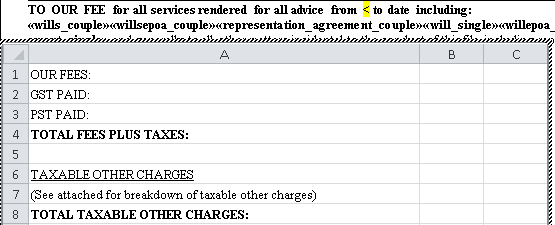
The second graphic shows the result after clicking outside the excel portion. The document prints this way as well.
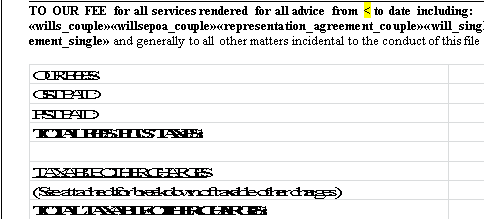
I've downloaded the document to my computer and it behaves the same as on the clients machine. I've tried unlocking the aspect ratio of the embed but it doesn't change anything. I'm at a loss as to how to rectify this issue.
Zero AI Policy
We believe in human intelligence. Our moderation policy strictly prohibits the use of LLM content in our Q&A threads.


I asked what method was being used to insert the excel spreadsheet, and S. Gupta answered it with some authority as though it was the asker posting a comment.


EARN REWARDS FOR ASKING, ANSWERING, AND MORE.
Earn free swag for participating on the platform.
Just to let you know, I only have Office 2003 on the PC I have at home, and would have to go to work to use 2010. I'm off for a few days.
I did try and replicate the issue with Word and Excel 2003, but have been unable to. It sounds like an incompatibility issue. Does it make any difference if you first save the Excel 2003 book as *.xlsx rather than *.xls?
Get a FREE t-shirt when you ask your first question.
We believe in human intelligence. Our moderation policy strictly prohibits the use of LLM content in our Q&A threads.
Microsoft Applications
--
Questions
--
Followers
Top Experts
Microsoft applications include a variety of software programs, including development and digital authoring programs (Expression and Media Center), educational programs, Internet software, including Essentials, Skype and the Live family, anti-virus, productivity applications and suites like Office, Excel, Word, Outlook, Access and PowerPoint, video games and server applications such as Exchange, SharePoint, IIS and Virtual Server.