
Cisco
--
Questions
--
Followers
Top Experts

On a Cisco ASA 5505 running 9.1.3. Under one of my connection profiles for a site to site VPN there is an option for Exempt ASA side host/network from address translation (Inside interface). That option is checked.
In the NAT rules there are several Section 1 and/or Manual NAT rules basically allowing the inside interface of the ASA to talk to different subnets on opposite side of the VPN in question. If I do a sh NAT DETAIL Command I can see the rules as follows:
Manual NAT Policies (Section 1)
1 (inside) to (outside) source static inside inside destination static OR_VOIP OR_VOIP
translate_hits = 45, untranslate_hits = 54
Source - Origin: 192.168.108.0/24, Translated: 192.168.108.0/24
Destination - Origin: 172.16.0.0/22, Translated: 172.16.0.0/22
2 (inside) to (outside) source static inside inside destination static OR_Dot4 OR_Dot4
translate_hits = 18, untranslate_hits = 18
Source - Origin: 192.168.108.0/24, Translated: 192.168.108.0/24
Destination - Origin: 192.168.4.0/24, Translated: 192.168.4.0/24
3 (inside) to (outside) source static inside inside destination static TT_LAN TT_LAN
translate_hits = 87, untranslate_hits = 87
Source - Origin: 192.168.108.0/24, Translated: 192.168.108.0/24
Destination - Origin: 192.168.121.0/24, Translated: 192.168.121.0/24
4 (inside) to (outside) source static inside inside destination static OR_Dot0 OR_Dot0
translate_hits = 90, untranslate_hits = 91
Source - Origin: 192.168.108.0/24, Translated: 192.168.108.0/24
Destination - Origin: 192.168.0.0/24, Translated: 192.168.0.0/24
Being that the "Exempt ASA side host/network from address translation" box is checked under the VPN connection profile do I still need these NAT rules?
Having a hard time finding out exactly what that check box does. Thanks.
Zero AI Policy
We believe in human intelligence. Our moderation policy strictly prohibits the use of LLM content in our Q&A threads.

MO
Why do I need to add the no proxy-arp route-lookup to my Nat rules?
turning off proxy-arp will allow the LAN sides of your tunnel to communicate with the LAN side interface of the opposing ASA.
To answer to your question, the NAT rules created are the result of turning on the exemption.
MO


EARN REWARDS FOR ASKING, ANSWERING, AND MORE.
Earn free swag for participating on the platform.
MO
However if I uncheck those two boxes and change the direction to both on the said NAT rule I get the following warning.
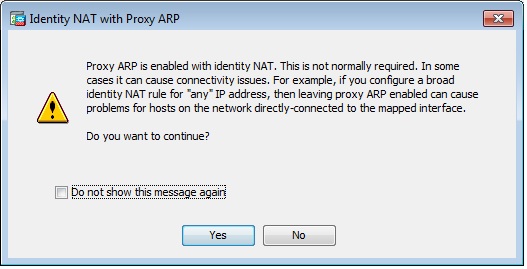
This configuration also works fine and the Show NAT detail is the same.
So the final question is which configuration is better and is the warning something I really need to worry about.
Get a FREE t-shirt when you ask your first question.
We believe in human intelligence. Our moderation policy strictly prohibits the use of LLM content in our Q&A threads.

Cisco
--
Questions
--
Followers
Top Experts
Cisco PIX is a dedicated hardware firewall appliance; the Cisco Adaptive Security Appliance (ASA) is a firewall and anti-malware security appliance that provides unified threat management and protection the PIX does not. Other Cisco devices and systems include routers, switches, storage networking, wireless and the software and hardware for PIX Firewall Manager (PFM), PIX Device Manager (PDM) and Adaptive Security Device Manager (ASDM).