
Printers and Scanners
--
Questions
--
Followers
Top Experts

I have a VM win2012 R2 server that I use for testing here are the steps
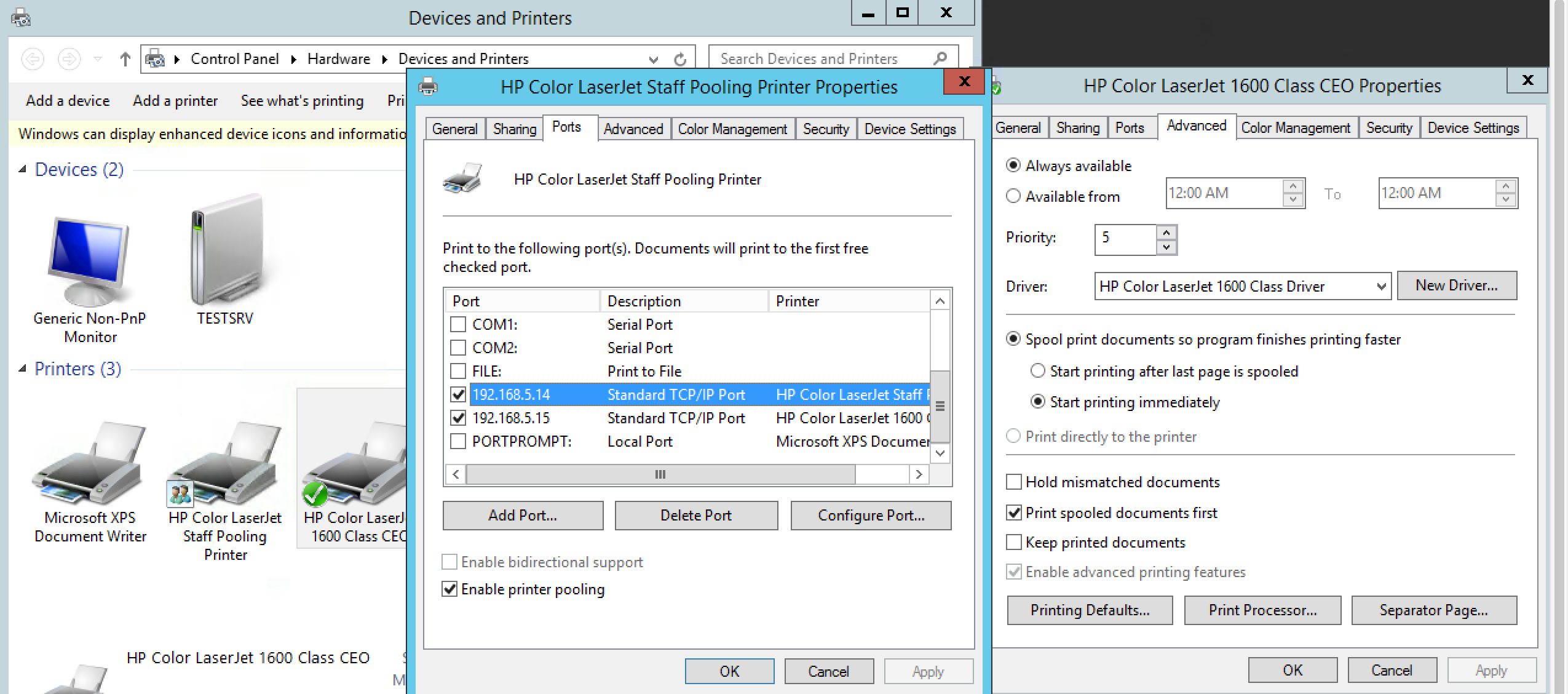
1-created printer 1 (not a printer device) IP 192.168.5.14 did not share it
2-created printer 2 (not a printer device) IP 192.168.5.15 did not share it
3- On the printer properties I set up the pooling and was able to tag both IP address (192.168.5.14 &15)
OK so now the printer pooling should be setup and working, but this is my confusion.
This is a for testing and learning, but when I do it for real, should I not create to printer device, each with a diff IP address and then go to the first printer device and setup the printer pooling?
That said, will the users not see 2 diff printers?
I want them to only see one printer which I named (HP Color Laserjet Staff Pooling Printer)
The other printer named (HP Color Laserjet 1600 Class CEO and setup priority printing by giving it a # 5.
Here is a snap shoot of the config f the above.
Zero AI Policy
We believe in human intelligence. Our moderation policy strictly prohibits the use of LLM content in our Q&A threads.

1-created printer 1 (not a printer device) IP 192.168.5.14 did not share it
2-created printer 2 (not a printer device) IP 192.168.5.15 did not share it
are these actual printer that can be pinged at the IP address?
in order for this to work correctly you will have to setup bout queues on the server and share them
then do the print pooling setup, the print jobs will go to either printer depending on what their status is, for instance if one is busy or down the jobs will roll to the other, but the users will have to know to check both printers.
this is the way I have done pooling before.

To clarify, Print Device is the actual hardware or physical device, while Printer is the icon in windows that is used to set up, manage and send print jobs to a physical device.
You have to have two exact same Print devices, configured with two different IP addresses and fully functional and working when tested individually. You don't have to have two Printers installed in Windows, just one. But you have to have two printer ports, each configured to a different physical device.
So, create just one Printer, enable Printer Pooling and check both ports. Now you have only one Printer that can be shared (or not).
Priority doesn't make sense as the purpose of printer pooling is to load balance print jobs between two physical devices so that users don't wait if someone "occupied" one printer with a document that takes time to finish.
Priority is used when you have two or more Printers for ONE physical device, when you want to give priority to some print jobs or print groups.
They are printers that I setup to use as test, I don't have 2 printer devices that are exactly the same to I improvised.
To answer your question, no you can not ping them.


EARN REWARDS FOR ASKING, ANSWERING, AND MORE.
Earn free swag for participating on the platform.
I understand, so to see it I got it let m explain it back to you.
I create to Print Device,
give each a diff IP address
Share the one device and set the pooling on the share device
The users only see the one shared device and the pooling uses a round robin to print from one printer to the other.
Is the above correct?
As for the prioritize printing that was just me testing, and why would it not work?
If the pooling is working and there is a work already printing then the next job to print should be the CEO even it the pooling is sending a print job to the print...
I didn't say priority would not work - it is just not that common when using printer pooling as it is when using multiple printers with one print device.
Read it wrong...
So my setup is correct?
Get a FREE t-shirt when you ask your first question.
We believe in human intelligence. Our moderation policy strictly prohibits the use of LLM content in our Q&A threads.

Agreed,
Thanks for your help
Printers and Scanners
--
Questions
--
Followers
Top Experts
A printer is a peripheral which makes a persistent human readable representation of graphics or text on paper or similar physical media. Traditional printers are being used more for special purposes, like printing photographs or artwork, and are no longer a must-have peripheral; 3D printing has become an area of intense interest, allowing the creation of physical objects. An image scanner is a device that optically scans images, printed text, handwriting, or an object, and converts it to a digital image. Hand-held scanners, where the device is moved by hand, have evolved from text scanning "wands" to 3D scanners used for industrial design, reverse engineering, test and measurement, orthotics, gaming and other applications.