
Windows 7
--
Questions
--
Followers
Top Experts

Why is Windows Update giving me Windows 7 Service Pack 1 when I have SP1
Why is Windows Update giving me Windows 7 Service Pack 1 when I have SP1 already installed (a long time ago, at this point!)?
I just ran Windows Update for the first time since 07/22/14 (yes, I do it manually) and one update is for SP1, apparently:

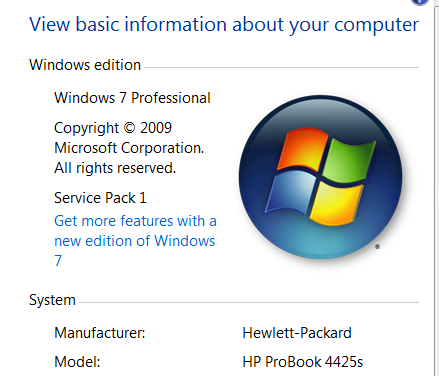
I'm not sure if this laptop came with SP1 installed - it's at least 3 yrs old - but I would have upgraded ASAP to SP1. In any case, SP1 is installed:
very curious, I am!
ub
I just ran Windows Update for the first time since 07/22/14 (yes, I do it manually) and one update is for SP1, apparently:
I'm not sure if this laptop came with SP1 installed - it's at least 3 yrs old - but I would have upgraded ASAP to SP1. In any case, SP1 is installed:
very curious, I am!
ub
Zero AI Policy
We believe in human intelligence. Our moderation policy strictly prohibits the use of LLM content in our Q&A threads.
ASKER CERTIFIED SOLUTION


membership
Log in or create a free account to see answer.
Signing up is free and takes 30 seconds. No credit card required.

ca you see the SP1 install on your programs and features list in the control panel? Make sure you have "show updates" marked... see if the KB# is the same or different...

There may be an update that is included in SP1 that your machine does not have. So to complete the SP1 install, you will need to have 'all' updates that are rolled up into SP1.
SOLUTION

membership
Log in or create a free account to see answer.
Signing up is free and takes 30 seconds. No credit card required.
It is probably the stub that gets the Service Pack started. SP1 for 64-bit is nearly a gigabyte and 32-bit is nearly 600Mb.


EARN REWARDS FOR ASKING, ANSWERING, AND MORE.
Earn free swag for participating on the platform.
The KB points to the update for Windows 7 and 2008 Server SP1.
I decided to let this update run - it was listed as 2.0 MB, so it certainly was not the full SP! It installed quicky and did not even require a reboot. But I rebooted anyway and checked. No more Important updates.
By the way, for some reason the Updates History only goes back to March 2014. I believe that is when I cloned my drive to an SSD and installed that as the primary drive. Apparently the installed updates did not transfer, I suppose.
Also, I was able to get Microsoft Support on the phone (within 2 minutes). The response was that some service related to Updates or the Service Pack may have gotten corrupted. I suppose it is difficult to actually identify what caused this particular Update to appear. As previously said, it was NOT the full SP1.
Thanks for the comments!
UB
I decided to let this update run - it was listed as 2.0 MB, so it certainly was not the full SP! It installed quicky and did not even require a reboot. But I rebooted anyway and checked. No more Important updates.
By the way, for some reason the Updates History only goes back to March 2014. I believe that is when I cloned my drive to an SSD and installed that as the primary drive. Apparently the installed updates did not transfer, I suppose.
Also, I was able to get Microsoft Support on the phone (within 2 minutes). The response was that some service related to Updates or the Service Pack may have gotten corrupted. I suppose it is difficult to actually identify what caused this particular Update to appear. As previously said, it was NOT the full SP1.
Thanks for the comments!
UB
I wish I had tried rindi's suggestion before running the update.
I will certainly keep it in mind the next time I see either (a) an update that installs but comes back as saying (again) that it is ready to be installed (again) or (b) a PC that has SP1 installed but wants to install SP1 again with some small subset of the full 600-1,000 MB.
Thanks, again.
I will certainly keep it in mind the next time I see either (a) an update that installs but comes back as saying (again) that it is ready to be installed (again) or (b) a PC that has SP1 installed but wants to install SP1 again with some small subset of the full 600-1,000 MB.
Thanks, again.
@Robert - Thank you and I was happy to help.
Get a FREE t-shirt when you ask your first question.
We believe in human intelligence. Our moderation policy strictly prohibits the use of LLM content in our Q&A threads.
Windows 7
--
Questions
--
Followers
Top Experts
Windows 7 is an operating system from Microsoft. Features include multi-touch support, a redesigned Windows Shell with a new taskbar, referred to as the Superbar, a home networking system called HomeGroup, and performance improvements.