
Windows 7
--
Questions
--
Followers
Top Experts

Zero AI Policy
We believe in human intelligence. Our moderation policy strictly prohibits the use of LLM content in our Q&A threads.

Run System Restore to a time before this started

 Have you done some tweaking?
 How do I show/hide the Command Bar (aka Folder Band) in Windows Explorer?
Confirm you have not modified windows registry or using a 3rd party theme?
As it is known as the Folder Band in Windows Explorer, if a 3rd party theme is installed it may have disabled or modified the ShellStyle.dll for the current Windows theme
How to Customize Command Bar in Windows 7 Explorer? Add Cut, Copy, Paste and Other Useful Buttons
Installed any software recently?
Using multiple monitors? VM?
Using shortcut keys.
The simplest trick is to repair its DLLs try the system file checker go to your start orb run type in sfc /scannow
This will revert all modified system DLLs back to their original state.


EARN REWARDS FOR ASKING, ANSWERING, AND MORE.
Earn free swag for participating on the platform.
@Merete, your screenshot is spot on, that is exactly what my explorer window looks like. I also mentioned that I already ran sfc and it came back with nothing. This is a physical machine, not a vm, no third party themes installed. Users don't have local admin, so they are unable to install any software. I am leaning towards a possible patch that may have been pushed out by LANDesk. She is the only user having this issue, so I am still unsure.
@jcimarron, I already expressed that system restore has been disabled on all computers, this is not a home computer.

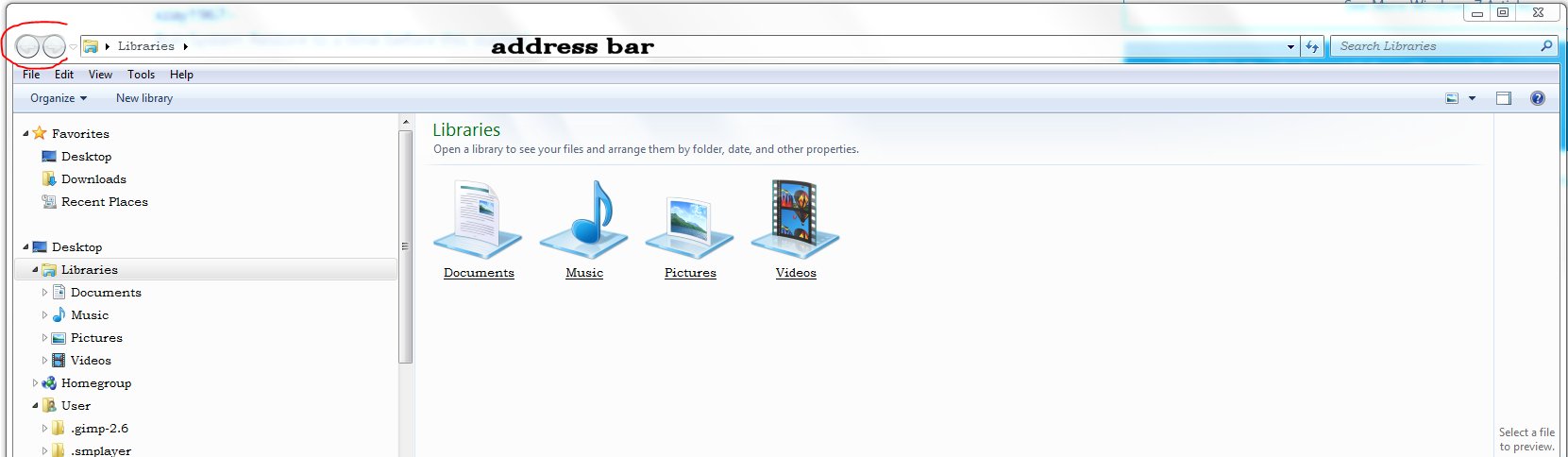
Just to confirm the user has the address bar but not those two tabs?<< the menu bar is there not hidden the address bar is there? [yes she has the address bar, just missing the arrows
When you open the view what options do you see? customise use standard buttons? [Not sure where you are referring to for this] In windows explorer I do not see those options
Is the user using windows classic there or the AERO?She is using Aero
If they are just invisible as per my screenshot that is because I haven't opened a folder there.
UI thought about the GP possibility, but then that would have affected other users as well
lisa-error.png
[HKEY_LOCAL_MACHINE\SOFTWA
"NoToolbarOptions"=dword:0
"NoAddressBar"=dword:00000
"NoToolBar"=dword:00000000
"NoLinksBar"=dword:0000000
Once I deleted the key, I had her reboot, and voila. Thanks for all that contributed, especially Merete.
Get a FREE t-shirt when you ask your first question.
We believe in human intelligence. Our moderation policy strictly prohibits the use of LLM content in our Q&A threads.
Accepted answer: 0 points for xzay1967's comment #a40496439
for the following reason:
While this did not solve the issue, it was still a great assistance.
Below is what they actually looked like when I first discovered them
[HKEY_LOCAL_MACHINE\SOFTWA
"NoToolbarOptions"=dword:0
"NoAddressBar"=dword:00000
"NoToolBar"=dword:00000001
"NoLinksBar"=dword:0000000
EARN REWARDS FOR ASKING, ANSWERING, AND MORE.
Earn free swag for participating on the platform.
I worked had helping you :)
Can I have an assisted answer?
I did mention I would throw in my testing see if anything lights a spark for you to look into http:#a40495362
Internet Explorer browser is the same as windows explorer and I mention looking at internet explorer browser?
I understood that IE can effect windows explorer settings from my own experiences.
Thank you.
Get a FREE t-shirt when you ask your first question.
We believe in human intelligence. Our moderation policy strictly prohibits the use of LLM content in our Q&A threads.
Windows 7
--
Questions
--
Followers
Top Experts
Windows 7 is an operating system from Microsoft. Features include multi-touch support, a redesigned Windows Shell with a new taskbar, referred to as the Superbar, a home networking system called HomeGroup, and performance improvements.