
Windows Server 2003
--
Questions
--
Followers
Top Experts

Reverting schema change from 69 (2012 R2) back to 47 (2008 R2). Forest restore question
Hello,
If we do Authoritative Restore for FSMO holders for each domains, dont they suppose to replicate changes to the remaining DCs? Why Microsoft is saying that you will need to restore the remaining DCs?
So, if we are trying to revert the schema change from 69 (2012 R2) back to 47 (2008 R2), would it be sufficient to restore Schema and FSMO holders for each domain and then replicate the changes??? Or we would need to restore all the remaining DCs? Would it be sufficient to Authoritatively restore only schema partition on the Schema master and replicate the changes??
Please advise.
P.S
I have read all MS documentation already. Need someone to post it from experience.
If we do Authoritative Restore for FSMO holders for each domains, dont they suppose to replicate changes to the remaining DCs? Why Microsoft is saying that you will need to restore the remaining DCs?
So, if we are trying to revert the schema change from 69 (2012 R2) back to 47 (2008 R2), would it be sufficient to restore Schema and FSMO holders for each domain and then replicate the changes??? Or we would need to restore all the remaining DCs? Would it be sufficient to Authoritatively restore only schema partition on the Schema master and replicate the changes??
Please advise.
P.S
I have read all MS documentation already. Need someone to post it from experience.
Zero AI Policy
We believe in human intelligence. Our moderation policy strictly prohibits the use of LLM content in our Q&A threads.

Full forest recovery to reverse it, did you run into issues where you need to do this or are you just trying to plan?
Thanks
Mike
Thanks
Mike

The issue is with how schema changes specifically are distributed and applied on a per-DC basis. The architecture was designed to be non-destructive. It isn't like the DC can just receive an entire new schema and destroy the old one. Such an act would not only be destructive, but would break the mappings of the actual objects in the LDAP database with their respective definitions.
As such, when restoring a DC with a different schema, changes are always additive, never destructive. Thus you can't restore a DC (even a schema master) and have it push out an older version. It simply can't work that way. An authoritative restore involves marking objects as authoritative, not schemas.
So if you find you have to revert a schema (which is *EXCEEDINGLY RARE*), you do have to restore all DCs. Schemas are backwards compatible, however, so as I have now hinted at many times, having a newer schema with older DCs is perfectly acceptable and rolling back should not be required except in the most dire of DR scenarios.
-Cliff
As such, when restoring a DC with a different schema, changes are always additive, never destructive. Thus you can't restore a DC (even a schema master) and have it push out an older version. It simply can't work that way. An authoritative restore involves marking objects as authoritative, not schemas.
So if you find you have to revert a schema (which is *EXCEEDINGLY RARE*), you do have to restore all DCs. Schemas are backwards compatible, however, so as I have now hinted at many times, having a newer schema with older DCs is perfectly acceptable and rolling back should not be required except in the most dire of DR scenarios.
-Cliff
Very good answer. YEs. we are doing it for the documentation purposes and testing it in the lab.
SO, I understand that we need to recover forest and will be doing restoring FSMO master and the remaining DCs.
So, when doing authoritative restore of FSMO master with ntdsutil, do we need to restore all partitions?? or just schema partition??
SO, I understand that we need to recover forest and will be doing restoring FSMO master and the remaining DCs.
So, when doing authoritative restore of FSMO master with ntdsutil, do we need to restore all partitions?? or just schema partition??


EARN REWARDS FOR ASKING, ANSWERING, AND MORE.
Earn free swag for participating on the platform.
so for 2003 it would be the following command:
authoritative restore: restore database
and for the 2008 FSMO DC it would be all partitions?
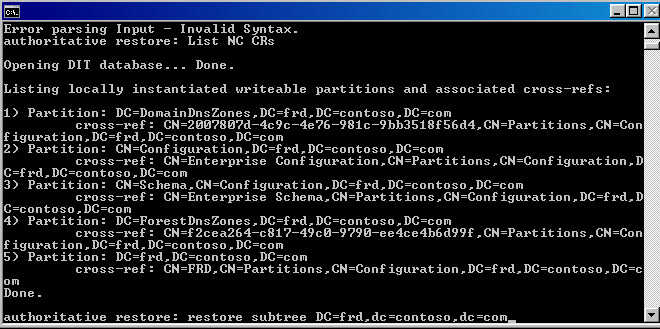
authoritative restore: restore database
and for the 2008 FSMO DC it would be all partitions?
ASKER CERTIFIED SOLUTION

membership
Log in or create a free account to see answer.
Signing up is free and takes 30 seconds. No credit card required.
Windows Server 2003
--
Questions
--
Followers
Top Experts
Windows Server 2003 was based on Windows XP and was released in four editions: Web, Standard, Enterprise and Datacenter. It also had derivative versions for clusters, storage and Microsoft’s Small Business Server. Important upgrades included integrating Internet Information Services (IIS), improvements to Active Directory (AD) and Group Policy (GP), and the migration to Automated System Recovery (ASR).