
Storage Software
--
Questions
--
Followers
Top Experts

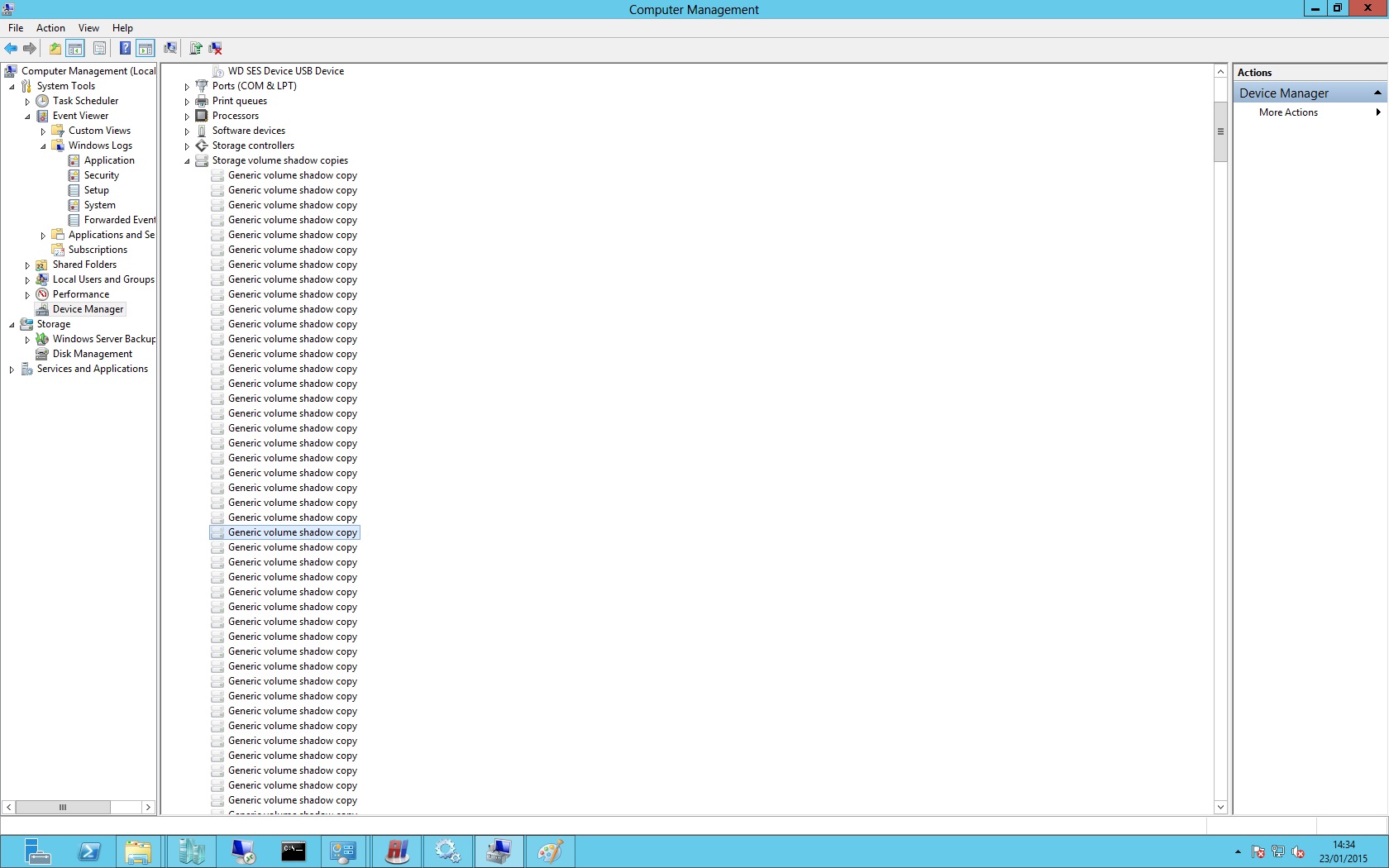
These appeared when I successfully created a backup, but now the backup fails and have read that I need to clear these out.
My question is rather than individually deleting each one is there a way I can do this in 1 go.
and why do they keep appearing?
John
Zero AI Policy
We believe in human intelligence. Our moderation policy strictly prohibits the use of LLM content in our Q&A threads.


EARN REWARDS FOR ASKING, ANSWERING, AND MORE.
Earn free swag for participating on the platform.
A Vss Writer has rejected an event with error 0x00000000 the operation completed successfully
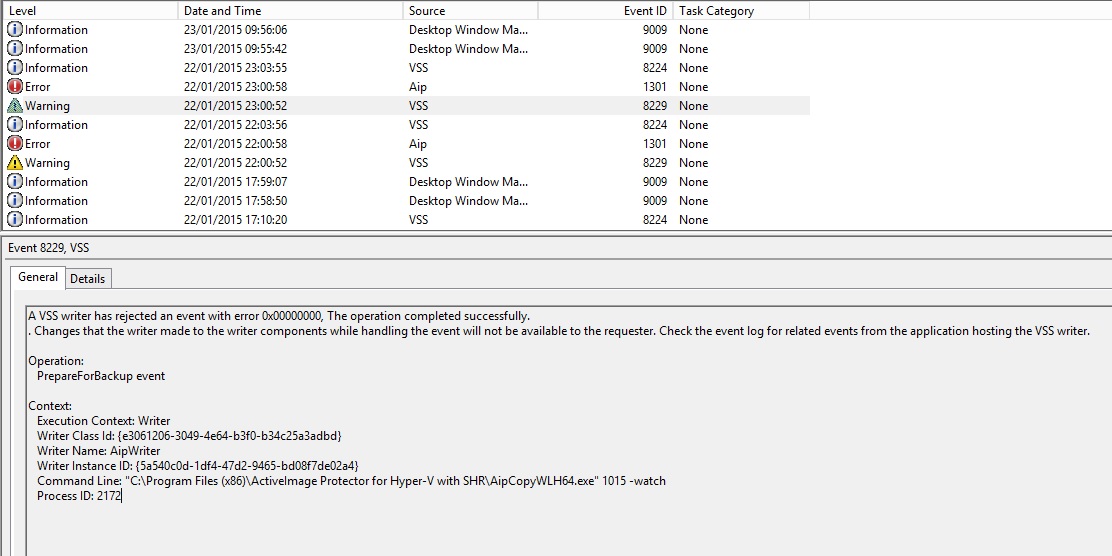
I did track down a similar issue with host on a VMware system that had Microsoft workarounds.
http://support.microsoft.com/kb/2853247
There was also a KB on the Active Image site about VSS issues:
Windows Application Log:
- Source: VSS
- Type (Level) : Error
Windows System Log:
- Source: Volsnap
- Type (Level) : Error
If the error is generated due to the AIP Software:
1. Please ensure that the AIP tracking driver was installed at the same time that AIP was installed. Also, ensure that Windows was rebooted after the AIP installation.
If a full and incremental backup task is scheduled to run while the tracking driver is not working correctly or is not installed, VSS cannot be started and consequently returns a -311 error. The tracking driver is a component included in the AIP standard installation.
* Windows 2000 systems do not include VSS. A -999 error may occur instead of a -311 error. Also, the above error will occur during a scheduled full backup task.
To confirm that the tracking driver is functioning properly, please select [System Information] - [Software Environment] and confirm that "aiptrack" is on the list of system drivers.
If the error is due to the OS:
Windows Server 2003:
Please install the update program for Windows Server 2003 or earlier as follows to see if the problem is solved.
1. Apply Windows Server 2003 Service Pack 2.
A Volume Shadow Copy Service (VSS) update package is available for Windows Server 2003
http://support.microsoft.com/kb/833167/en-us
2. Apply the roll-up package.
An update rollup package is available to resolve some Volume Shadow Copy Service (VSS) snapshot issues in Windows Server 2003.
http://support.microsoft.com/kb/940349/en-us
Also I did get the backup to perform once yesterday, unfortunately after that it stopped working again, but everytime it put 100's of Generic Shadow Copy Devices in storage manager, they are not used and I know having theses can cause issues, but its painful going in and having to delete these every time
Get a FREE t-shirt when you ask your first question.
We believe in human intelligence. Our moderation policy strictly prohibits the use of LLM content in our Q&A threads.
http://support.microsoft.com/kb/982210
You could also stop the shadow copy service otherwise. This could be a bug for 2012 that they have not addressed yet.

Just tried to do a full backup job and same errors etc happening
EARN REWARDS FOR ASKING, ANSWERING, AND MORE.
Earn free swag for participating on the platform.
Here is the workaround:
http://www.guillaumeverrey.com/2013/07/error-the-specified-component-was-not-reported-by-the-vss-writer-error-517-in-windows-server-2012-backup/
Here is the original thread:
https://communities.ca.com/thread/106282465

Storage Software
--
Questions
--
Followers
Top Experts
The term "Backup" means the methods and processes involved to copy computer data (system data as well as application data) to media other than the ones where the data originally live (disk, tape, optical, cloud). "Restore" in turn means the methods and processes involved in data recovery, i. e., bringing back copied computer data to their original location. Backup/Restore primarily serves as a means of protection against data loss, be it due to disaster, corruption or sabotage. It can also be used for recovering data from an earlier point in time and even for cloning machines or applications. There is a wide variety of backup/restore software available, from expensive commercial products to free or open source tools.