
Outlook
--
Questions
--
Followers
Top Experts

Outlook missing older auto-suggest email addresses
We recently switched domain controllers and therefore have new user accounts. The workstations had to have Outlook set up for the new user account. We did import all the mail, calendars and contacts from the previous "user".
When composing a new message, we used to be able to start typing an email and Outlook would auto-suggest the rest of the address. That still works when sending to contacts, or when sending to someone previously sent with the new setup, but all the people sent-to pre-conversion no longer auto-suggest. Why not?
Can I fix this?
When composing a new message, we used to be able to start typing an email and Outlook would auto-suggest the rest of the address. That still works when sending to contacts, or when sending to someone previously sent with the new setup, but all the people sent-to pre-conversion no longer auto-suggest. Why not?
Can I fix this?
Zero AI Policy
We believe in human intelligence. Our moderation policy strictly prohibits the use of LLM content in our Q&A threads.

Hello,
This is for the outlook auto complete list. First close Outlook.
If the prior user account is still saved on that workstation, you can go into the user profile folder and find the nk2 file in Outlook folder. You will need to have hidden files and folders shown to find it. You'll need admin privileges to traverse the folders.
There should be a file in there like olduserprofile.nk2. If that file is there, then you can copy it to the same path but in the new user profile to replace that nk2 file, it may need to be renamed to match. However, this will wipe out your new auto-complete entries recently made.
This is for the outlook auto complete list. First close Outlook.
If the prior user account is still saved on that workstation, you can go into the user profile folder and find the nk2 file in Outlook folder. You will need to have hidden files and folders shown to find it. You'll need admin privileges to traverse the folders.
C:\users\olduserprofile\AppData\Local\Microsoft\OutlookThere should be a file in there like olduserprofile.nk2. If that file is there, then you can copy it to the same path but in the new user profile to replace that nk2 file, it may need to be renamed to match. However, this will wipe out your new auto-complete entries recently made.
SOLUTION


membership
Log in or create a free account to see answer.
Signing up is free and takes 30 seconds. No credit card required.

Hey there,
In order to resort this problem all you need to do is check that the NK2 file exists or not. If it exists follow these steps:
Outlook will now process the nk2-file and import it into a hidden property of the mailbox but not in the actual Suggested Contacts folder in Outlook 2010 (Outlook 2013 no longer uses this folder).
follow this process, hope this will sort out your problem. For any further queries feel free to contact back.
*but this is only applicable for Outlook 2010 and below.
Regard
Phil Coulson
In order to resort this problem all you need to do is check that the NK2 file exists or not. If it exists follow these steps:
1. Copy the old nk2-file to the following folder
For Windows Vista/7/8
C:\Users\%username%\AppDat
C:\Users\%username%\AppDat
For Windows XP
C:\Documents and Settings\%username%\Applic
C:\Documents and Settings\%username%\Applic
2. Rename the nk2-file to the name of your mail profile
As you find the nk2 file, rename it to your profile name. The default profile name is "Outlook", so the new name for the nk2 file will be "Outlook.nk2".
Start Outlook with the /importnk2 switchas defined below:
Windows Vista, Windows 7 and Windows 8
Start-> type; outlook.exe /importnk2
Windows XP
Start-> Run; outlook.exe /importnk2
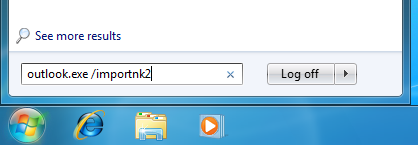
Windows Vista, Windows 7 and Windows 8
Start-> type; outlook.exe /importnk2
Windows XP
Start-> Run; outlook.exe /importnk2
Outlook will now process the nk2-file and import it into a hidden property of the mailbox but not in the actual Suggested Contacts folder in Outlook 2010 (Outlook 2013 no longer uses this folder).
follow this process, hope this will sort out your problem. For any further queries feel free to contact back.
*but this is only applicable for Outlook 2010 and below.
Regard
Phil Coulson
I guess I should have mentioned, older Outlook versions were 2007 and 2010. The 2007 users have now been migrated to 2013. I do have access to the old user accounts in C:\Users\...\Outlook\ however, even for the former 2007 users there are no .nk2 files.
cpmcomputer's link say, "In Microsoft Outlook 2010, the Auto-Complete List is no longer saved in a file with an extension of .nk2. The Auto-Complete List entries are now saved in your Microsoft Exchange Server mailbox or in the Outlook Data File (.pst) for your account."
cpmcomputer:
cpmcomputer's link say, "In Microsoft Outlook 2010, the Auto-Complete List is no longer saved in a file with an extension of .nk2. The Auto-Complete List entries are now saved in your Microsoft Exchange Server mailbox or in the Outlook Data File (.pst) for your account."
cpmcomputer:
Outlook 2010/2013 ... The entries are stored in the users profile as an auto stream fileI have the .pst files exported from the original Exchange .ost's. So, where can I find these auto-complete "stream" files?


EARN REWARDS FOR ASKING, ANSWERING, AND MORE.
Earn free swag for participating on the platform.
Ok first for outlook 2007
The autocomplete feature is contained in an nk2 file in the users profile
It is located as a hidden file so make sure
" show hidden files and protected system files is set and also show extensions for known files is ticked
There are three tick boxes
See this link for details
https://m.youtube.com/watch?v=wxIIskKmUQA
That should allow you to see the nk2 files
In the old profiles
I think it is stored at
Users/oldprofile/appdata/l
(This from memory "local" may be "roaming"
So you may need to fish around
Sorry I do not have a pc to refer to and many google articles specify the wrong folder
Copy the file to the same location in the new profiles and run
Outlook.exe /importnk2 from an elevated command prompt
For outlook2010 a bit more complex
https://vinny4tech.wordpress.com/2012/11/14/outlook-2010-to-2013-where-did-my-autocomplete-go/
Caution these processes will overwrite any new folders since you moved the profiles
The autocomplete feature is contained in an nk2 file in the users profile
It is located as a hidden file so make sure
" show hidden files and protected system files is set and also show extensions for known files is ticked
There are three tick boxes
See this link for details
https://m.youtube.com/watch?v=wxIIskKmUQA
That should allow you to see the nk2 files
In the old profiles
I think it is stored at
Users/oldprofile/appdata/l
(This from memory "local" may be "roaming"
So you may need to fish around
Sorry I do not have a pc to refer to and many google articles specify the wrong folder
Copy the file to the same location in the new profiles and run
Outlook.exe /importnk2 from an elevated command prompt
For outlook2010 a bit more complex
https://vinny4tech.wordpress.com/2012/11/14/outlook-2010-to-2013-where-did-my-autocomplete-go/
Caution these processes will overwrite any new folders since you moved the profiles
Hey there once again,
Okay, so the location for the auto-complete "stream" files is,
C:\Users\YOUR-USER-NAME\Ap
This folder will contain "Stream_Autocomplete.dat" files. For further reference please visit the link below:
http://support.microsoft.com/kb/2806550
I guess this might solve your problem. In case of any doubt feel free to discuss.
Best Regards
Phil
Okay, so the location for the auto-complete "stream" files is,
C:\Users\YOUR-USER-NAME\Ap
This folder will contain "Stream_Autocomplete.dat" files. For further reference please visit the link below:
http://support.microsoft.com/kb/2806550
I guess this might solve your problem. In case of any doubt feel free to discuss.
Best Regards
Phil
Altering the folder view options did the trick helping me locate nk2 files. For Outlook 2007 these files are in C:\Users\%username%\AppDat
Also, for Outlook 2010 users, I did find the Stream_Autocomplete...dat files in C:\Users\%username%\AppDat
I've successfully copied the 2010 Stream_Autocomplete file per cpmcomputers' link. I've asked the user to let me know if it works.
Meanwhile, slight wrinkle with the nk2 files. I have located and copied them. But, the 2007 users have now been upgraded to 2013 directly. So, how do I import those nk2 files? Can I still do: outlook.exe /importnk2? I don't want to experiment!
Also, for Outlook 2010 users, I did find the Stream_Autocomplete...dat files in C:\Users\%username%\AppDat
I've successfully copied the 2010 Stream_Autocomplete file per cpmcomputers' link. I've asked the user to let me know if it works.
Meanwhile, slight wrinkle with the nk2 files. I have located and copied them. But, the 2007 users have now been upgraded to 2013 directly. So, how do I import those nk2 files? Can I still do: outlook.exe /importnk2? I don't want to experiment!
Get a FREE t-shirt when you ask your first question.
We believe in human intelligence. Our moderation policy strictly prohibits the use of LLM content in our Q&A threads.
ASKER CERTIFIED SOLUTION
membership
Log in or create a free account to see answer.
Signing up is free and takes 30 seconds. No credit card required.
Agree with phil
His procedure should sort your final issue
His procedure should sort your final issue
Looks like those procedures for both Outlook 2010 and Outlook 2007 -> 2013 worked! Thanks! Great to have access to such expertise.
Outlook
--
Questions
--
Followers
Top Experts
Microsoft Outlook is a personal information manager from Microsoft, available as a part of the Microsoft Office suite. Although often used mainly as an email application, it also includes a calendar, task manager, contact manager, note-taker, journal, and web browser.