
Storage
--
Questions
--
Followers
Top Experts

I am having an issue with my tape drive.
We have a tsm server 7.0 (windows 2008 entreprise) which is attached to a scsi tape library (overland neo 200).
.
A few days ago, we had to shut down the server and the tape drive for a maintenance operation (I have also disconnected the scsi cable for a few minutes and then reconnect it).
Since the reboot, tsm doesnt' recognize the tape library.
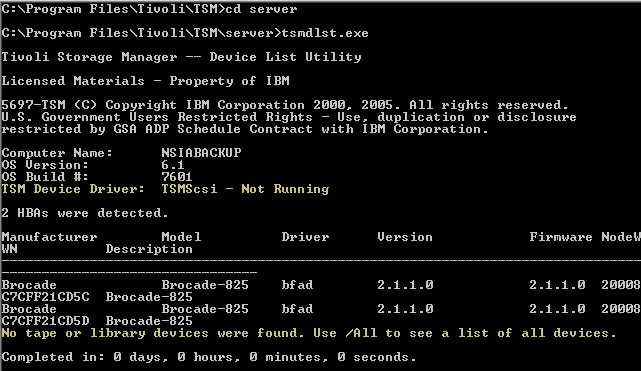
So, I have reinstalled the drivers from the neo overland storage, I have also installed IBM Tape Diagnotic tool (itdt), but the server still cannot scan the tape library.
I have rebooted the server a couple of time and I also double check the scsi cable, it seems ok. What can I do?
Zero AI Policy
We believe in human intelligence. Our moderation policy strictly prohibits the use of LLM content in our Q&A threads.

When you say you disconnected the SCSI cable, where was this at the server end or the library end? Did you plug it back into the same place?
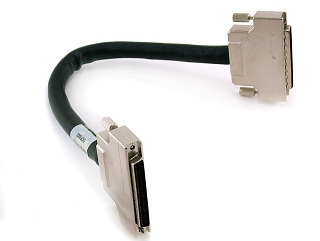
Please describe what your SCSI cable looks like? Is it a SAS cable or a Fibre Channel cable?
Is the library directly connected or via a switch?
To answer your question, I have plugged back the cable in the same place (the library is directly connected to the server).
I have double checked different time.


EARN REWARDS FOR ASKING, ANSWERING, AND MORE.
Earn free swag for participating on the platform.
Get a FREE t-shirt when you ask your first question.
We believe in human intelligence. Our moderation policy strictly prohibits the use of LLM content in our Q&A threads.

the problem is NOT "TSM Device driver" as reported by tsmdlst.exe: "TSM Device driver" is usually used for non IBM autoloaders, while the NEO 200 is really an IBM machine Dell-rebranded.
You need to follow instructions from the following link:
http://www-01.ibm.com/support/docview.wss?uid=swg21238577
You need to make sure that your windows server sees both tape and autochanger from device manager: only after that you will have to check on TSM, by issuing "q drive" and "q path".
I never worked with NEO 200 but I know very well IBM TS3100/TS3200: if the procedure is the same, you need to install windows drivers by running the file "install_exclusive" from the downloaded driver and then reboot the server.
hope this helps
max
EARN REWARDS FOR ASKING, ANSWERING, AND MORE.
Earn free swag for participating on the platform.

Storage
--
Questions
--
Followers
Top Experts
Computer data storage, often called storage or memory, is a technology consisting of computer components and recording media used to retain digital data. In addition to local storage devices like CD and DVD readers, hard drives and flash drives, solid state drives can hold enormous amounts of data in a very small device. Cloud services and other new forms of remote storage also add to the capacity of devices and their ability to access more data without building additional data storage into a device.