
Microsoft Office
--
Questions
--
Followers
Top Experts

 Also attached is the WindowsUpdate.Log
MESH 64bit PC
Windows 7 Home Premium Service Pack 1
MS Office Professional Plus 2013
Can you please help me sort this out.
WindowsUpdate.log
Zero AI Policy
We believe in human intelligence. Our moderation policy strictly prohibits the use of LLM content in our Q&A threads.

What's the current AV state and the history on the workstation?
James
I have used AVG free for years and it was installed as soon as I got this PC. As it happens it was updated today as I had been away over the weekend.
Chris


EARN REWARDS FOR ASKING, ANSWERING, AND MORE.
Earn free swag for participating on the platform.

I tried your suggestions with no change. I noticed that in the list of programs (Control Panel/Programs and Features) there was a seperate listing for Office Notes 2013 which I think got there when I put Notes onto my Smartphone. I have removed this and Notes stillruns as usual.
But I now wonder if I should backup my Office data files (Documents, Spreadsheets etc) on a seperate hard drive and the remove Office 2013 and reinstall it. What do you think? Are there any files, logs, registry entries which might need cleansing prior to the reinstall?
Chris
If you do this (not a bad thing to do), uninstall Office, shut down, start back up, install Office 2013 and check activation / subscription so that it can update. Then run updates.
Get a FREE t-shirt when you ask your first question.
We believe in human intelligence. Our moderation policy strictly prohibits the use of LLM content in our Q&A threads.
Just spent numerous hours uninstalling Office 2013. In the end I had to resort to a manual uninstall. I then started a new install from a disk but almost immediately hit a Microsoft Bootstrapper problem. I resolved this and successfully installed Office 2013.
On switching off there were 54 updates to be processed. On next start up I checked the update history and (Rude word!!) there were failures. To get a clear idea as to which were the failures I cleared the update history and ran a new update check. It found 19 updates. The window below shows that 2 were OK and the rest failed.
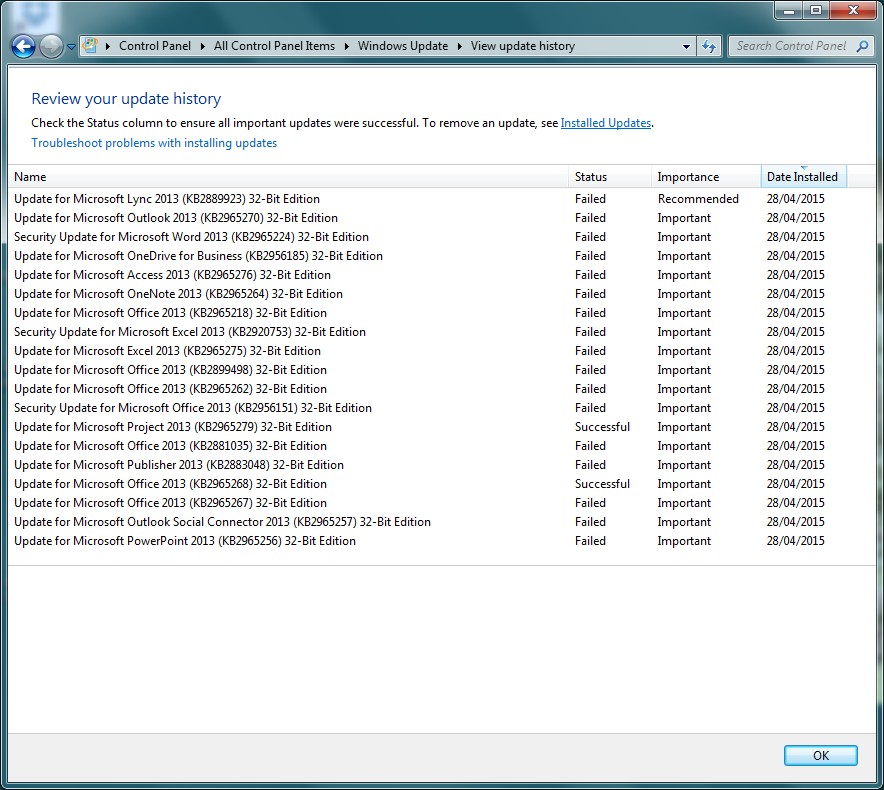 You will see that they are all updates that failed on updates prior to reinstalling. Any ideas what to try next?
Chris
First, make sure all Windows 7 Updates are complete including recommended updates. Sometimes .NET Framework gets stuck in Recommended.
If updates do not help, uninstall Office completely and proceed with Windows Repairs.
The Windows 7 repair steps are as follows:
1. System File Checker.
Open cmd.exe with Run as Administrator and run SFC /SCANNOW.
Allow to complete, restart or, preferably, shut down the computer and then start up again.
Test to see if the problem has been corrected.
2. Windows 7 Repair Install: You need a working recovery partition or the Windows 7 DVD.
Here is a Seven Forums tutorial to assist you.
http://www.sevenforums.com/tutorials/3413-repair-install.html
3. Back up and reinstall Windows.
Thank you for your continuing support. I think I might have isolated why these files will not install. I have checked several of their descriptions on the internet and in each case they state that a prerequisite is Office 2013 SP1 must be installed.
I discovered that "When the number behind MSO is 15.0.4569.1506 or higher, then you have successfully installed Service Pack 1 for Office 2013". My number is 15.0.4420.1017 which I understand means SP1 has not been installed.
So I downloaded the SP1 Update and started to run it. Up came the screen asking me to accept the terms which I did and installation began. But almost immediately an error stoppedit - An error occured while running detection.
Not sure what to do next?
By the way I am enjoying your article on Outlook.
Chris
EARN REWARDS FOR ASKING, ANSWERING, AND MORE.
Earn free swag for participating on the platform.
I wonder if SP1 is for a different version than I have or you have. I have Home and Business which has everything Office 2010 Pro had and more. SP1 may be for Pro or Enterprise and I am not certain about that.
When I look at Office -> Account -> About, it does not say SP1 (but I have seen SP1 for V2010 and earlier)
I see this link:
http://www.microsoft.com/en-ca/download/details.aspx?id=42017
and it says it includes all prior updates. So it may be because updates are failing that you cannot run this.
I am not sure what else except for the Windows fixes I have pointed to above.
To confirm I am using Microsoft Office Professional Plus 2013 with an Academic - Volumn Licence. Tomorrow I shall talk to the supplier to see what they say.
Thanks for now I shall tell you how I get on.
Chris
I used this cmd instruction in the Office15 directory "cscript ospp.vbs /dstatus".
This reported LICENSE NAME:Office15 OfficeProPlusVL-MAK edition
LICENSE DESCRIPTION: Office15, Retail(MAK) Channel
BETA EXPIRATION: 01/01/1601
LICENSE STATUS: -------LICENSED---------
and the last 5 characters of the license agree with what I enterrred on installation.
I think that this rules out a problem with the license.
I have just run Windows Update and include 6 optional Updates for Windows 7 and the the 17 updates for Office that have been causing the problem. The Widows 7 updates were ok but once again the Office updates failed.
Having restarted after the update I tried once again to install SP1 and once again got the message "An error occured while running detection.".
I wonder if I should yet again uninstall Office, reinstall it and immediately try to install SP1?
Get a FREE t-shirt when you ask your first question.
We believe in human intelligence. Our moderation policy strictly prohibits the use of LLM content in our Q&A threads.

Before starting once again on the uninstall, install and attempt to install SP1, I had a long chat with my nephew who is a very experienced IT professional. In the end we came to the conlusion that as Office is working without any problems i should just put up with the failed updates each time i shut down.
Thanks for your interest
Chris
After putting up with the 18 updates each time I shut down for 4 months, I have almost had enough and am considering moving to Office 365, the 1PC version. Whilst it might cost more than running 2013 for several years, the fact that the subscription means you will always the latest version appeals to me. Can you foresee any problems with this approach.
Chris
EARN REWARDS FOR ASKING, ANSWERING, AND MORE.
Earn free swag for participating on the platform.
Chris
Get a FREE t-shirt when you ask your first question.
We believe in human intelligence. Our moderation policy strictly prohibits the use of LLM content in our Q&A threads.
Forgive me bothering you again but when I attempt to uninstall Office 2013, I get the following message
 On checking which Microsoft programs are installed I get the list below. Can you advise which of these are part of Office 2013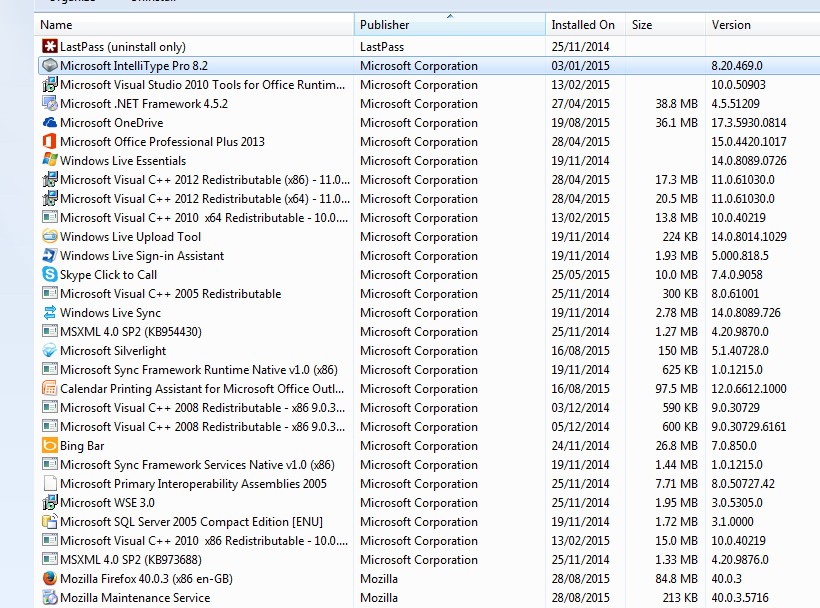
So you need only uninstall Office 2013 in the list above. Good luck.
Thanks to all your help Office 365 safely installed and at last the 18 updates that failed to install everytime i shut down have been cleared away.
Uptp now I have kept all my data files on a seperate drive on my PC. With an incresing use of my smartphone and the chance to put Office 365 on my wife's I-Pad, I am tempted to use OneDrive. What's your view on this?
Chris
EARN REWARDS FOR ASKING, ANSWERING, AND MORE.
Earn free swag for participating on the platform.
I am glad you got Office installed and running. That is good news.
Microsoft Office
--
Questions
--
Followers
Top Experts
Microsoft Office is an integrated suite of applications that includes Outlook, Word, Excel, Access, PowerPoint, Visio and InfoPath, along with a number of tools to assist in making the individual components work together. Coding within and between the projects is done in Visual Basic for Applications, known as VBA.