Link to home
Create AccountLog in
Windows 7

Windows 7

--

Questions

--

Followers

Top Experts

Avatar of sglee
sglee

Installing the driver for HP Officejet Pro 8600 All-in-one printer on Windows 2012R2 Server
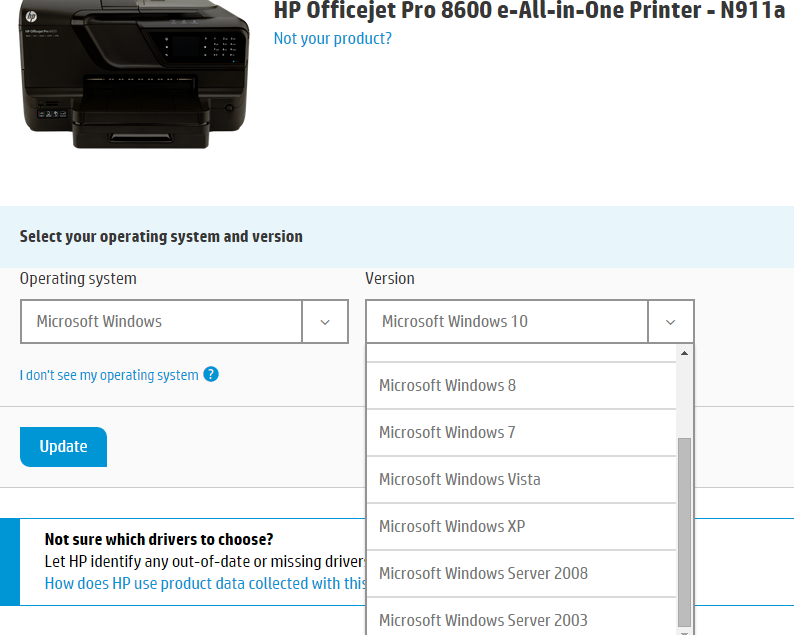
User generated imageHi,
 
 I have a HP Officejet Pro 8600 All-in-one printer attached to Windows 7 PC via USB and it has wireless capability(& given IP address of 192.168.1.22).
 This user will need to login to Terminal Server running Windows 2012R2 using Remote Desktop Connection and need to print to HP Officejet Pro 860 printer during remote desktop sesession.
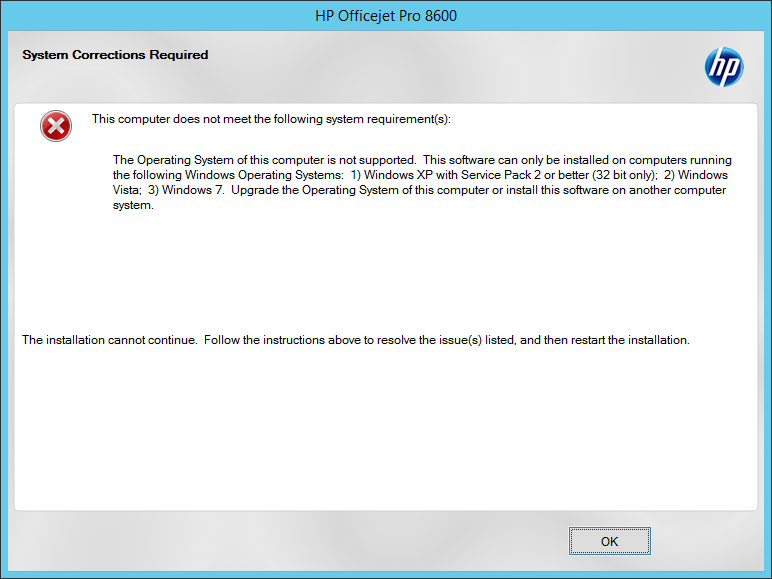
 As seen in the screenshot, HP does not have printer driver for Windows 2012.
 Is there any way that I can print let this user print to this printer (no need to scan, fax or copy) while connected to Terminal Server?
 I created a share on Windows 7 PC, but when I try to connect to that shared printer (for example, \\Win7PC\HP8600), I would imagine Windows 2012R2 server will ask for the driver.
 The obvious solution is to buy another printer that is compatible with Windows 2012R2 server and I know that.
 But I am just curious if there is any other solution?

Zero AI Policy

We believe in human intelligence. Our moderation policy strictly prohibits the use of LLM content in our Q&A threads.


Avatar of JohnJohn🇨🇦

On the HP Driver site, look for this driver file: OJ8610_198.exe . This driver was issued on December 6 and works fine on my Windows 10 machine (where anything earlier did not).  Look the driver above by searching for Windows 10 drivers and try it on your server.

Avatar of sgleesglee

ASKER

ok. let me try OJ8610_198.exe.

Avatar of sgleesglee

ASKER

@John
can you provide the link? I can't find it on HP site when I selected Windows 10.

Reward 1Reward 2Reward 3Reward 4Reward 5Reward 6

EARN REWARDS FOR ASKING, ANSWERING, AND MORE.

Earn free swag for participating on the platform.


ASKER CERTIFIED SOLUTION
Avatar of JohnJohn🇨🇦

Link to home
membership
Log in or create a free account to see answer.
Signing up is free and takes 30 seconds. No credit card required.
Create Account

Avatar of David Johnson, CDDavid Johnson, CD🇨🇦

Server 2012R2 is based on Windows 8.1 use that driver

Avatar of JohnJohn🇨🇦

The driver I posted will work on Windows 8.1 as well. I would certainly attempt the newest driver first.

Avatar of sgleesglee

ASKER

Ok I will download and try newest win8.1 driver first and post the results.

Free T-shirt

Get a FREE t-shirt when you ask your first question.

We believe in human intelligence. Our moderation policy strictly prohibits the use of LLM content in our Q&A threads.


Avatar of sgleesglee

ASKER

I downloaded and tried both of these drivers under Windows 8.1, but both gave me this error.User generated imageOJ8600_1315-1.exe  120,909KB
OJ8600_Basicx64_1315.exe 30,718KB

Avatar of sgleesglee

ASKER

I tried OJ8610_198.exe  165,890KB and resulted in the same error as with other two drivers:
OJ8600_1315-1.exe  120,909KB
OJ8600_Basicx64_1315.exe 30,718KB

Avatar of sgleesglee

ASKER

I wish I could just have access to INF files to see if W2012R2 will work with them.
These EXE files don't even create a separate folder with INF files. It just checks existing OS first and fails to move on.

Reward 1Reward 2Reward 3Reward 4Reward 5Reward 6

EARN REWARDS FOR ASKING, ANSWERING, AND MORE.

Earn free swag for participating on the platform.


Avatar of JohnJohn🇨🇦

It would appear that printer is not made for Servers. We use HP 600 and Xerox printers on our client Server 2012 and they work fine.  I use the HP 8600 series myself but not on a server.

SOLUTION
Link to home
membership
Log in or create a free account to see answer.
Signing up is free and takes 30 seconds. No credit card required.

Avatar of sgleesglee

ASKER

@David
When I download these files, they are all .EXE files.
How can i unzip EXE file?

"Did this on Server 2016 and Server 2012R2" ---> I have Server 2012R2. I DO NOT have or never mentioned Server 2016.

install winrar or 7zip, right-click on the executable and select extract to folder

Free T-shirt

Get a FREE t-shirt when you ask your first question.

We believe in human intelligence. Our moderation policy strictly prohibits the use of LLM content in our Q&A threads.


Avatar of sgleesglee

ASKER

I extracted INF files from OJ8610_198.exe  165,890KBfile using WinRAR.
I created a new printer and pointed to the extracted folder and the system found HP Officejet Pro 8610.
Tomorrow I am going to put this in production environment and try to print. I will report back.

Avatar of sgleesglee

ASKER

I used OJ8610_198.exe. Extracted into the folder and pointed to the folder for the driver and it worked.
Thank you so much for your help.

Avatar of JohnJohn🇨🇦

@sglee - Thanks for the update and I was happy to help.

Reward 1Reward 2Reward 3Reward 4Reward 5Reward 6

EARN REWARDS FOR ASKING, ANSWERING, AND MORE.

Earn free swag for participating on the platform.


i  have a HP Office jet Pro 8620  and i installed it on windows server 2012r2 and install Drivers but when i try to print test page it didn't print and there is no error show? when i add it local on client its working fine  . any help here

Avatar of JohnJohn🇨🇦

When this happens, we add the printer driver locally and map it to the printer. There are compatibility issues in a number of cases.
Windows 7

Windows 7

--

Questions

--

Followers

Top Experts
Windows 7 is an operating system from Microsoft. Features include multi-touch support, a redesigned Windows Shell with a new taskbar, referred to as the Superbar, a home networking system called HomeGroup, and performance improvements.