
.NET Programming
--
Questions
--
Followers
Top Experts

Installation of .Net Framework 3.5 under Windows 10
Hi there,
we have installed a fresh Windows 10 Professional x64. Our customer needs the .Net Framework version 3.5 on the system to run his special software.
We`re unable to install this on the system neither with a offline install nor with the program and feature menu in the system settings.
The comand promt did not help yet too.
Are there any ideas or tricks known to solve the problem?
Thanks a lot
we have installed a fresh Windows 10 Professional x64. Our customer needs the .Net Framework version 3.5 on the system to run his special software.
We`re unable to install this on the system neither with a offline install nor with the program and feature menu in the system settings.
The comand promt did not help yet too.
Are there any ideas or tricks known to solve the problem?
Thanks a lot
Zero AI Policy
We believe in human intelligence. Our moderation policy strictly prohibits the use of LLM content in our Q&A threads.
ASKER CERTIFIED SOLUTION


membership
Log in or create a free account to see answer.
Signing up is free and takes 30 seconds. No credit card required.

Yes, that works anytime anywhere unless one uses the incorrect system architecture (x86 setup medium on x64 system) - (no points)

It also may be as simple as enabling .NET 3.5 in Control Panel, Programs and Features, Windows Features.
On my install of Windows 10 Pro 64-bit, .NET 3.5 was already installed:
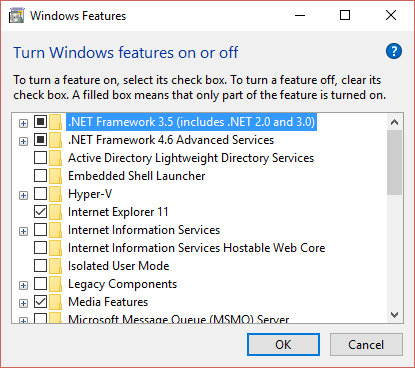
It may be because it was pre-installed by the OEM, but like John Hurst wrote, you should be able to enable it in that window.
It may be because it was pre-installed by the OEM, but like John Hurst wrote, you should be able to enable it in that window.


EARN REWARDS FOR ASKING, ANSWERING, AND MORE.
Earn free swag for participating on the platform.
Dear Dirk Mare,
Thank you so much for your comment. This solved our problem. I`ve also tried a similar command but it did not work.
Best wishes
Thank you so much for your comment. This solved our problem. I`ve also tried a similar command but it did not work.
Best wishes
.NET Programming
--
Questions
--
Followers
Top Experts
The .NET Framework is not specific to any one programming language; rather, it includes a library of functions that allows developers to rapidly build applications. Several supported languages include C#, VB.NET, C++ or ASP.NET.