
Microsoft Access
--
Questions
--
Followers
Top Experts

I using the code below very successfully in Access 2003 and also in Runtime version of Access 2007
But it fails with Access 2013 (Full version).
The fail line is:
If xml_doc.selectSingleNode("//api_result/call_result/result").Text = "True" ThenI Googled the problem and it seems like the way you script selectSingleNode in Access 2013 and after has changed.
The function 'log in' to the Bulk SMS service I'm subscribed to and checks the credits available
Here is the code:
Public Function CheckCredits()
Dim oHttp As Object
Dim strUrl, strUsername, strPassword, strMessage, strMobileNumber  As String
Set oHttp = CreateObject("Microsoft.XMLHTTP")

strUsername = "xxx"
strPassword = "xxx"

strUrl = "http://www.mymobileapi.com/api5/http5.aspx?Type=credits&username=" & strUsername & "&password=" & strPassword

oHttp.Open "POST", strUrl, False
oHttp.send

Dim xml_doc As New DOMDocument
Dim nde_Asset As IXMLDOMNode
Dim nde_Dividend As IXMLDOMNode

xml_doc.Loadxml (oHttp.ResponseText) ' response text is the xml file being returned

If xml_doc.selectSingleNode("//api_result/call_result/result").Text = "True" Then
  SMSCredits = CDbl(xml_doc.selectSingleNode("//api_result/data/credits").Text)
 Else
  MsgBox "A SMS account has not been created for you. Kindly notify us about this", vbCritical, "Notice"
  SMSCredits = ""
  Exit Function
End If

 Set xml_doc = Nothing
 Set oHttp = Nothing
End FunctionAlso - If I replace the "IF" cause routine with just: xml_doc.save("C:\test.xml"
Then the result in Access 2003 gives a xml script with the credits and result as true
But in Access 2013 it results in an empty xml file
I also tried late binding but get the same error
I can also add that I found a post here:
http://stackoverflow.com/questions/2...glenode-syntax
about the topic that it is a new thing in A2013 and after with ref to this site in Answer 1:
https://support.microsoft.com/en-us/kb/313372
Also see this example:
https://msdn.microsoft.com/en-us/lib.../ff860915.aspx
Lastly - the wording of the error is:
"Object variable or With block variable not set"
Hope to get some help with adapting the code to work on Access 2013 please
Thanks
Kelso
Zero AI Policy
We believe in human intelligence. Our moderation policy strictly prohibits the use of LLM content in our Q&A threads.

Dim strUrl, strUsername, strPassword, strMessage, strMobileNumber As Stringdeclares only strMobileNumber as String. The other variables are declared implicitly as Variant.
Also use always Option Explcit:
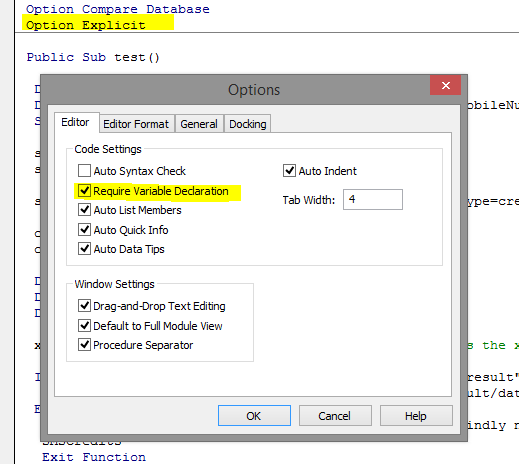
Then you'll get an appropriate error, when you haven't declared a variable.
Then for development and debugging use always late-binding, also for posting concise and complete samples.
Also use always explicit XPath queries. Using '//' is slower.
And use more structured code:
Option Compare Database
Option Explicit

Public Event AfterDataExtraction(ASuccess As Boolean, ACredits As String, AError As String, AResult As String)
Public Event AfterLoad(ASuccess As Boolean)
Public Event BeforeDataExtraction()
Public Event BeforeLoad()
Public Event OnError(AMethodName As String, AErrObject As ErrObject)

Private Const MOBILE_API_URL As String = "http://www.mymobileapi.com/api5/http5.aspx?Type=credits&username=xxx&password=xxx"

Private m_XDocument As MSXML2.DOMDocument60

Public Function ExtractData() As Boolean

  Const XPATH_CREDITS As String = "/api_result/data/credits"
  Const XPATH_ERROR As String = "/api_result/call_result/error"
  Const XPATH_RESULT As String = "/api_result/call_result/result"

  On Local Error GoTo LocalError

  Dim Series As MSXML2.IXMLDOMNode

  Dim Credits As String
  Dim Error As String
  Dim Result As String

  ExtractData = True
  RaiseEvent BeforeDataExtraction
  Credits = XElement(XDocumentNode(XPATH_CREDITS), "<n/a>")
  Error = XElement(XDocumentNode(XPATH_ERROR))
  Result = XElement(XDocumentNode(XPATH_RESULT))

  RaiseEvent AfterDataExtraction(ExtractData, Credits, Error, Result)
  Exit Function

LocalError:
  ExtractData = False
  RaiseEvent OnError("ExtractData", Err)
  RaiseEvent AfterDataExtraction(ExtractData, Credits, Error, Result)

End Function

Private Sub FinalizeLoading()

  On Local Error Resume Next

End Sub

Private Sub InitializeLoading()

  On Local Error Resume Next

  Set m_XDocument = Nothing
  Set m_XDocument = New MSXML2.DOMDocument60
  m_XDocument.async = False
  m_XDocument.validateOnParse = True

End Sub

Public Function LoadFromWebService(Optional AUrl As String = MOBILE_API_URL) As Boolean

  On Local Error GoTo LocalError

  Dim URL As String

  LoadFromWebService = False
  RaiseEvent BeforeLoad
  InitializeLoading
  m_XDocument.Load AUrl
  FinalizeLoading
  LoadFromWebService = True
  RaiseEvent AfterLoad(LoadFromWebService)
  Exit Function

LocalError:
  LoadFromWebService = False
  RaiseEvent OnError("LoadFromWebService", Err)
  RaiseEvent AfterLoad(LoadFromWebService)

End Function

Private Function XDocumentNode(AXPath As String) As MSXML2.IXMLDOMNode

  On Local Error Resume Next

  Set XDocumentNode = m_XDocument.SelectSingleNode(AXPath)

End Function

Private Function XDocumentNodes(AXPath As String) As MSXML2.IXMLDOMNodeList

  On Local Error Resume Next

  Set XDocumentNodes = m_XDocument.SelectNodes(AXPath)

End Function

Private Function XNode(ANode As MSXML2.IXMLDOMNode, AXPath As String) As MSXML2.IXMLDOMNode

  On Local Error Resume Next

  Set XNode = ANode.SelectSingleNode(AXPath)

End Function

Private Function XNodes(ANode As MSXML2.IXMLDOMNode, AXPath As String) As MSXML2.IXMLDOMNodeList

  On Local Error Resume Next

  Set XNodes = ANode.SelectNodes(AXPath)

End Function

Private Function XAttribute(ANode As MSXML2.IXMLDOMNode, AAttributeName As String) As String

  On Local Error Resume Next

  XAttribute = ANode.Attributes.getNamedItem(AAttributeName).Text

End Function

Private Function XElement(ANode As MSXML2.IXMLDOMNode, Optional ADefaultValue As String = "") As String

  On Local Error Resume Next

  XElement = ADefaultValue
  XElement = ANode.Text

End Functionwith
Option Compare Database
Option Explicit

Private WithEvents m_MobileApi As clsMobileApi

Private Sub btnApiCall_Click()

  txtLog.Value = ""

  Set m_MobileApi = New clsMobileApi
  m_MobileApi.LoadFromWebService
  m_MobileApi.ExtractData
  Set m_MobileApi = Nothing

End Sub

Private Sub m_MobileApi_AfterDataExtraction(ASuccess As Boolean, ACredits As String, AError As String, AResult As String)

  txtLog.Value = txtLog.Value & "Data extraction done (" & ASuccess & "):" & vbCrLf
  txtLog.Value = txtLog.Value & "Credits:" & ACredits & vbCrLf
  txtLog.Value = txtLog.Value & "Error:" & AError & vbCrLf
  txtLog.Value = txtLog.Value & "Result:" & AResult & vbCrLf

End Sub

Private Sub m_MobileApi_AfterLoad(ASuccess As Boolean)

  txtLog.Value = txtLog.Value & "Loading done (" & ASuccess & ")." & vbCrLf

End Sub

Private Sub m_MobileApi_BeforeDataExtraction()

  txtLog.Value = txtLog.Value & "Start data extraction.." & vbCrLf

End Sub

Private Sub m_MobileApi_BeforeLoad()

  txtLog.Value = txtLog.Value & "Start loading.." & vbCrLf

End Sub

Private Sub m_MobileApi_OnError(AMethodName As String, AErrObject As ErrObject)

  txtLog.Value = txtLog.Value & "Error in " & AMethodName & ":" & AErrObject.Description & vbCrLf

End SubYour problem are undeclared variables. So I would rewrite it at least as:
Option Compare Database
Option Explicit

Public Sub test()

  Const XPATH_CREDITS As String = "/api_result/data/credits"
  Const XPATH_RESULT As String = "/api_result/call_result/result"

  On Local Error GoTo LocalError

' Using Microsoft XML 6.0 reference.
  Dim XmlDocument As MSXML2.DOMDocument60

  Dim strUrl As String
  Dim strUsername As String
  Dim strPassword As String
  Dim strMessage As String
  Dim strMobileNumber As String
  Dim SMSCredits As String

  Set XmlDocument = New MSXML2.DOMDocument60

  strUsername = "xxx"
  strPassword = "xxx"
  strUrl = "http://www.mymobileapi.com/api5/http5.aspx?Type=credits&username=" & strUsername & "&password=" & strPassword

  XmlDocument.async = False
  XmlDocument.Load strUrl
  If XmlDocument.SelectSingleNode(XPATH_RESULT).Text = "True" Then
    Debug.Print "Found result."
    SMSCredits = XmlDocument.SelectSingleNode(XPATH_CREDITS).Text
    Debug.Print "Credits:", SMSCredits
  Else
    MsgBox "A SMS account has not been created for you. Kindly notify us about this", vbCritical, "Notice"
    SMSCredits = ""
  End If

  Set XmlDocument = Nothing

  Exit Sub

LocalError:
  Debug.Print Err.Description

End SubAnd last but not least: The error message "object not set" does also appear when selectSingleNode() does not return a value. Cause this method should normally return an object. So test for existence of these nodes:
Option Compare Database
Option Explicit

Public Sub test()

  Const XPATH_CREDITS As String = "/api_result/data/creditx"
  Const XPATH_RESULT As String = "/api_result/call_result/result"

  On Local Error GoTo LocalError

' Using Microsoft XML 6.0 reference.
  Dim XmlDocument As MSXML2.DOMDocument60
  Dim XmlNode As MSXML2.IXMLDOMNode

  Dim strUrl As String
  Dim strUsername As String
  Dim strPassword As String
  Dim strMessage As String
  Dim strMobileNumber As String
  Dim SMSCredits As String

  Set XmlDocument = New MSXML2.DOMDocument60

  strUsername = "xxx"
  strPassword = "xxx"
  strUrl = "http://www.mymobileapi.com/api5/http5.aspx?Type=credits&username=" & strUsername & "&password=" & strPassword

  XmlDocument.async = False
  XmlDocument.Load strUrl
  Set XmlNode = XmlDocument.SelectSingleNode(XPATH_RESULT)
  If Not XmlNode Is Nothing Then

    If XmlNode.Text = "True" Then
      Debug.Print "Found result."
      Set XmlNode = XmlDocument.SelectSingleNode(XPATH_CREDITS)
      If Not XmlNode Is Nothing Then
        SMSCredits = XmlNode.Text
      Else
        Debug.Print "Credit node not found."
      End If

      Debug.Print "Credits:", SMSCredits
    End If

  Else
    Debug.Print "Result node not found"
    SMSCredits = ""
  End If

  Set XmlDocument = Nothing

  Exit Sub

LocalError:
  Debug.Print Err.Description

End SubOption Compare Database
Option Explicit
Public Event AfterDataExtraction(ASuccess As Boolean, ACredits As String, AError As String, AResult As String)
Public Event AfterLoad(ASuccess As Boolean)
Public Event BeforeDataExtraction()
Public Event BeforeLoad()
Public Event OnError(AMethodName As String, AErrObject As ErrObject)
Private Const MOBILE_API_URL As String = "http://www.mymobileapi.com/api5/http5.aspx?Type=credits&username=xxx&password=xxx"
Private m_XDocument As MSXML2.DOMDocument60
Public Function ExtractData() As Boolean
Const XPATH_CREDITS As String = "/api_result/data/credits"
Const XPATH_ERROR As String = "/api_result/call_result/error"
Const XPATH_RESULT As String = "/api_result/call_result/result"
On Local Error GoTo LocalError
Dim Series As MSXML2.IXMLDOMNode
Dim Credits As String
Dim Error As String
Dim Result As String
ExtractData = True
RaiseEvent BeforeDataExtraction
Credits = XDocumentNode(XPATH_CREDITS).Text
Error = XDocumentNode(XPATH_ERROR).Text
Result = XDocumentNode(XPATH_RESULT).Text
RaiseEvent AfterDataExtraction(ExtractData, Credits, Error, Result)
Exit Function
LocalError:
ExtractData = False
RaiseEvent OnError("ExtractData", Err)
RaiseEvent AfterDataExtraction(ExtractData, Credits, Error, Result)
End Function
Private Sub FinalizeLoading()
On Local Error Resume Next
End Sub
Private Sub InitializeLoading()
On Local Error Resume Next
Set m_XDocument = Nothing
Set m_XDocument = New MSXML2.DOMDocument60
m_XDocument.async = False
m_XDocument.validateOnParse = True
End Sub
Public Function LoadFromWebService(Optional AUrl As String = MOBILE_API_URL) As Boolean
On Local Error GoTo LocalError
Dim URL As String
LoadFromWebService = False
RaiseEvent BeforeLoad
InitializeLoading
m_XDocument.Load AUrl
FinalizeLoading
LoadFromWebService = True
RaiseEvent AfterLoad(LoadFromWebService)
Exit Function
LocalError:
LoadFromWebService = False
RaiseEvent OnError("LoadFromWebService", Err)
RaiseEvent AfterLoad(LoadFromWebService)
End Function
Private Function XDocumentNode(AXPath As String) As MSXML2.IXMLDOMNode
On Local Error Resume Next
Set XDocumentNode = m_XDocument.SelectSingleNode(AXPath)
End Function
Private Function XDocumentNodes(AXPath As String) As MSXML2.IXMLDOMNodeList
On Local Error Resume Next
Set XDocumentNodes = m_XDocument.SelectNodes(AXPath)
End Function
Private Function XNode(ANode As MSXML2.IXMLDOMNode, AXPath As String) As MSXML2.IXMLDOMNode
On Local Error Resume Next
Set XNode = ANode.SelectSingleNode(AXPath)
End Function
Private Function XNodes(ANode As MSXML2.IXMLDOMNode, AXPath As String) As MSXML2.IXMLDOMNodeList
On Local Error Resume Next
Set XNodes = ANode.SelectNodes(AXPath)
End Function
Private Function XAttribute(ANode As MSXML2.IXMLDOMNode, AAttributeName As String) As String
On Local Error Resume Next
XAttribute = ANode.Attributes.getNamedItem(AAttributeName).Text
End Function
Private Function XElement(ANode As MSXML2.IXMLDOMNode) As String
On Local Error Resume Next
XElement = ANode.Text
End FunctionThanks for the reply and the comprehensive answer.
I tried just the last piece of code (since the first and middle scripts result in compile errors).
If I execute it, it does nothing, so I removed the "On Local Error" line which then results in exactly the same error I was getting in my original question above.
Does the feedback help you or do you need more info.
As I said - the error only appears in Access 2013 not prior version. Not sure what you using to test
Thanks
Option Compare Database
Option Explicit

Public Sub test()

  Const XPATH_CREDITS As String = "/api_result/data/credits"
  Const XPATH_RESULT As String = "/api_result/call_result/result"

  On Local Error GoTo LocalError

' Using Microsoft XML 6.0 reference.
  Dim XmlDocument As MSXML2.DOMDocument60
  Dim XmlNode As MSXML2.IXMLDOMNode

  Dim strUrl As String
  Dim strUsername As String
  Dim strPassword As String
  Dim SMSCredits As String

  Set XmlDocument = New MSXML2.DOMDocument60

  strUsername = "xxx"
  strPassword = "xxx"
  strUrl = "http://www.mymobileapi.com/api5/http5.aspx?Type=credits&username=" & strUsername & "&password=" & strPassword

  XmlDocument.async = False
  XmlDocument.Load strUrl
  Set XmlNode = XmlDocument.SelectSingleNode(XPATH_RESULT)
  If Not XmlNode Is Nothing Then

    If XmlNode.Text = "True" Then
      Debug.Print "Found result."
      Set XmlNode = XmlDocument.SelectSingleNode(XPATH_CREDITS)
      If Not XmlNode Is Nothing Then
        SMSCredits = XmlNode.Text
      Else
        Debug.Print "Credit node not found."
      End If

      Debug.Print "Credits:", SMSCredits
    End If

  Else
    Debug.Print "Result node not found"
    SMSCredits = ""
  End If

  Set XmlDocument = Nothing

  Exit Sub

LocalError:
  Debug.Print Err.Description

End Sub


EARN REWARDS FOR ASKING, ANSWERING, AND MORE.
Earn free swag for participating on the platform.
Thanks again.
I'm however only getting a "Result node not found" if I run the code with a valid User login.
I created an account for you to use to test:
strUsername = "arnelgp"
strPassword = "arnelgp"
I also loaded 10 credits on the account so the result should be '10'
Let me also add that if I (like I mentioned in my original question) download the xml file on my Access 2003 machine then I get this:
- <api_result>
- <data>
<credits>10</credits>
</data>
- <call_result>
<result>True</result>
<error />
</call_result>
</api_result>
On the A2013 machine the xml file is empty
I hope this helps

XML:
Result node not found
Which version of Access are you testing with?
Post the entire VBA module you're testing with.

Get a FREE t-shirt when you ask your first question.
We believe in human intelligence. Our moderation policy strictly prohibits the use of LLM content in our Q&A threads.
To make even more sure I just created a new blank database file from scratch and pasted your above script into a brand new module.
All I had to do was ref Microsoft XML v6.0 for it to debug.
I can do this because the code is not reliant on anything else.
So you getting the credit result as 10 on your side?
EARN REWARDS FOR ASKING, ANSWERING, AND MORE.
Earn free swag for participating on the platform.
Microsoft Access
--
Questions
--
Followers
Top Experts
Microsoft Access is a rapid application development (RAD) relational database tool. Access can be used for both desktop and web-based applications, and uses VBA (Visual Basic for Applications) as its coding language.