
Microsoft Excel
--
Questions
--
Followers
Top Experts

I don't want a drop down to choose the name I am looking for, but I want to start typing the name, and the cell will be smart and suggest the rest of the name based on the first couple letters put in.
Example........
Chris is the name I want in my cell.....When I put in just the letter "C" it will start to suggest Christopher or Christian ect.
Is this possible?
Thanks
Zero AI Policy
We believe in human intelligence. Our moderation policy strictly prohibits the use of LLM content in our Q&A threads.


This occurs when the entries in the cells above have the similar entries to what you start to type in the cell. However, it only occurs when there is one option that it can suggest.
For example, if you had in previous cells in the same column:
Christopher Columbus
Chris Pike
Chris Biggins
If you started typing Chris it wouldn't make any suggestions until it could give a unique suggestion, ie if you typed Chris P it would autocomplete the rest of Pike. If you typed Christo it would autosuggest Christopher Columbus.
There is also the "Pick from list" right click option.
Right click on a cell one below the bottom of a list there is an option to pick from Dropdown List. This creates a list of entries from cells above. This doesn't have to be a predetermined list like Data Validation dropdown list but will show a list of previous entries in that column.
Thanks
Rob H


EARN REWARDS FOR ASKING, ANSWERING, AND MORE.
Earn free swag for participating on the platform.
That could work , but I need to determine where the cell is located to enter the name.
My cell will be in a different sheet. Then I will do a bunch of vlookups to fill in a table.
If I was better at pivot tables it would be much easier.

Thanks
Rob H
Get a FREE t-shirt when you ask your first question.
We believe in human intelligence. Our moderation policy strictly prohibits the use of LLM content in our Q&A threads.

one easy option is to use the ActiveX Combo box.
please see attached workbook.
try to type inside the blue box, for example if you type J you will get auto suggestion Joseph Porter then if you type another "a" like Ja then you will get auto suggestion Jackson Thompson and if you add m like becoming Jam then you get James Spencer
it is easy to create. you create a name list then insert a active X combo box from the delveoper tab. then click on deisgin veiew and click on the combo box and then click on properties and then on the properties there is something called fillrange and put the named range there. see the screenshot.
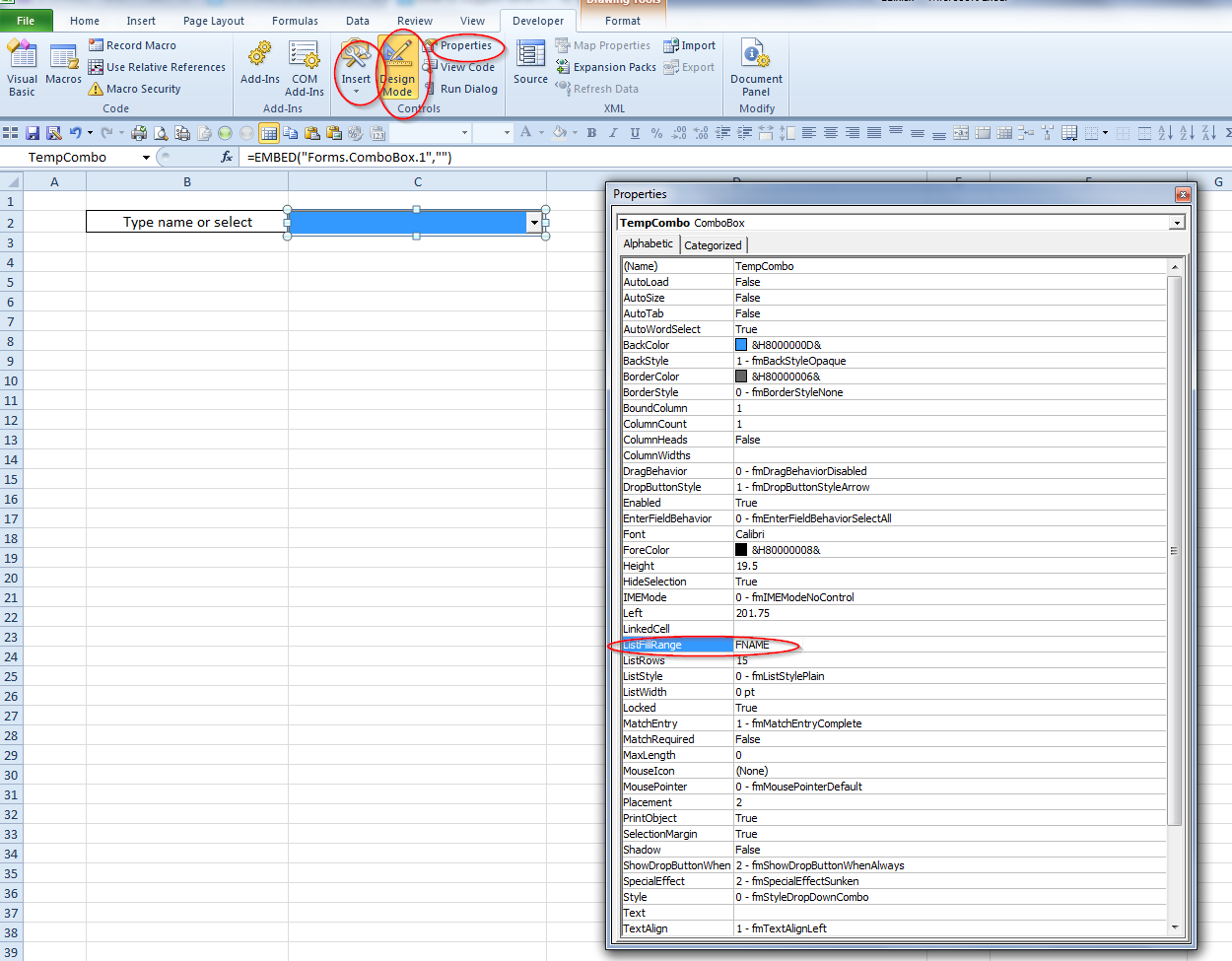 EE.xlsx
I can understand your aversion if you use a list which has repeated values and not sorted alphabetically. If that is the case it is possible to create an alphabetic list of possible entries on which to source the dropdown. One way of doing this is with a Pivot Table and just show the Name field in the Pivot, thus creating a list of available names; maybe this is what you were referring to when mentioning Pivot Tables in your earlier comment.


Was hoping to get something that would finish what I am typing or suggest based on the first few characters I start to enter.
@Rob, thanks, I need one cell that I enter the name of a person, that person is in a table on a second sheet.
Then I will do Vlookup to to fill in other information next to the name in the new table.
Thanks guys. Hope that make sense.
Chris
EARN REWARDS FOR ASKING, ANSWERING, AND MORE.
Earn free swag for participating on the platform.
I would love to just start typing the name of the person, and it would complete it for me.
Thanks though, yours looks cool.
Chris

Does that make sense?
Thanks
Chris
Get a FREE t-shirt when you ask your first question.
We believe in human intelligence. Our moderation policy strictly prohibits the use of LLM content in our Q&A threads.
I didn't realize,
Thank you very much it works great.
Microsoft Excel
--
Questions
--
Followers
Top Experts
Microsoft Excel topics include formulas, formatting, VBA macros and user-defined functions, and everything else related to the spreadsheet user interface, including error messages.