
Exchange
--
Questions
--
Followers
Top Experts

Exchange 2016 OWA is not opening on chrome.
I have just installed Exchange 2016 Version 15.1 (Build 544.27) ; even at the hosted server (windows 2016) I am unable to open OWA/ECP at google chrome Version 54.0.2840.99 m (64-bit).
Chrome says: ERR_SPDY_INADEQUATE_TRANSP
I am using SSL certificates: https://www.ssls.com/ssl-certificates/comodo-positivessl-multi-domain
I am using the same kind of certificate protected exchange 2013 servers on chrome without any issue.
I have found the related links:
https://social.technet.microsoft.com/Forums/en-US/a858858c-71f4-4968-a49b-25559019148f/exchange-2016-owa-will-not-open-in-firefox-or-chrome
https://www.experts-exchange.com/questions/28592968/SSL-Certs-Google-SHA1.html
https://www.nartac.com/Products/IISCrypto
https://support.mozilla.org/en-US/questions/1143320
Please guide the recommended procedure to resolve the issue.
Chrome says: ERR_SPDY_INADEQUATE_TRANSP
I am using SSL certificates: https://www.ssls.com/ssl-certificates/comodo-positivessl-multi-domain
I am using the same kind of certificate protected exchange 2013 servers on chrome without any issue.
I have found the related links:
https://social.technet.microsoft.com/Forums/en-US/a858858c-71f4-4968-a49b-25559019148f/exchange-2016-owa-will-not-open-in-firefox-or-chrome
https://www.experts-exchange.com/questions/28592968/SSL-Certs-Google-SHA1.html
https://www.nartac.com/Products/IISCrypto
https://support.mozilla.org/en-US/questions/1143320
Please guide the recommended procedure to resolve the issue.
Zero AI Policy
We believe in human intelligence. Our moderation policy strictly prohibits the use of LLM content in our Q&A threads.
SOLUTION


membership
Log in or create a free account to see answer.
Signing up is free and takes 30 seconds. No credit card required.
Thanks for the links.
As per the link you shared the issue comes when you configure DAG not in a standalone installation. I have also configured a standalone setup. My issue i guess is due to http2 protocol enabled by default. Pls guide me further.
Extract from links shared in previous comment:
Magnus
November 7, 2016 at 5:21 am
If running a standalone Exchange 2016 on WS2016 without DAG, there should be no issues?
Reply
Bharat Suneja [MSFT]
November 7, 2016 at 7:27 am
That’s correct.
Reply
Eliseo Villafuerte
November 7, 2016 at 9:06 pm
Yes, no issue when Windows 2016 is used to deploy Exchange 2016 CU3 in non-DAG configuration. So I deployed on WS2012R2 to enable HA. Will wait patiently for the fix.
As per the link you shared the issue comes when you configure DAG not in a standalone installation. I have also configured a standalone setup. My issue i guess is due to http2 protocol enabled by default. Pls guide me further.
Extract from links shared in previous comment:
Magnus
November 7, 2016 at 5:21 am
If running a standalone Exchange 2016 on WS2016 without DAG, there should be no issues?
Reply
Bharat Suneja [MSFT]
November 7, 2016 at 7:27 am
That’s correct.
Reply
Eliseo Villafuerte
November 7, 2016 at 9:06 pm
Yes, no issue when Windows 2016 is used to deploy Exchange 2016 CU3 in non-DAG configuration. So I deployed on WS2012R2 to enable HA. Will wait patiently for the fix.
SOLUTION
membership
Log in or create a free account to see answer.
Signing up is free and takes 30 seconds. No credit card required.
ASKER CERTIFIED SOLUTION
membership
Log in or create a free account to see answer.
Signing up is free and takes 30 seconds. No credit card required.
Mr. Todd Nelson gave the best recommendation. I agree with him.
As it's a small standalone installation, I dare to go with the existing plan.
The steps I performed fixed the current issue so I choosed my solution.
As it's a small standalone installation, I dare to go with the existing plan.
The steps I performed fixed the current issue so I choosed my solution.
https://www.nartac.com/Products/IISCrypto
Before applying Best practice:

After applying best practice:
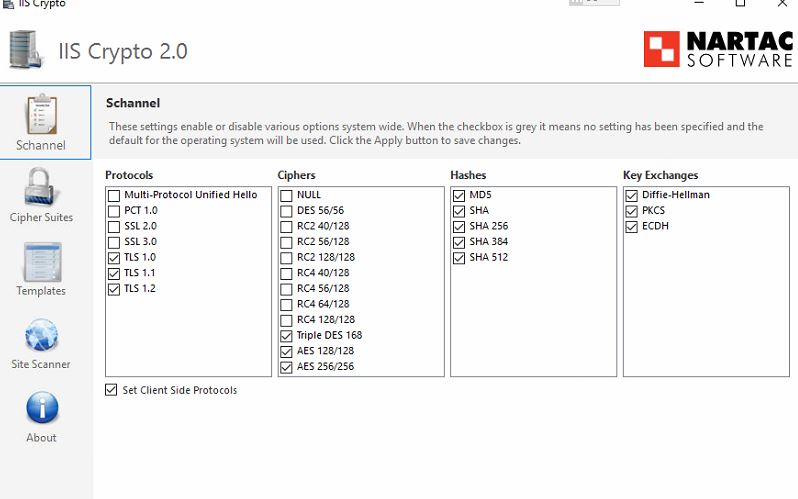
Before applying Best practice:
After applying best practice:


EARN REWARDS FOR ASKING, ANSWERING, AND MORE.
Earn free swag for participating on the platform.
Exchange
--
Questions
--
Followers
Top Experts
Exchange is the server side of a collaborative application product that is part of the Microsoft Server infrastructure. Exchange's major features include email, calendaring, contacts and tasks, support for mobile and web-based access to information, and support for data storage.